01Three editions
All three editions compute the same numbers with the same formulas. They differ only in where the tempo comes from and how you read the result.
| Edition | Tempo from | Get it |
|---|---|---|
| Web edition | typed in, slider or TAP | timtechlor.de/BPM2MS2HZ — runs in any browser, nothing to install |
| REAPER window (ReaImGui) | the project tempo, or a manual tempo | ReaPack package BPM2MS2HZ Calculator (section 02) |
| Console edition | the project tempo | TT_BPM_Converter.lua, download from the web edition; prints the table into the REAPER console |
02Install
The web edition needs nothing. For REAPER:
- Install ReaPack (one file into the UserPlugins folder, restart REAPER).
- Extensions → ReaPack → Import repositories…, paste
https://raw.githubusercontent.com/timtechlor/reapack-TimTechlor/main/index.xml - Extensions → ReaPack → Browse packages, search for BPM2MS2HZ Calculator, install, Apply.
- The window edition needs ReaImGui (“ReaImGui: ReaScript binding for Dear ImGui”, repository ReaTeam Extensions, which ReaPack ships with). Install it the same way and restart REAPER.
- Run it from Actions → Show action list → search “BPM2MS2HZ”. Bind it to a key or a toolbar button if you use it often.
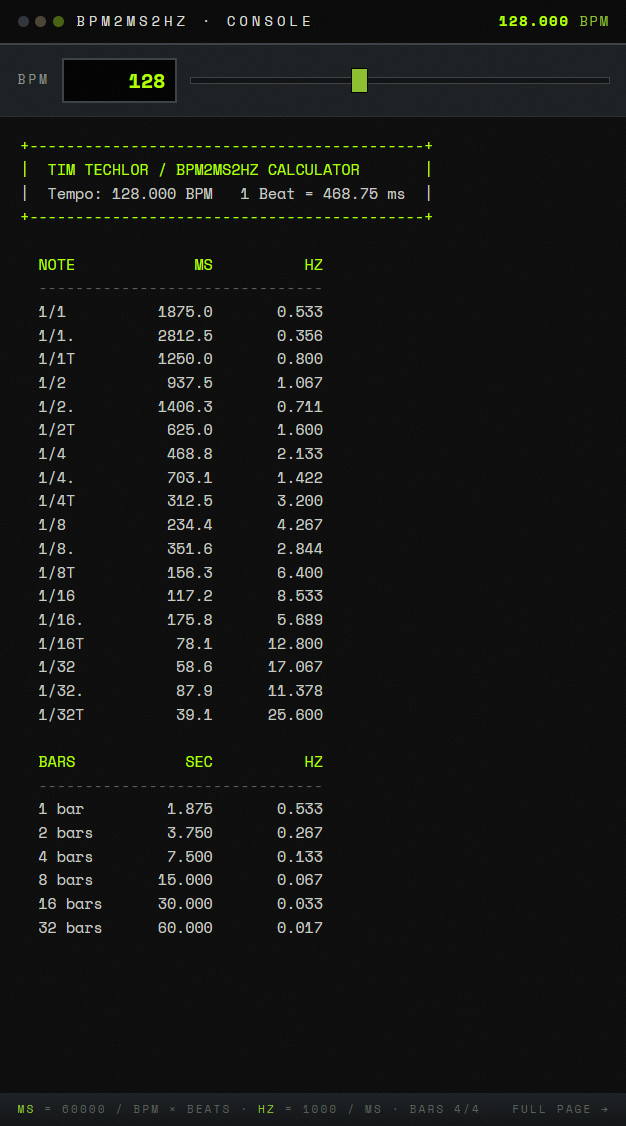
TT_BPM_Converter.lua. Each run clears the console and prints the table for the current project tempo.03Reading the table
ms  = 60000 / BPM × beats      (1 beat = 1 quarter note)
Hz = 1000 / ms| Label | Meaning | Factor |
|---|---|---|
1/4 | plain note value, here one beat | ×1 |
1/4. | dotted | ×1.5 |
1/4T | triplet | ×2/3 |
1 bar | whole bars, as seconds | 4 beats per bar in 4/4 |
The note table runs from 1/1 to 1/32. The web and console editions list bars from 1 to 32 and assume 4/4; the REAPER window goes up to 64 bars and lets you pick the time signature.
Example at 128 BPM: one beat is 60000 / 128 = 468.75 ms, so 1/4 reads 468.8 ms and 2.133 Hz, and one bar is 1.875 s.
04In practice
Delay times
Read the MS column and type the value into a delay that has no host sync. At 128 BPM the dotted eighth (1/8., 351.6 ms) is the classic ping-pong spacing; a plain 1/4 is 468.8 ms.
LFO rates
The HZ column is the LFO speed that locks to the grid: at 128 BPM, 1/4 = 2.133 Hz and 1/16 = 8.533 Hz. Auto-pan, tremolo and filter sweeps then move with the track instead of drifting against it.
Release and sidechain
Whole bars come as seconds: 1 bar = 1.875 s at 128 BPM. A compressor release of one bar keeps the pump breathing with the track instead of choking it; for a tight kick duck, start from the 1/8 or 1/16 value.
05Web edition
- Tempo — type it into the BPM field or drag the slider. The table updates live.
- TAP — tap along with the beat; the tempo is averaged over the last taps. A pause of more than three seconds starts a new measurement.
- COPY — copies the console table as text.
- Popup — opens a compact window with only the tempo input and the live table, to pin next to your DAW.
06REAPER window
- Tempo follows the project by default (checkbox “from project”). Touching the slider switches to a manual tempo; tick the checkbox again to go back to sync.
- Click any value to copy it to the clipboard, then paste it into the plug-in field.
- Tabs — NOTE VALUES (1/1 to 1/32, dotted, triplets) and BARS (up to 64 bars, selectable time signature).
- OPTIONS (top right) — UI font size, show or hide dotted and triplet variants, wordmark watermark. All settings are saved permanently.
07Troubleshooting
- The window does not open and REAPER reports a missing ImGui function — ReaImGui is not installed, or REAPER was not restarted after installing it (section 02).
- The console edition prints “No valid project tempo found.” — open or create a project and run it again.
- The values do not match a tempo change later in the song — the scripts use the tempo REAPER reports as current when they read it. For a section with a different tempo, set that tempo manually in the window (or in the web edition).
- COPY does nothing in the browser — the browser blocked clipboard access; open the page directly (not inside a frame) and allow clipboard access.