
01The concept
TT-303PATGEN is a MIDI effect. It contains no sound generator: it writes patterns and plays them as MIDI notes, locked to the host transport. A pattern has 1 to 32 steps; every step carries a note, an octave shift, a gate state (off, on or tie), an accent flag, a slide flag and a probability. That is exactly the vocabulary of a TB-303 sequencer, which makes the output a perfect match for the TT-303 in HOST mode (velocity at or above the accent threshold = accent, overlapping notes = slide) — and it plays just as well on any other mono bass synth.
The generator is deterministic. Every pattern comes from a 24-bit
SEED; the same seed with the same settings always produces the
same pattern, and the seed is always visible, so a good result can be found
again. Instead of re-rolling a pattern you like, you mutate it: change a
few steps, only in the range you choose.
02Quick start
- Insert
TT-303PATGENbefore the synth in the track’s FX chain (MIDI effects work top to bottom). For the TT-303 leave itsModeon HOST. - Press play. The demo pattern in slot A starts immediately — the
RUNtoggle (top right) enables output. - Press GENERATE. A new pattern appears in the active slot, the seed box shows its seed.
- Shape the result with the GENERATOR knobs and the scale / root / algorithm boxes, generate again, or press MUTATE to vary the current pattern.
- Click in the piano roll to set notes, in the ACCENT / SLIDE / GATE rows to edit the steps. Play a MIDI key (C2 = original pitch) to transpose live.
- Happy? Turn on
SEQ LINKand run the ReaScript TT-303PATGEN Print to MIDI Item to turn the pattern into a real MIDI item.
03The front panel
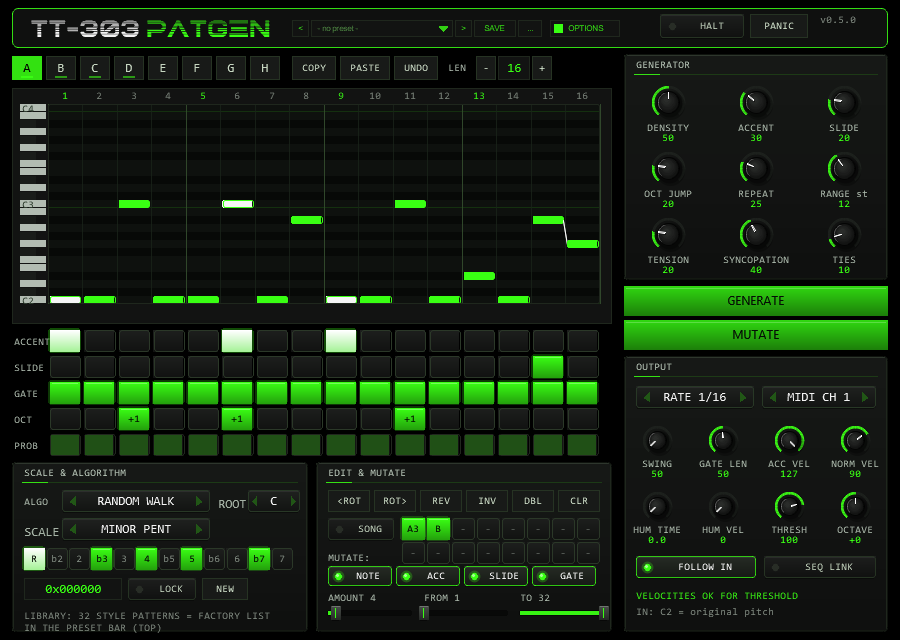
- HEADER
- Wordmark, the preset bar (see Preset bar & user bank), the
OPTIONSbutton, theRUNtoggle andPANIC. - OPTIONS
- The
OPTIONSbutton in the header, right of the preset bar, opens a small box with the COLOR choice: ten colour schemes (see below). - SLOT BAR
- Slots A–H,
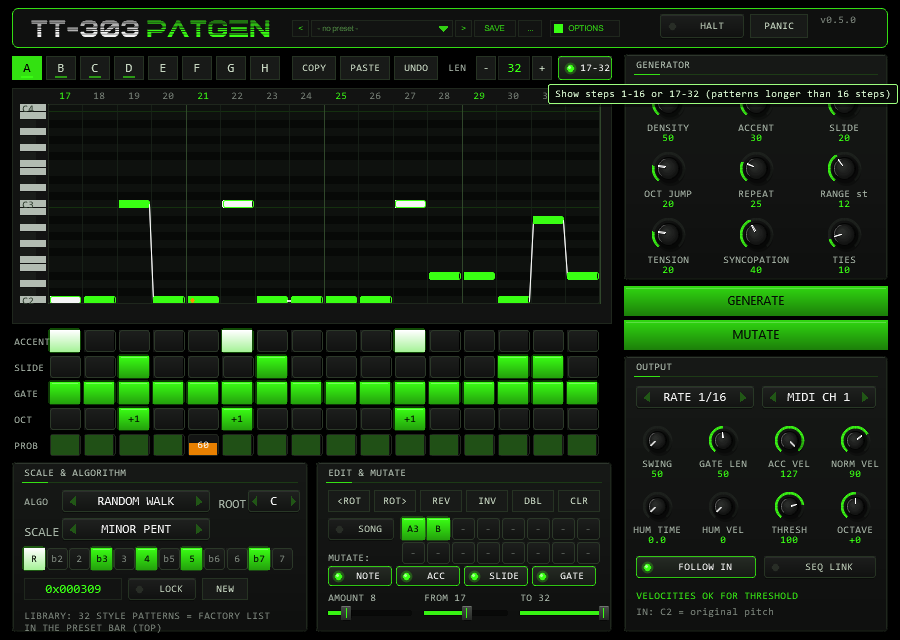
COPY/PASTE/UNDO, the pattern length (− value +, 1–32) and, for patterns longer than 16 steps, the page switch 1-16 / 17-32. At the right end sits the MIDI monitor: last note sent, current step, ACC and SLIDE LEDs (until 0.4.0 it was in the header). - PIANO ROLL
- 16 columns x 25 semitone rows above
ROOT. Click = set note, drag = move it, click a note or right-click = remove it. Accented notes are white, ties extend to the next step, slides are drawn as a connecting line, an orange dot marks a probability below 100 %. The green column is the step that is playing. - STEP ROWS
ACCENT,SLIDE,GATE(off / on / tie),OCT(-1, 0, +1, +2) andPROB(0–100 %). Click a cell or drag across cells to paint; right-click resets the cell.- GENERATOR
- Nine knobs (see below), then the big GENERATE and MUTATE buttons.
- OUTPUT
- Rate, MIDI channel, swing, gate length, velocities, humanize, accent
threshold, octave,
FOLLOW INandSEQ LINK. - SCALE & ALGORITHM
- Algorithm, root, scale, the 12 scale keys (click = custom scale), seed box with
LOCK/NEW. (The library list withLOADthat used to sit here is now the FACTORY section of the preset bar.) - EDIT & MUTATE
- Rotate, reverse, invert, double, clear; the song chain; the MUTATE property switches and the AMOUNT / FROM / TO sliders.
| Widget | Gesture | Behaviour |
|---|---|---|
| Knob | drag vertically | set value; Shift = fine |
| mouse wheel | ±2 % of range per detent | |
| right-click, double-click, Ctrl+click | reset to default | |
| Combo box | arrows / click / wheel | previous / next / step through the list |
| Step rows | click, drag | paint the value the first click chose |
| Any control | hover | a tooltip explains it |
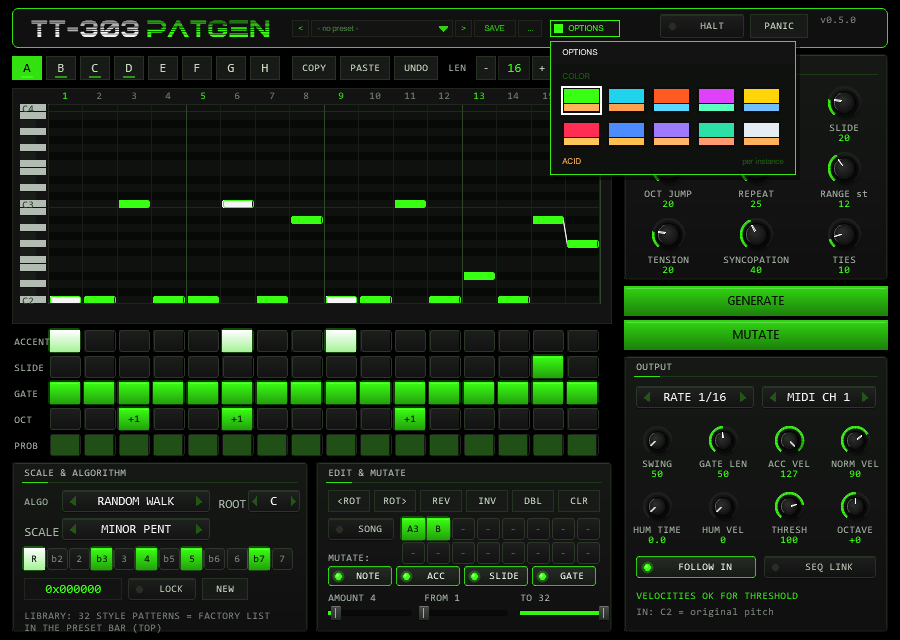
OPTIONS in the header, then a swatch. A click outside the box closes it.Options / Color. The OPTIONS button opens the box; COLOR offers ten schemes:
ACID, CYAN, ORANGE, MAGENTA, YELLOW, RED, BLUE, VIOLET, MINT and ICE. A scheme changes the accent colour (knob rings, active
steps, LEDs), the second colour and, for RED to ICE, the slightly tinted panel background of the whole front at once. The choice applies
per plug-in instance, is saved with the project and with FX-chain copies, and is not touched by the generator. The factory colour is ACID
(the classic acid green). The colour is stored in the hidden parameter 64 (UI Color, 0–9).
04The pattern model
| Field | Values | Meaning |
|---|---|---|
| Note | semitones above ROOT | the piano-roll row; final MIDI note = 36 (C2) + ROOT + 12 x OCTAVE + note + input transpose |
| Octave | -1 / 0 / +1 / +2 | shifts the step by whole octaves |
| Gate | off / on / tie | tie: the previous note keeps sounding into this step, no new note-on |
| Accent | 0 / 1 | note is sent with ACC VEL instead of NORM VEL |
| Slide | 0 / 1 | links this step to the next one: the next note-on is sent before this note-off |
| Probability | 0–100 % | chance that the step plays; decided by a hash of seed, step and position, so playback is reproducible |
- Slide rule. A slide only sounds if the next step is a normal gate step. Into a rest it is ignored, into a tie the tie wins. A slide into the same pitch is played as a tie (holding a note; the second accent is not retriggered). Slides work across the pattern end (last step into step 1).
- Tie. The note is released after the last step of the tie run plus the gate length. A tie after a rest starts a new note.
- Ranges. A pattern can hold notes from 12 semitones below to 35 above ROOT; the generator stays
inside 0..
RANGE.
05The generator
GENERATE fills the active slot. Order of work: gate mask, ties, notes, accents, slides, octave jumps.
| Control | Range | Function |
|---|---|---|
DENSITY | 0–100 % | share of steps that play (gate on or tie). The exact count is used, e.g. 50 % of 16 = 8 steps |
ACCENT | 0–100 % | chance that a normal gate step is accented |
SLIDE | 0–100 % | chance of a slide from a playing step into an adjacent normal gate step (needs two playing steps in a row) |
OCT JUMP | 0–100 % | chance of +1 octave (rarely +2); only if the note stays inside RANGE |
REPEAT | 0–100 % | tendency to repeat the previous note |
RANGE | 5–24 st | ambitus above ROOT; the base line lives in the first octave (up to 11 semitones), octave jumps add to it. No note leaves 0..RANGE |
TENSION | 0–100 % | share of dissonant tones: the minor second (b2) and the tritone. Only scales that contain them are affected (Phrygian, Blues, Phrygian Dominant, Chromatic, Whole Tone); the minor pentatonic has neither |
SYNCOPATION | 0–100 % | moves the weight of the rhythm from the downbeats to the offbeats |
TIES | 0–100 % | chance that a step right after a playing step becomes a tie |
Algorithms (ALGO):
| Algorithm | Rhythm | Melody |
|---|---|---|
| RANDOM WALK | weighted choice of exactly DENSITY x length steps (downbeat-heavy, shifted by SYNCOPATION) | small scale-degree steps preferred (weights 36 / 26 / 14 / 8 / 4 for 1–5 degrees), pulled to the root on strong steps |
| MARKOV | as above | transition table over the 12 pitch classes, counted from the plug-in’s own 32 library patterns (+ smoothing), weighted by closeness |
| EUCLID+WALK | Euclidean rhythm E(k, n) with a rotation from SYNCOPATION | random walk |
| MOTIF+VAR | as random walk | the first four steps form a motif, repeated in every bar with 25 % variation per note (70 % on the last step) |
| CLASSIC MUT | from a library pattern | a random library pattern, snapped to the chosen scale and RANGE, then every step is mutated with MUTATE % probability. Gate, accent and slide come from the library (DENSITY etc. are not used) |
Scales: Minor Pentatonic, Natural Minor, Phrygian, Harmonic Minor, Dorian, Chromatic, Blues, Phrygian Dominant, Whole Tone and Custom (the 12 keys under the scale box). Every generated note lies inside the chosen scale — verified over 10 000 patterns per scale.
06SEED & LOCK
| LOCK | GENERATE does |
|---|---|
| ON | uses the shown seed: the same pattern every time (recall) |
| OFF | draws a new random seed, shows it, and generates from it: lock it to keep or re-create the result |
The seed is 24 bit (shown as 0xF4B2A7). Mouse wheel over the box steps ±1
(Shift = 16), right-click sets 0, NEW draws a fresh seed without generating. The generator uses
an XorShift PRNG; per-step probability and humanize use a stateless hash of (seed, step, position), so they
repeat exactly on every play.
07MUTATE & edit operations
MUTATE changes AMOUNT distinct steps inside the reroll range FROM..TO
(e.g. FROM 9 to only vary the second half). Each chosen step gets one of the enabled properties
(NOTE moves the note along the scale, ACC flips the accent, SLIDE flips the
slide, GATE switches the step on or off). The mutation sequence is reproducible from seed and press
count; every GENERATE starts it again.
| Button | Operation |
|---|---|
<ROT / ROT> | rotate the pattern one step (wraps around the length; slide flags travel with their step) |
REV | reverse; slides are links between two steps, so they are moved to the mirrored link (twice = original) |
INV | mirror the pitches around ROOT, snap to the scale, lift the whole pattern by octaves until nothing is below ROOT |
DBL | double the length (16 becomes 32, second half = copy). Only for lengths up to 16 |
CLR | clear the slot |
Everything above is undoable with UNDO (press again to redo).
08Slots, undo & song chain
Eight slots A–H hold independent patterns (each with its own length). COPY and
PASTE move a pattern between slots. In normal mode the active slot plays.
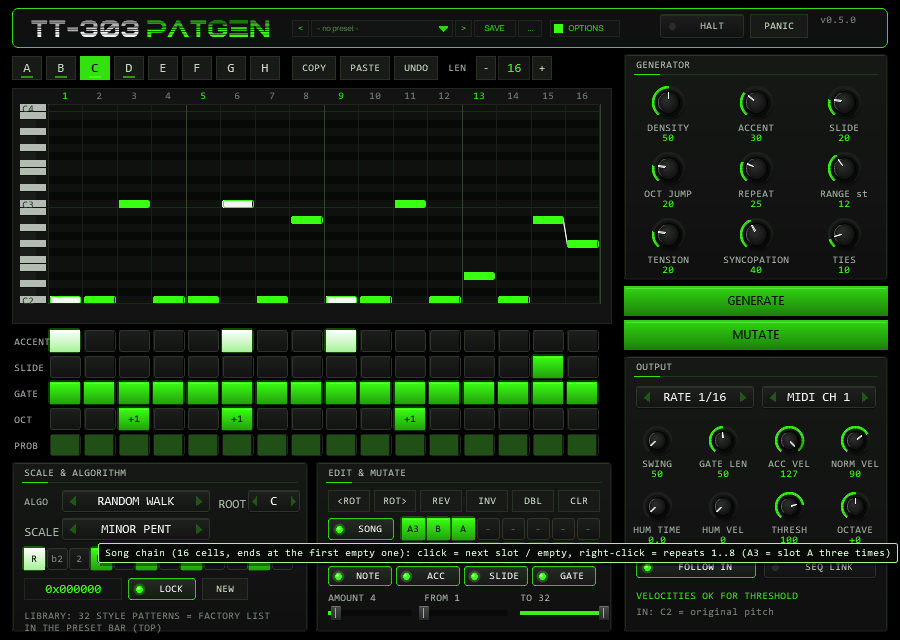
SONG plays a chain of up to 16 entries instead: click a chain cell to step through empty, A..H;
right-click sets the repeats 1–8 (A3 = slot A three times). The chain ends at the first empty cell
and loops. The position is computed from the transport position, so jumps and loops always land in the right place.
The default chain is A A A B.
Slots, lengths and the chain are saved with the project and with FX presets. Loading a preset with an unknown format version keeps the defaults.
09The library
32 built-in patterns of 16 steps, original style studies written for this plug-in, not copies of any recording: Roll 1–8 (rolling 16ths, root pedal with octave pops, Voyager-like), Sparse 1–8 (few notes, slides, offbeat accents, Acid-Tracks-like), Drive 1–8 (driving 16ths with the phrygian b2, Higher-State-like) and Squelch 1–8 (dirty root and b7 basslines, Phuture-like). Since 0.5.0 they are the FACTORY section of the preset bar: choosing one writes the pattern into the active slot as written (undoable); the CLASSIC MUT algorithm snaps a random one to your scale.
10Preset bar & user bank
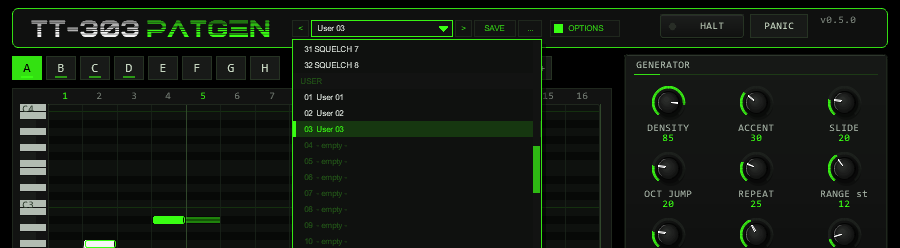
OPTIONS: < name > SAVE .... The name opens the list with the FACTORY and USER sections.The bar loads and saves the whole musical state of the instance in one step: all generator, mutate and output settings, scale / root / custom mask, SEED and LOCK,
the active slot, all eight patterns (with their lengths) and the song chain. Not part of a preset: the colour scheme (OPTIONS), the MIDI channel, RUN, SEQ LINK, the
library list position and the hidden test parameters.
| Control | Function |
|---|---|
< / > | Previous / next preset: first the 32 factory patterns, then the used user slots; wraps around and loads immediately. |
| Name field | Opens the list: FACTORY (the 32 library patterns) and USER (32 slots, empty ones show - empty -). Mouse wheel scrolls, click loads. A * behind the name means the state differs from the loaded preset (the active slot alone does not count). |
SAVE | Saves the current state into the selected user slot; with a factory preset (or none) selected, into the first free slot. A name box opens (up to 24 characters, default User 07): type, Enter or OK saves, CANCEL or a click outside cancels. |
... | RENAME, COPY (into the next free slot), DELETE (a second click confirms) for the selected user preset, and INIT (factory settings of all preset parameters; slots A–D get library patterns 1–4, the chain is A A A B). |
A factory preset is one library pattern: it is written into the active slot (exactly what the old LOAD did) and leaves every setting and all other slots alone.
A user preset restores everything, including which slot is active, all eight patterns and the chain. Loading is applied inside the plug-in’s audio callback, like every other pattern edit,
so a running pattern never changes mid-step in a half-written state. Loading a preset resets the undo memory and the MUTATE counter (the next MUTATE with the same seed repeats the same variation).
Where the user bank lives. Plug-ins cannot write files, so the 32 user slots are part of the plug-in state: they are saved with the project, with FX-chain and track-template copies,
and in every REAPER preset of this plug-in (the + button in the FX window toolbar). To take your bank to another project or computer, save a REAPER preset once
(+ → Save preset) and load it there: the whole bank comes with it. Each used user slot adds about 2 kB to the project (a full bank of 32 roughly 65 kB). Projects saved with earlier versions load unchanged with an empty bank.
Typing names. REAPER keeps Space for the transport, so type Shift+Space for a blank. Depending on your REAPER settings Esc closes the whole FX window; use CANCEL instead. (The + menu of the FX window also has Send all keyboard input to plug-in.)
11Output & sync
| Control | Range | Function |
|---|---|---|
RATE | 1/16, 1/8, 1/16T, 1/32 | step length |
SWING | 50–75 % | delays every second step by (2 x SWING - 1) x step length |
GATE LEN | 5–100 % | note length as a share of a step (50 = half a step); a slide overlaps by half of it (at least one sample) |
MIDI CH | 1–16 | output channel; changing it releases held notes |
ACC VEL / NORM VEL | 1–127 | velocity of accented / normal steps (defaults 127 / 90) |
THRESH | 1–127 | the accent threshold of your synth (TT-303 default 100). Keeps humanized velocities on the right side and drives the warning line |
HUM TIME / HUM VEL | 0–20 ms / 0–30 | deterministic timing (±) and velocity jitter; the plug-in looks ahead, so pulling notes early costs no latency |
OCTAVE | -2…+2 | transposes the output by octaves |
Timing is sample-accurate: the plug-in schedules every note-on and note-off at its own sample offset from the host tempo and beat position; transport jumps, loops and tempo changes are followed. Measured against the exact grid at 120, 140 and 174 bpm, with swing 50 and 62, the note-on positions are identical to the sample.
12MIDI input, transpose & panic
- Transpose. With
FOLLOW INon, an incoming note transposes the pattern: C2 (MIDI 36) is the original pitch, C#2 is +1, and so on. Release all keys and the pattern returns to ROOT. Incoming notes are never passed through (they would collide with the generated notes); with FOLLOW off they are ignored. - Pass-through. All other MIDI (CC, pitch bend, ...) goes through unchanged.
- No hanging notes. Stop, pause,
RUNoff, a transport jump or loop, a change of the MIDI channel and CC 123 / CC 120 all release every sounding note immediately.
13Using it with the TT-303
- Put TT-303PATGEN above the TT-303 on the same track. In the TT-303 keep
Mode= HOST. - The TT-303 reads velocity ≥ its Accent from velocity value (default 100) as accent. The defaults ACC VEL 127 and
NORM VEL 90 are on the correct sides; if you change the threshold in the TT-303, set
THRESHhere to the same value. - Overlapping notes are a slide in the TT-303; its Slide time sets the glide.
- Do not use the TT-303’s own SEQ mode at the same time.
The plug-in’s test suite renders PATGEN → TT-303 offline and measures the result: accented notes are clearly louder, a slide keeps the note running and glides the pitch, a retriggered octave jump does not.
14SEQ LINK (gmem)
With SEQ LINK on, the active pattern is published in the gmem namespace tt303pg so another
JSFX or script can read it. This is a sender only; nothing in the TT-303 reads it yet.
| Index | Content |
|---|---|
gmem[0] | 30301 (magic) |
gmem[1] | 1 (protocol version) |
gmem[2] | pattern length 1–32 |
gmem[3] | write counter (+1 after every complete write) |
gmem[4 + 4 s + k] | step s (0..31), field k: 0 MIDI note (absolute, without input transpose), 1 gate (tie = 1), 2 accent, 3 slide |
gmem[132..138] | extension: step length in beats, swing, gate length, ACC VEL, NORM VEL, channel, 1 = valid |
A tie is exported as a slide of the previous step into the same pitch. Write the header last, read the counter twice to detect a torn read. The TT-303 stores 16 steps in the range C1–C3; longer or higher patterns must be clipped by the reader.
15Print to MIDI Item
The ReaScript TT-303PATGEN Print to MIDI Item.lua (installed with the plug-in) turns the live generator
into a real track. Turn on SEQ LINK, select the target track, put the edit cursor where the item should
start, run the script and enter the number of bars. It writes the pattern as it plays: swing, gate length, slides as
overlapping notes, ties as longer notes, accent and normal velocity, the MIDI channel. Probability and humanize are
not printed. The result is compared note by note against the live output in the test suite.
16Automation & parameters
All controls are hidden JSFX sliders that stay automatable. Parameters 1–36 are the musical controls (slot, seed, lock, algorithm, scale, root, custom mask, the nine generator settings, mutate settings, rate, swing, gate length, channel, velocities, threshold, follow, run, humanize, song, SEQ LINK, octave, library index). The preset bar stores all of them except MIDI channel, run, SEQ LINK and library index. Parameter 64 is the hidden UI colour (scheme 0–9, see Options / Color). Parameters 37–63 are a command / diagnostic bus used by the automated tests (command, arguments, acknowledge, memory query, event log, statistics, block timing) — ignore them. Patterns themselves are not parameters: they are saved with the project and with FX presets (and, in the user bank, with every preset you save).
17Limits & honest notes
- MIDI output is only produced while the transport plays. There is no free-running audition mode yet.
- The generator cannot judge taste. It makes musically shaped patterns from rules; whether one grooves is a matter of your ears (seeds and MUTATE exist for that).
- Euclid at 50 % density never has two adjacent notes, so SLIDE has nothing to act on there.
- Tempo changes inside one audio block are not resolved; the tempo at the start of each block is used.
- Changing the RATE while playing restarts the step counter at the current position (notes are released).
18Troubleshooting
- Nothing plays — check that the transport runs,
RUNis on (not HALT), the plug-in sits before the synth and the MIDI channel matches the synth. - No accents in the TT-303 — the TT-303 threshold is above ACC VEL, or NORM VEL is at or above it. The line under the output panel warns about this.
- Slides do not glide — the next step must be a normal gate step; check the TT-303 slide time.
- Every GENERATE looks different — that is LOCK off. Turn LOCK on to repeat a seed.
- The edit has no effect while stopped — the plug-in applies edits inside its audio callback; it must be active (not bypassed, not offline).
- The pattern sounds an octave too low or high — ROOT and OCTAVE shift the output; C2 + ROOT is the base.