
01The concept
TT-ARPSEQ turns held notes into patterns. Up to four tracks (key areas) listen to your MIDI, build a note list from the keys you hold and play it back in a host-synchronous rhythm. What makes it different from a classic arpeggiator is the data lane architecture: each aspect of the pattern is its own row of step values with its own loop start, loop end and direction.
Give the TRANSP lane a 3-step loop and the ACCENT lane a 4-step loop and the combined pattern only repeats after 12 steps; add a 5-step ORDER lane and it takes 60. The unit is a MIDI-only effect: put it before an instrument in the FX chain. Output goes to the MIDI channel of each track, so four tracks can drive four different instruments.
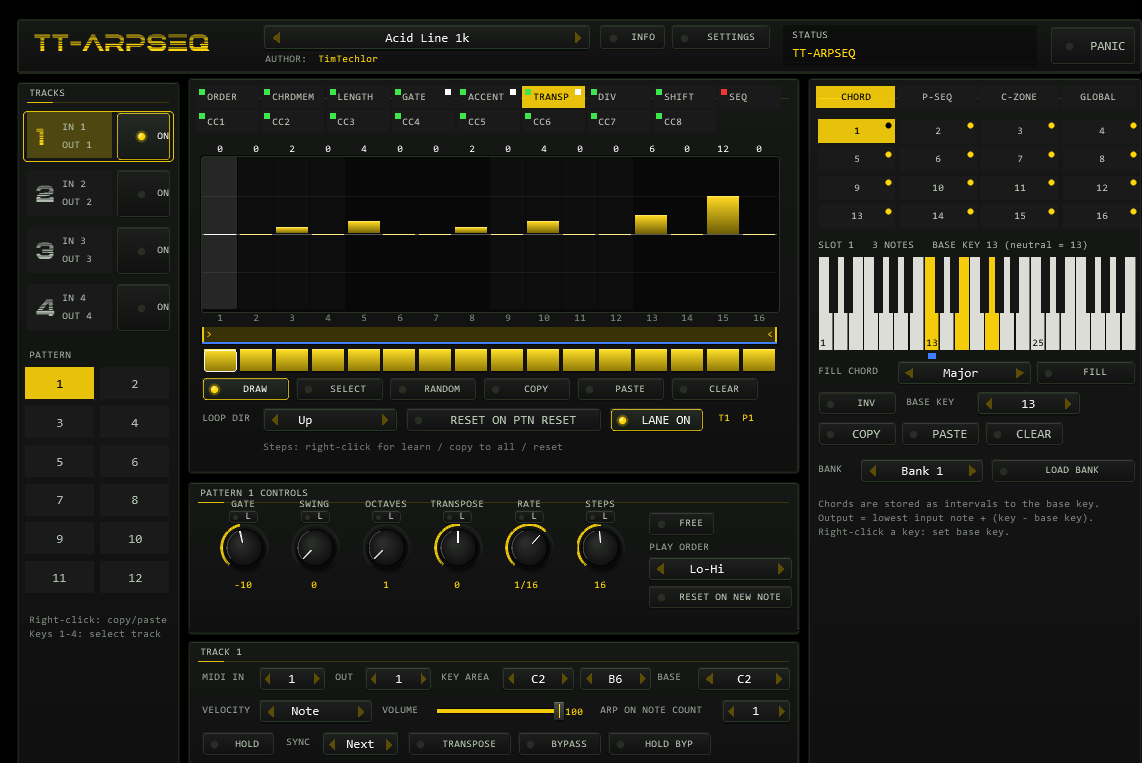
02Quick start
- Insert
TT-ARPSEQon a track before your instrument (it passes audio untouched). - Hold a chord in the key area (default C2–B6). Track 1 starts playing an ascending 1/16 arpeggio, locked to the project tempo.
- Pick a factory preset with the preset bar in the header (
</>or the name field). Names ending in 3k want a three-key chord, 1k a single key, 1-8k one to eight keys. - Open a lane tab (e.g. TRANSP), drag across the bars to paint values. Painting switches the lane and the touched steps on.
- Drag the two loop markers under the bars to shorten the lane loop; the other lanes keep their own length.
- Use HOLD to latch the chord, PANIC if a note ever hangs.
03The front panel
- HEADER
- The preset bar (
<name>SAVE...; the name opens the list of factory and user presets), author,INFOpopup with the preset description,SETTINGS(opens the GLOBAL tab), theOPTIONSbutton (colour scheme), the status bar (shows the value of the control you touched last) and the redPANICbutton (all notes off on every channel, all tracks reset). - TRACKS
- Four track buttons with input/output channel and an
ONswitch. Ctrl+click on ON solos the track (again: all on). Right-click a track: copy, paste,Send only CC,Trigger CM. - PATTERN
- 12 patterns per track. Only the selected pattern plays; with the pattern sequencer on, the selection follows the chain. Right-click: copy, paste, clear. A dot marks a pattern that is playing but not selected.
- LANE TABS
- Nine data lanes (ORDER, CHRDMEM, LENGTH, GATE, ACCENT, TRANSP, DIV, SHIFT, SEQ) and eight CC lanes. Green/red dot top left: lane on/off (click to toggle, off = all values ignored). White dot top right: the lane holds data.
- STEP EDITOR
- 16 bars per page (
1-16/17-32when STEPS > 16). The value is printed above each bar, the step number below. Bars outside the pattern length are dimmed. The white cursor shows the step each lane played last. - LOOP STRIP
- The accent-coloured region is the lane loop, the line below it (second colour of the scheme, blue in YELLOW) the pattern length (STEPS).
- STEP ON/OFF ROW
- Off = the step's value is ignored (default value used). On the ORDER lane an off step means no note.
- TOOLS
DRAWpaints,SELECTselects a step range by dragging;RANDOM,COPY,PASTE(same lane only) andCLEARact on the selection (whole pattern length when nothing is selected).
| Gesture | Effect |
|---|---|
| Drag over bars | paint values (fast drags are interpolated) |
| Ctrl + drag over bars | copy the last value to the bars you cross |
| Double-click a bar | reset the step to its default |
| Right-click bars | menu: toggle lane, MIDI learn step, MIDI unlearn, copy to all steps, reset steps |
| Drag a knob | set value; Shift = fine |
| Right-click a knob | MIDI learn / unlearn |
| 1–4 | select track |
| 5 6 | draw / select tool |
| 7 8 9 0 | random / clear / copy / paste on the selection |
| q w e r t z u i o | select lane ORDER … SEQ (w = CHRDMEM; QWERTY, QWERTZ or AZERTY in GLOBAL) |
04Options & color
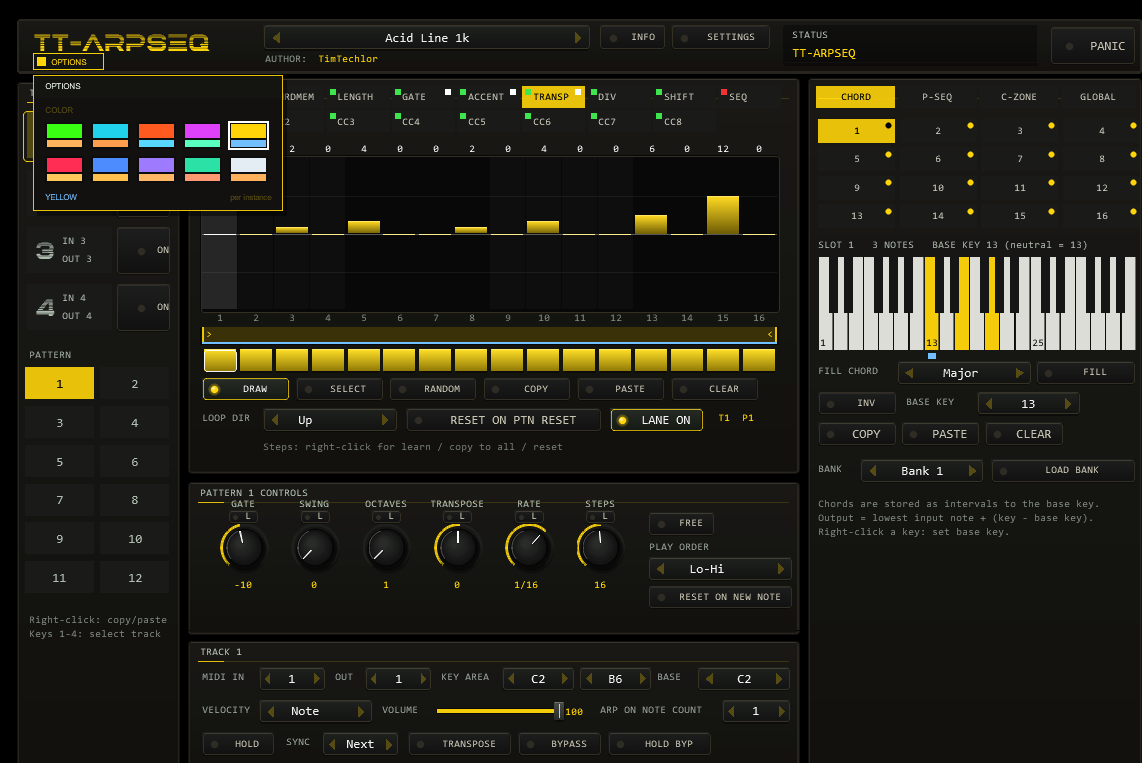
The OPTIONS button sits in the header directly right of the preset bar. It opens a small box with the COLOR choice: ten colour schemes (ACID, CYAN, ORANGE, MAGENTA, YELLOW, RED, BLUE, VIOLET, MINT, ICE). Click a swatch to switch the whole front at once; each swatch shows the accent colour on top and the second colour below. A click outside the box closes it.
- The factory colour is YELLOW. The choice is stored per plug-in instance: it is saved with the project and travels with the FX chain. The 36 factory presets, random/clear and copy/paste never change it (a REAPER FX preset stores it like any other parameter).
- The colour is the hidden parameter
UI Color(0–9) and can be automated or set from a script. - Signal colours keep their meaning in every scheme: the lane on/off dots (green/red), the white data dots and the piano keys.
05Tracks & key areas
| Control | Function |
|---|---|
ON | Off: notes in the key area are not processed but sent unchanged to the MIDI OUT channel. |
MIDI IN / OUT | Input channel (All or 1–16) and output channel. Notes outside every active key area and channel pass through untouched on their own channel. |
KEY AREA | Lowest and highest key the track listens to. Areas may overlap; if two tracks output the same note on the same channel the running note is stopped and the new one starts (note steal). Use different OUT channels to avoid that. |
BASE | Output transposition relative to the key-area start: output = input + (BASE − area start). Key area C1–C2 with BASE C2 plays C1 as C2. |
VELOCITY | Max (127), Note (velocity of the note being played), First / Last (velocity of the first / last entry of the note list), Average (mean of the held notes). |
VOLUME | Scales the generated velocities (0–100 %). |
ARP ON NOTE COUNT | Number of keys that must be held before the arpeggio starts. Fewer keys pass through unchanged, so you can play melody lines without arpeggiating; when the count is reached the passed-through notes end and all held keys join the arpeggio. |
HOLD | The chord keeps playing after you release the keys; the next chord replaces it. HOLD BYP temporarily disables hold. |
SYNC | Delays a change of the input chord by n steps (Next = at the next step). |
TRANSPOSE | With HOLD on and a chord latched, a newly pressed key does not join the chord but transposes it by (key − chord root): C-E-G latched, then G3 → G-B-D. |
BYPASS | All incoming notes pass through unprocessed; a latched hold chord keeps playing. |
Send only CC | The track sends its CC lanes only, no notes (right-click the track button). |
Trigger CM | The keys of the key area play chord-memory slots as block chords (first key = slot 1) on BASE; keys without a slot are silent. |
06Patterns & pattern controls
Every track owns 12 patterns; each pattern owns its controls and all lane data. Each knob has a L lock switch: a locked control keeps its value when a preset is loaded.
| Control | Range | Function |
|---|---|---|
GATE | −100…+100 | Note length as a fraction of the step: 0 = a full step, +100 = 150 %, −100 = 50 %. A lane GATE value overrides it. |
SWING | 0…100 | Delays every second step by up to 50 % of the rate (100 = 50 %). |
OCTAVES | 1…5 | Repeats the whole note list in higher octaves (Lo-Hi: C E G C' E' G'; Hi-Lo and Reversed run the complete list backwards). |
TRANSPOSE | −24…+24 | Semitones, or scale degrees when a scale is set. |
RATE | 1/1 … 1/64 | Straight, dotted and triplet values. FREE switches to Hz (0.1–20), independent of tempo. |
STEPS | 1…32 | Pattern length; limits the right end of every lane loop. |
PLAY ORDER | Hi-Lo, Lo-Hi, As Played, Reversed. | |
RESET ON NEW NOTE | Every new key restarts the pattern. |
07Data lanes
| Lane | Values | Meaning |
|---|---|---|
| ORDER | Nxt, Off, Prv, 1st, Lst, Hi, Low, Rnd | Which note of the list plays. Nxt (default) is the next note and advances the list. Off plays nothing and does not advance. Prv repeats the previous note. 1st, Lst, Hi, Low pick the first, last, highest or lowest entry; Rnd a random one (seeded: identical on every play). A step switched off in the ORDER row is silent. |
| CHRDMEM | 1…16 | Chord-memory slot played in this step (see below). |
| LENGTH | 1…16 | Multiplies the note length: LENGTH 2 at 1/16 lasts 2/16 and can overlap the next step. |
| GATE | −100…+100 | Note length relative to rate × LENGTH: at 1/16, LENGTH 2, GATE 50 the note lasts 3/16. Overrides the pattern GATE. With Gate length in steps a positive value is a length in steps (1–32). |
| ACCENT | 0…100 | Velocity emphasis. As soon as a lane has accents, un-accented notes drop to 75 % of the base velocity and an accent lifts the note up to 127. |
| TRANSP | −24…+24 | Semitones (scale degrees with a scale) for all notes of the step, added to the pattern TRANSPOSE. |
| DIV | 1…8 | Splits the note into n equal parts: at 1/16 with DIV 2 two 1/32 notes play. |
| SHIFT | −50…+50 | Moves the note earlier (negative) or later (positive) by a percentage of the rate. Negative values need lookahead; the plug-in generates the step early, the first step after a start is clamped to the moment the key was pressed. |
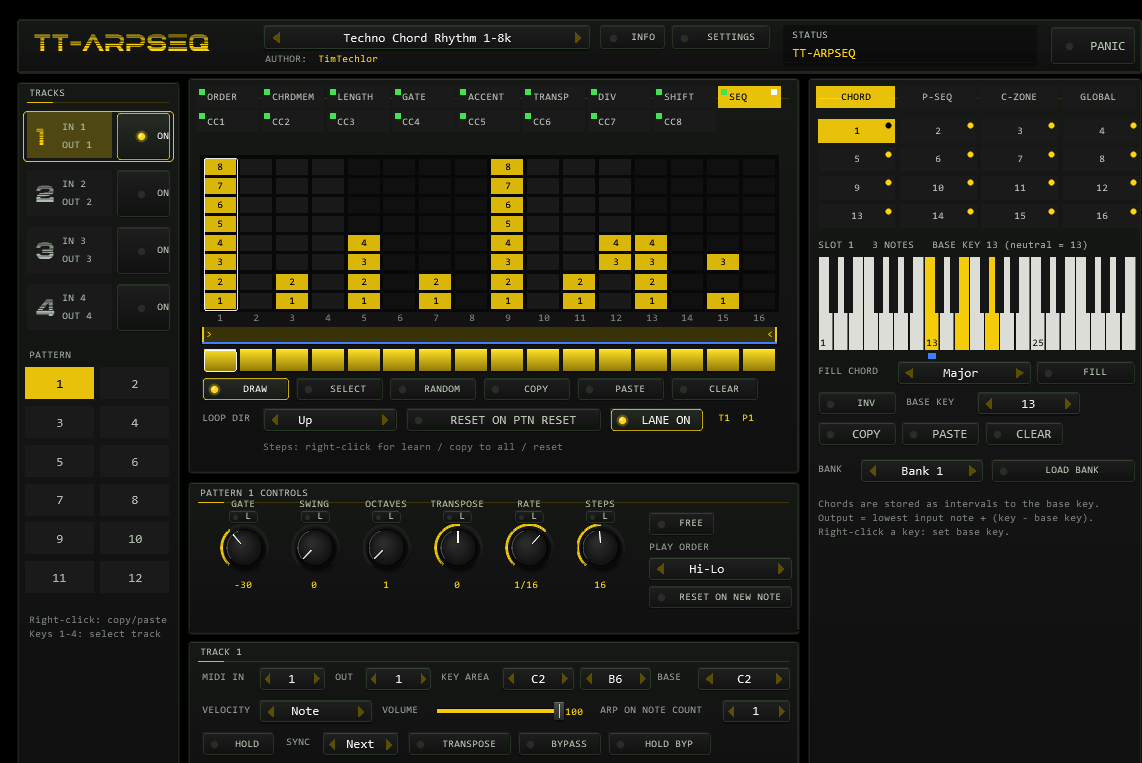
| SEQ | 8-bit mask | Each row of the grid is one place of the note list (row 1 = lowest). Only marked places play, in any combination: with a 3-note chord and only row 1 marked just the lowest note sounds. |
| CC 1…8 | 0…127 | One CC per active step on the MIDI OUT channel, on a CC number you choose per lane (CC --: unassigned). |
A lane's default state: on (except SEQ) with every step switched off (ORDER: on), so a fresh pattern is a plain arpeggio. Painting a value switches the lane and the step on.
08Loop points, directions & resets
Below the bars, the loop strip holds the loop start > and end < of the lane. Left mouse button moves the left marker when the mouse is between the markers, the right button the right marker; outside them the nearer marker follows the mouse. Ctrl applies the change to all lanes of the pattern.
| LOOP DIR | Order of the steps |
|---|---|
| Up | left to right, then back to the start |
| Down | right to left |
| Up alt | left to right and back, without repeating the end steps (ping-pong) |
| Down alt | right to left and back |
RESET ON PTN RESET: by default a lane simply keeps looping when the pattern restarts (after all keys were released, on a pattern change, on RESET ON NEW NOTE). With the switch on, the lane starts from its loop start again. On the ORDER lane the switch also rewinds the note list; by default the list position is not reset. Lane cursors stand still while the track is idle.
09Chord memory
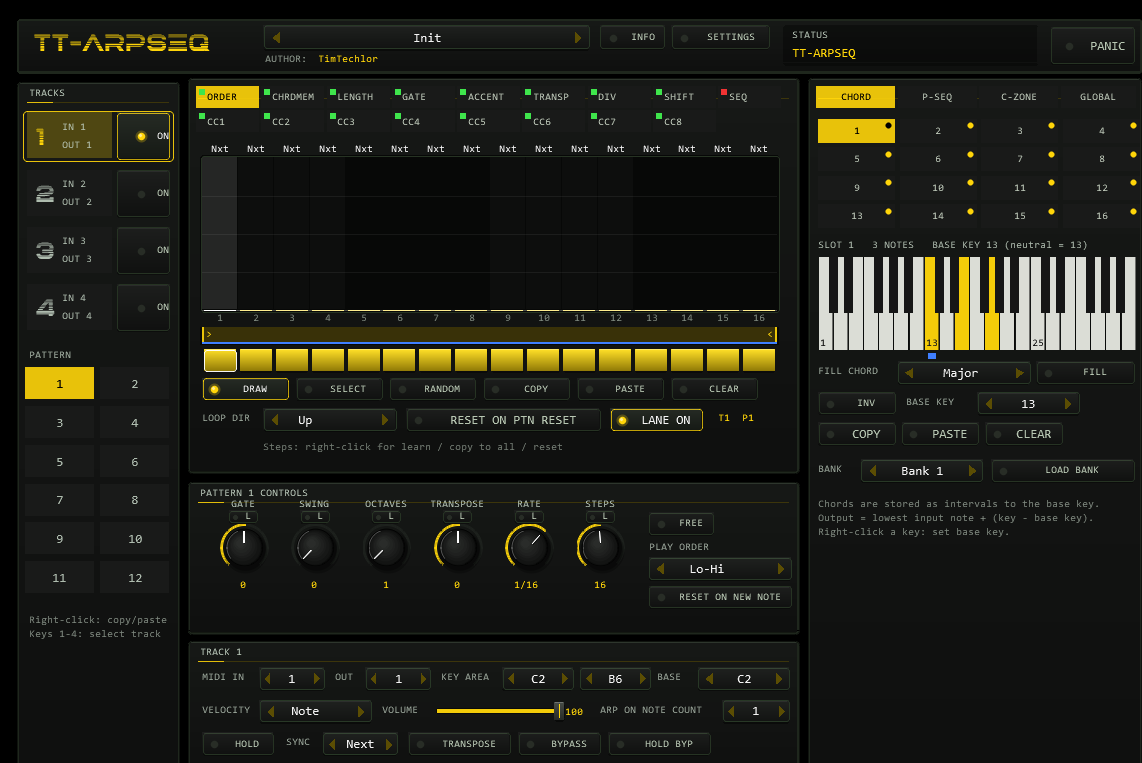
16 slots, each a chord of up to 8 keys on a three-octave keyboard, stored as intervals. The chord is stamped on the lowest input note:
output note = lowest played note + (chord key − base key)| Chord keys | Base key | Played | Output |
|---|---|---|---|
| 0 4 7 | 0 | C1 | C1 E1 G1 |
| 0 4 7 | 4 | C2 | G#1 C2 D#2 |
| 2 4 7 | 0 | C1 | D1 E1 G1 |
| keys 1,5,8 (0 4 7), neutral base 13 | 13 (index 12) | C3 D3 | C2 E2 G2 |
Moving the base key moves the whole chord relative to the input note. The neutral position is key 13, the first key of the second octave. Click keys to toggle them; right-click a key to set the base key. FILL writes a preset chord (Major, Minor, Sus2, Sus4, 7, maj7, m7, Dim, Aug, Power, Quart, 6, m6, add9, 9, Octave) at the base key, INV inverts, COPY/PASTE/CLEAR work per slot, LOAD BANK loads one of six factory banks (16 chords each).
A step whose CHRDMEM lane is active plays the whole slot chord at once and replaces the ORDER choice; a SEQ mask then filters the chord tones. The original manual's display bug (slots 1–15 only) does not exist here: all 16 slots are selectable.
10Pattern sequencer
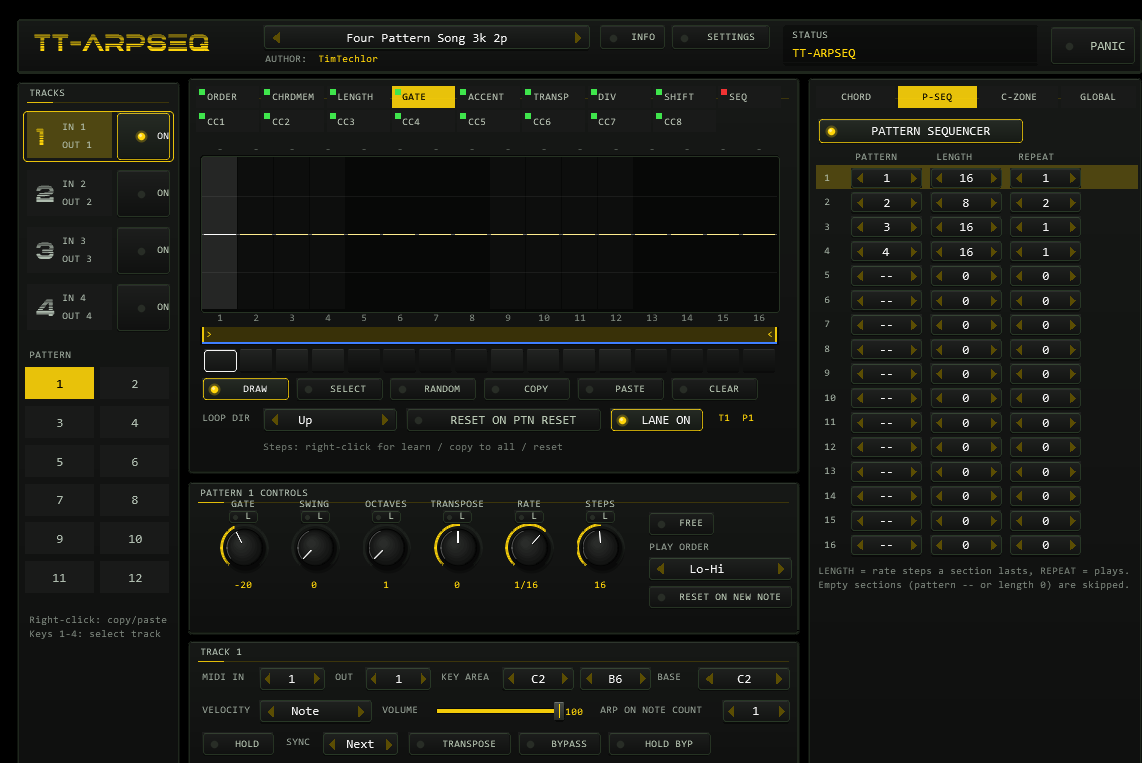
The P-SEQ panel chains patterns of the selected track. Each of the 16 sections has a PATTERN (1–12, -- = empty), a LENGTH in rate steps and a REPEAT count (number of plays). Example: section 1 = pattern 1, length 4, repeat 2; section 2 = pattern 2, length 4, repeat 1 plays pattern 1 for 4 steps twice, then pattern 2 for 4 steps, and starts over. Empty sections are skipped. The chain restarts with every pattern reset; each pattern change starts the new pattern from its loop starts (lanes with the reset flag) and continues the swing grid.
11Control zone & program change
Keys of a 24-key zone control the plug-in instead of being played (default C0 = MIDI 24 with C3 = 60):
| Key | Function |
|---|---|
| C0 … G#0 | toggle ORDER, CHRDMEM, LENGTH, GATE, ACCENT, TRANSP, DIV, SHIFT, SEQ lane on/off in the current pattern of the selected track |
| A0 / A#0 | toggle HOLD / HOLD BYPASS |
| B0 | panic |
| C1 … B1 | select pattern 1–12 of the selected track |
The table in the C-ZONE tab is freely assignable (n/a, lanes, previous/next preset, hold, hold bypass, panic, pattern 1–12) and replaces the original configuration file. Disable Control Zone turns the zone off so all keys play notes.
CONTROL ZONE SYNC (GLOBAL tab): with value 4, pattern changes happen at steps 1, 5, 9, 13 …; a command issued during step 5 takes effect at step 9. Idle tracks switch immediately.
Program change 0–47 selects track (PC ÷ 12 + 1) and pattern (PC mod 12 + 1): 0–11 = track 1 patterns 1–12, 12–23 = track 2, and so on.
12Scale & global settings
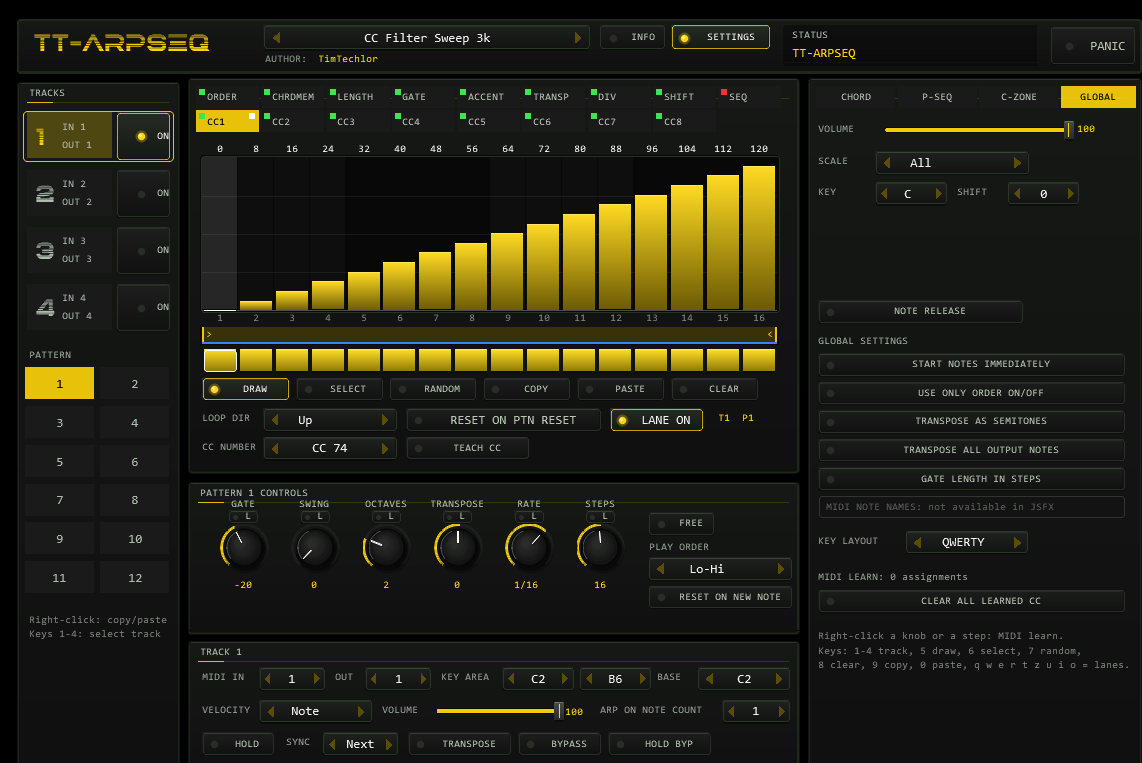
SCALE (All, Major, Minor, Dorian, Phrygian, Lydian, Mixolydian, Harm. Minor, Pent. Major, Pent. Minor, Blues, Whole Tone, Custom) with KEY and SHIFT (modes). All output notes are snapped to the nearest scale tone (a tie goes down) and transposition counts in scale degrees: C3 E3 G3 +1 gives D3 F3 A3 in C major, C#3 F3 G#3 without a scale. SHIFT n rotates the mask: mode 1 of C major is 0,1,0,1,1,0,1,0,1,0,1,1. All is the identity.
| Setting | Function |
|---|---|
NOTE RELEASE | The pattern is not reset the moment the last key is released: at the next step it resets only if no new note has arrived. Lets you change chords live without restarting the pattern. |
Start notes immediately | The first note plays at the moment of the key press instead of the next grid step. |
Use only ORDER on/off | Only the ORDER row keeps step switches; LENGTH, GATE, ACCENT, TRANSP, DIV and SHIFT apply on every step. CHRDMEM, SEQ and CC lanes keep their own step switches. |
Transpose as semitones | Transposition counts in semitones; the result is snapped to the scale. |
Transpose all output notes | Pass-through notes (track off, bypass, below the note count) are snapped to the scale too. |
Gate length in steps | Positive lane GATE values are lengths in steps (1–32). |
Disable Control Zone | see above |
Enable MIDI note names | Not available: JSFX has no way to name MIDI editor keys. The row is shown greyed out. |
13MIDI learn & TEACH CC
Right-click a pattern knob (or the FREE switch, or a step in the bar editor) and choose MIDI learn, then move a controller: the next incoming CC is assigned. Learned CCs control the pattern knobs of the current pattern, step values, master volume, track volume, the rate type, track on/off and hold, and are consumed (not passed on). Unlearn removes an assignment; GLOBAL has CLEAR ALL LEARNED CC. Assignments are saved with the project and presets. CC 120 and CC 123 from the host act as panic.
TEACH CC (CC lanes): sends a slow 0–127–0 triangle on the lane's CC number and the track's OUT channel so you can put the target plug-in into its own learn mode and pick the parameter. Switch it off afterwards.
14Presets & project state
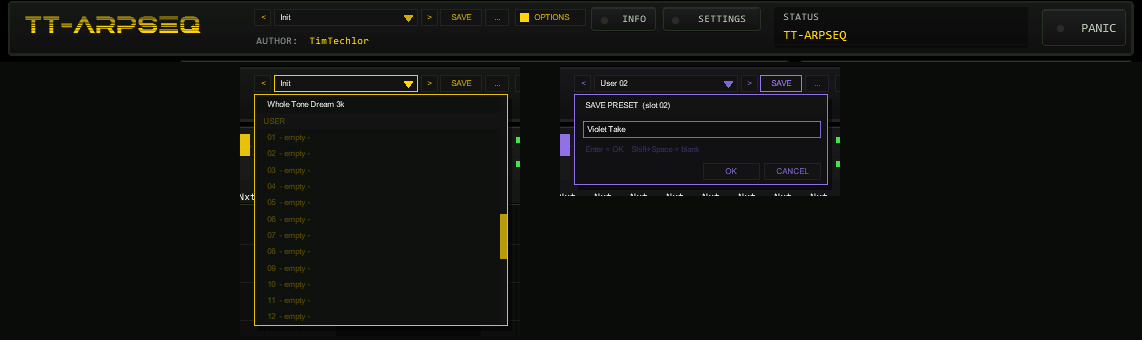
OPTIONS: < name > SAVE .... The name opens the list (FACTORY and USER); SAVE opens the name box.The bar offers the 36 factory presets and 32 user slots. Loading a factory preset works as before: it replaces tracks, patterns, chord memory and the scale group; MIDI learn, control-zone table, the global app settings and the colour scheme stay, and locked pattern controls keep their values. The control-zone keys assigned to previous / next preset still step through the factory list.
| Control | Function |
|---|---|
< / > | Previous / next preset: first the 36 factory presets, then the used user slots; wraps around and loads immediately. |
| Name field | Opens the list: FACTORY (36 presets) and USER (32 slots, empty ones show - empty -). The mouse wheel scrolls, a click loads. A * behind the name means that the state differs from the loaded preset (the pattern selection of the tracks is not counted, because control zone, program change and the pattern sequencer change it while playing). |
SAVE | Saves the current state into the selected user slot; with a factory preset (or none) selected, into the first free slot. A name box opens (up to 24 characters, default User 07): type, Enter or OK saves, CANCEL or a click outside cancels. |
... | RENAME, COPY (into the next free slot) and DELETE (a second click confirms) for the selected user preset. |
What a user preset contains. Everything a factory preset can change, and all of it as it is right now: the four track set-ups (key area, channels, base note, velocity mode, volume, hold, sync, ...), the pattern controls and all lane data of all 12 patterns of all four tracks (values, step switches, loop points, directions), the pattern sequencer chains, the chord memory, and the scale group (scale, key, mode, custom mask, control-zone sync, note release, use-only-ORDER, gate length in steps). Loading a user preset restores this state exactly, including the pattern lock flags. Not part of a preset: master volume, the MIDI learn table, the control-zone key table, the other global app settings (start immediately, semitone transposition, keyboard layout, ...), the selected track and the colour scheme. Loading stops all sounding notes and restarts the lane cursors, like loading a factory preset.
Where the user bank lives. Plug-ins cannot write files, so the 32 user slots are part of the plug-in state: they are saved with the project, with FX-chain and track-template copies, and in every REAPER preset of this plug-in (the + button in the FX window toolbar). To take your bank to another project or computer, save a REAPER preset once (+ → Save preset) and load it there: the whole bank comes with it. Projects saved with earlier versions load unchanged with an empty bank. Because a slot holds the complete lane data, a full bank makes the project grow: a used slot adds roughly 4–8 KB to the project (the state is stored as its difference to the default pattern), a full bank of 32 slots about 0.2 MB; the plug-in reserves about 18 MB of memory per instance for the bank.
Typing names. REAPER keeps Space for the transport, so type Shift+Space for a blank. Depending on your REAPER settings Esc closes the whole FX window; use CANCEL instead. While the bar's list or name box is open, the front's own keyboard shortcuts (1-4, q w e ...) are switched off. The window's INFO box shows the description of the loaded preset (for a user preset: its name).
15Timing model
- Steps lie on the host's beat grid (multiples of the rate from beat 0); with stopped transport an internal beat clock keeps time so you can play live. FREE rate runs from the moment of the first key.
- Every note is a time-sorted, sample-accurate event scheduled in the audio block; the plug-in adds no latency.
- Swing delays every second step by up to half a step, counted from the pattern reset and continuing across pattern wraps and changes.
- Notes that would hang are ended on key release (immediately, or at the next step with NOTE RELEASE), track off, panic, transport stop and transport jumps.
- When a chord starts exactly on a step, that step is the first note.
16Automation & parameters
The whole state lives in the plug-in and its saved data. For the host, sixteen hidden parameters exist: TEST ID (diagnostics, keep at 0), MASTER VOLUME, PANIC, per track T1–T4 ON, PATTERN (1–12) and HOLD, and UI Color (colour scheme 0–9, per instance, not part of presets). They follow the panel and can be automated.
17Differences & limits
- Independent implementation of the function set of a well-known arpeggiator/sequencer; look, names of controls and code are TT-ARPSEQ's own.
- The original manual leaves many details open. The choices made here (list order with octaves, accent scaling, gate scaling, ORDER semantics, sync and hold behaviour) are documented in the project LOGBUCH.
- Pass-through notes below ARP ON NOTE COUNT start immediately; if the count is reached at the same instant they last zero samples.
- Negative SHIFT on the first note after a start is clamped to the key-press time.
- Key names in the MIDI editor and audio-unit virtual outputs are not part of a JSFX.
18Troubleshooting
- Nothing plays — check that the track is ON, that your keys are inside the KEY AREA and on the MIDI IN channel, that the key is not in the control zone (default C0–B1) and that the FX sits before the instrument.
- The instrument ignores accents — many instruments barely react to velocity; raise their velocity sensitivity.
- A pattern does not restart when you play a new chord — NOTE RELEASE is on, or the lane loops continue by design (turn on RESET ON PTN RESET).
- A held note rings after you release it — that happens only when the source keeps the key; use PANIC.
- Cursor and loop markers do not match the sound — every lane has its own loop; compare lane by lane.
- Preset names show an old version number in REAPER's title bar — REAPER caches the description line; rescan the JSFX list.