
01The concept
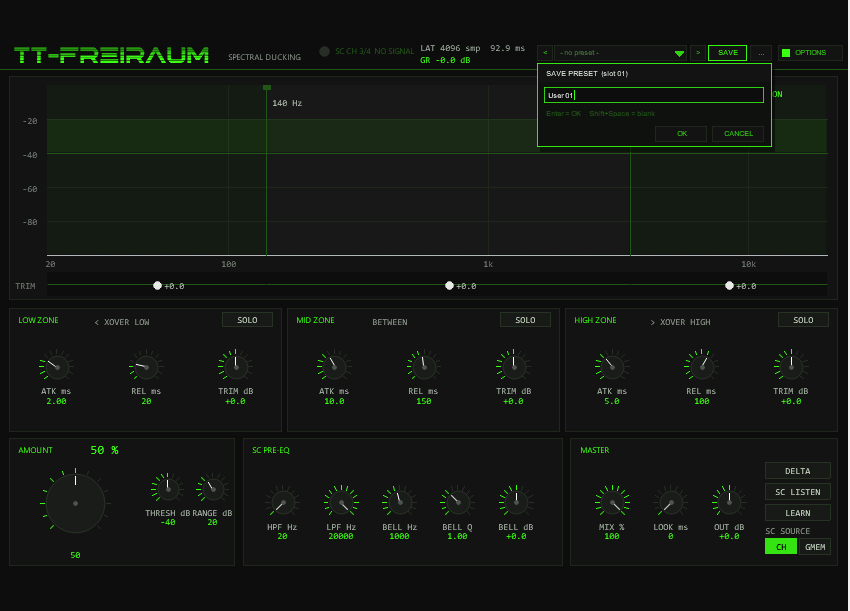
A broadband ducker turns the volume down when the sidechain hits — the whole signal, including the parts that do not conflict. TT-FREIRAUM works spectrally: it analyses the sidechain every 10.7 ms (512-sample hop at 48 kHz, 11.6 ms at 44.1 kHz) and removes energy from the main signal only at the frequencies the sidechain actually occupies.
main out = main in − Σ ( zone activity(t) × removed zone spectrum )The removed energy is reconstructed per zone through its own overlap-add path and scaled by a per-sample time-domain activity — a hybrid of spectral weights (updated per hop) and analogue-style envelopes (updated per sample). A kick ducking a bass removes only the kick's bins; the bass's own harmonics in between keep playing. And because the removed part exists as a real signal, DELTA audition and ZONE SOLO come free, without phase errors.
02Quick start
- Insert
TT-FREIRAUMon the track that should make room (e.g. pads, guitars, a busy bus). The preset bar in the header offers factory starting points. - Feed the sidechain — either works, both are honest options:
route the competing signal to channels 3/4 of this track
(send destination 3/4, track channel count 4), or set
SC SOURCE to
GMEMand place aTT-TRUEAB PRE(free, same ReaPack) on the source track — cross-track ducking with no cabling at all. - Watch the header LED: it must read
SC CH 3/4 SIGNALorSC GMEM LINK OK. Then raise AMOUNT — the display shows the main spectrum, the sidechain spectrum and the live cut curve. - Press DELTA to hear exactly what is being removed, and trim the three zones to taste.
03Sidechain routing
The plug-in exposes four input pins — Main L/R on 1/2, SC L/R on 3/4 — and two ways to fill the sidechain pair:
| SC SOURCE | Path | Use case / cost |
|---|---|---|
CH (default) | Sample-synchronous pins 3/4 of the plug-in. Send the source to channels 3/4 and set the receiving track to 4 channels. | Standard send routing on one track/bus; lowest latency (4096 + LOOKAHEAD only) |
GMEM | Shared ring buffer in the ttab gmem namespace, written by a TT-TRUEAB PRE instance on the source track | Ducking across tracks and busses without rewiring — e.g. sidechain straight from a subgroup or FX return. Adds a fixed 2048-sample guard to the reported latency |
For GMEM mode the sender needs both switches on:
ACTIVE and DRY RING — the link carries the
unprocessed audio itself, not just a level. Internally FREIRAUM then delays
the main signal by 2048 samples before analysis, because the PRE may run
before or after it inside the same audio block; the measured offset is
tracked continuously, so the link stays sample-aligned. If the PRE stops
updating for ~250 ms (bypassed, track offline), the link is declared stale
and the plug-in falls back to silence on the sidechain: no ducking, clean
passthrough. With several PREs running, the last writer wins.
SC CH 3/4 SIGNAL / SC CH 3/4 NO SIGNAL, or
SC GMEM LINK OK / NO PRE (GMEM). Without a valid
source the plug-in stays idle — nothing is ducked, the main signal passes
unchanged (still delayed, because PDC is constant).04Zones & ballistics
The spectrum is divided into three zones by two crossover frequencies. The zone masks are complementary smooth-step crossfades in log-frequency, ±1/4 octave wide around each crossover, and sum to exactly 1 — the three zones partition the spectrum with no gaps and no overlap.
| Zone | Attack | Release | Trim |
|---|---|---|---|
LOW — below XOVER LOW (40–500 Hz, def. 140) | 0.5–50 ms (def. 2) | 10–250 ms (def. 20) | ±12 dB each: scales how much of the detected removal this zone applies. −12 dB nearly mutes removal in that zone, +12 dB lets it reach the full AMOUNT |
MID — between the crossovers (XOVER HIGH 1–12 kHz, def. 3500) | 2–100 ms (def. 10) | 50–500 ms (def. 150) | |
HIGH — above XOVER HIGH | 1–80 ms (def. 5) | 20–300 ms (def. 100) |
XOVER HIGH is constrained to at least twice
XOVER LOW — raise the low crossover and the high one moves with
it if needed.
Each zone has its own detector on the sidechain: the (pre-EQ'd, mono)
sidechain is split by 4th-order Linkwitz-Riley-style band filters at the
crossovers, followed by a fast peak envelope, a gate at THRESH
with a 3 dB knee, and independent attack/release ballistics — computed
per sample, so an attack can land well inside the 10.7 ms analysis hop
(measured: 90 % after 2.9 ms on the LOW zone at its default ATK of 2 ms). The times are
99 % settling constants. Between hops the zone's spectral removal decays at
its release rate instead of snapping back at frame boundaries.
Typical setting: fast low zone (kick vs. sub-bass, no phase smearing), a musical mid zone (vocal vs. guitars), a controlled high zone (hi-hat vs. snare crispness).

05Spectral engine
The engine runs a 4096-sample sqrt-Hann window on a 512-sample hop (8× overlap-add, constant-overlap-add sum 4). The sidechain is analysed with a 4096-point real FFT, which gives 2049 bins ≈ 11.7 Hz apart at 48 kHz; DC and Nyquist are never ducked. The main signal is zero-padded to an 8192-point transform, so the removal acts as a linear filter and its tails cannot wrap around inside the frame; the cut curve is interpolated onto the 5.9 Hz intermediate bins.
Two changes in v1.1.0 over v1.0.0: the hop is half as long (v1.0.0: 1024 samples, 4×), and the main-signal transform is truly zero-padded (v1.0.0 filtered circularly within 4096 samples). Measured with a sidechain tone that the main signal shares, at AMOUNT 100: the residue of a 400 Hz→2.8 kHz sweep drops from −55.4 to −64.2 dB, the residue of a 1 kHz vocal-style vibrato (±100 Hz, 6 Hz) from −46.7 to −51.2 dB. The energy of the removal's impulse response beyond 30 ms falls from −44.1 to −50.5 dB, removal away from the notch from −98 to −104 dB. Steady-state depth, attack/release, latency and the DELTA null are unchanged. The price is ~3.5 % of one core more.
Per hop, the sidechain magnitudes are converted to dB against a sine-peak
calibration, mapped through THRESH/RANGE to a 0–1
weight, dilated by ±2 bins — a 4096-sample window cannot carve a notch
narrower than roughly five bins, and without dilation a pure tone only
reaches ~4.7 dB instead of the full 6.0 dB — and smoothed with a 1-2-1
kernel against comb artefacts and "watery" sound. The removal gain per bin
and zone is min(1, AMOUNT × weight × trim) × zone mask; each
zone's removed spectrum is synthesised into its own OLA ring, and the output
subtracts the activity-weighted sum from the (latency-matched) dry signal.
| Control | Range | Function |
|---|---|---|
AMOUNT | 0–100 %, def. 50 | Global removal depth; 100 % = full bin suppression wherever the sidechain is over threshold |
THRESH | −80…0 dB, def. −40 | Sidechain level below which bins count as silent — also the gate of the zone activity detectors |
RANGE | 3–48 dB, def. 20 | dB window above THRESH that maps to full weight; smaller = harder, more binary carving |
06SC pre-EQ & gate
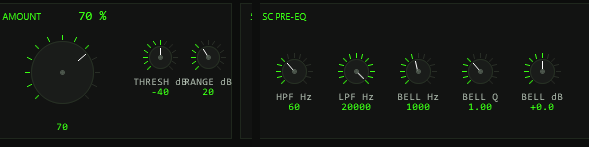
The SC PRE-EQ shapes the sidechain in the time domain, before both consumers — the spectral analysis and the zone detectors hear exactly the same filtered signal. One truth, no disagreement between "what is removed" and "when".
| Stage | Range / default | Typical use |
|---|---|---|
HPF 4th-order | 20–500 Hz, def. 20 Hz (off at the minimum) | Remove sub rumble so the ducker follows the real kick |
LPF 4th-order | 1–20 kHz, def. 20 kHz (off at the maximum) | Ignore hiss/cymbal bleed on the sidechain |
BELL FREQ/Q/GAIN | 100 Hz–16 kHz · 0.3–10 · ±18 dB, def. 0 dB (off) | Surgically notch out a bleed frequency (e.g. hi-hat on the snare send) or emphasise the band that should drive the duck |
THRESH does double duty: it sets the bin level below which the
spectrum counts as silent and the gate threshold of all three zone
detectors (with a 3 dB knee). If a zone never opens even though the
spectrum shows energy, THRESH is the first knob to lower.
07Controls & display
All sliders stay hidden by design — the drawn front panel (900×570) is the interface. Knobs: drag vertically, Shift for fine steps, mouse wheel over a knob, right-click or double-click for the default.
| Control | Values | Function |
|---|---|---|
SC SOURCE CH / GMEM buttons | CH 3/4 · GMEM LINK | Sidechain input path (section 03) |
AMOUNT | 0–100 %, def. 50 | Removal depth |
THRESH / RANGE | −80…0 / 3–48 dB | Spectral gate shaping (section 06) |
XOVER LOW / HIGH | 40–500 / 1k–12k Hz | Zone boundaries — also draggable as lines in the display; HIGH ≥ 2× LOW |
LOW/MID/HIGH ATK · REL · TRIM | see zone table | Per-zone ballistics and removal scaling; TRIM is also on the strip under the display |
PRE HPF / LPF / BELL FREQ·Q·dB | see pre-EQ table | Sidechain conditioning |
LOOK (LOOKAHEAD) | 0–20 ms, def. 0 | Delays the main signal so ducking starts before the transient (section 10) |
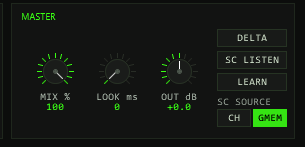
MIX | 0–100 %, def. 100 | Parallel blend: scales the removed energy only — phase-aligned, no comb |
OUT | ±12 dB, def. 0 | Make-up gain after the process |
DELTA / SC LISTEN / LEARN | toggle buttons | Audition modes and snapshot (sections 08/09) |
SOLO per zone | OFF/LOW/MID/HIGH | Solos one zone's band (section 08) |
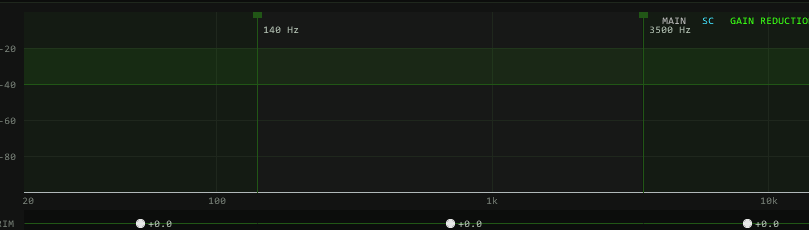
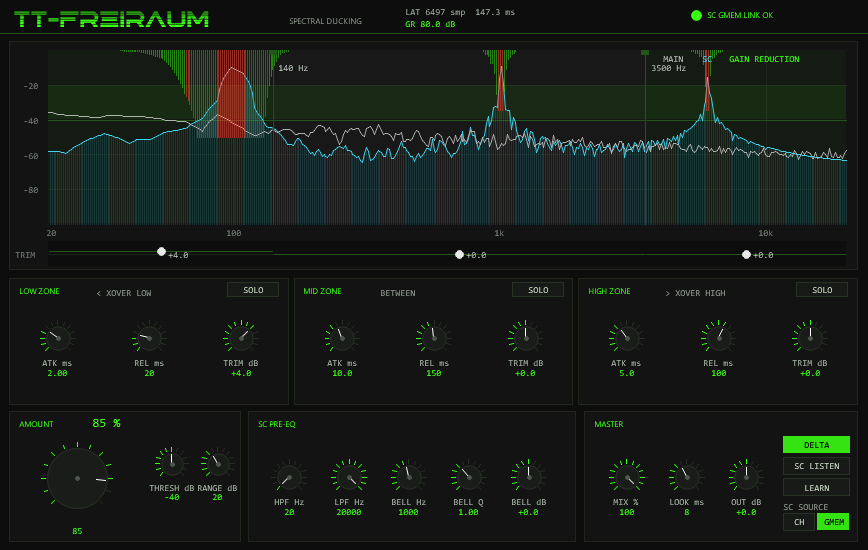
The spectral plot (log scale, 20 Hz–20 kHz) shows the main spectrum in
grey, the sidechain in cyan and the current gain reduction as
bars hanging from the top — green up to 12 dB, red beyond, 24 dB reaches
half the plot height. The dashed THRESH line plus the
RANGE band above it are shaded in, so you see exactly where the
sidechain starts to bite. Below the plot, the TRIM strip holds
a draggable handle per zone (±12 dB). The header shows live
LAT … smp / … ms and GR … dB, the strongest
per-bin reduction right now.
Options / Color
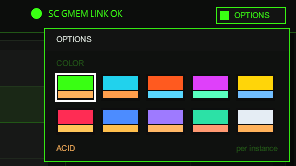
The OPTIONS button at the right end of the header bar opens a
small box. Under COLOR it offers ten colour schemes for the whole
front: ACID (the factory colour, a neon green), CYAN, ORANGE, MAGENTA,
YELLOW, RED, BLUE, VIOLET, MINT and ICE. Click a swatch to switch the accent,
its second colour and, for RED to ICE, the tinted panel background at once; a click anywhere
outside the box closes it. The choice applies per plug-in instance, is stored
with the project, the FX chain and REAPER presets, and does not touch any audio
parameter. The factory colour is ACID, and the trace colours of the spectral
display (MAIN grey, SC cyan, red for heavy gain reduction) keep their meaning
in every scheme.
08Presets
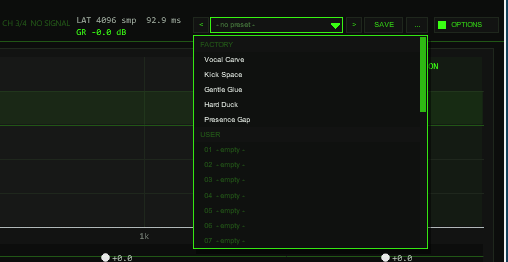
OPTIONS: < name > SAVE .... The name opens the list with the FACTORY and USER sections.The bar loads and saves the whole sound setting of the instance in one step (21 values): AMOUNT, the three zone TRIMs, both crossovers, attack and release of all three zones,
the SC pre-EQ (HPF, LPF, the bell), LOOK, OUT, THRESH and RANGE. Not part of a preset: SC SOURCE (it describes your routing, not the sound),
MIX, the audition modes (DELTA / SC LISTEN), the zone SOLO, LEARN together with its snapshot (a measurement of your sidechain, never stored),
the colour scheme (OPTIONS) and the hidden test parameters. Loading a preset therefore never switches your routing, your wet/dry balance or an audition. Note that LOOK is part of a preset:
a preset with lookahead changes the reported latency (REAPER re-aligns it automatically).
| Control | Function |
|---|---|
< / > | Previous / next preset: first the five factory presets, then the used user slots; wraps around and loads immediately. |
| Name field | Opens the list: FACTORY (5 presets) and USER (32 slots, empty ones show - empty -). Mouse wheel scrolls, click loads. A * behind the name means a value differs from the loaded preset. |
SAVE | Saves the current setting into the selected user slot; with a factory preset (or none) selected, into the first free slot. A name box opens (up to 24 characters, default User 01): type, Enter or OK saves, CANCEL or a click outside cancels. |
... | RENAME, COPY (into the next free slot), DELETE (a second click confirms) for the selected user preset, and INIT (all 21 values back to the factory defaults: AMOUNT 50 %, trims 0 dB, crossovers 140 Hz / 3.5 kHz, attack/release 2/20, 10/150 and 5/100 ms, HPF 20 Hz, LPF 20 kHz, bell 1 kHz / Q 1 / 0 dB, LOOK 0 ms, OUT 0 dB, THRESH −40 dB, RANGE 20 dB). |
Factory presets
Starting points, not final settings. Each preset was measured with a pink-noise main signal (−18 dBFS) and a steady sine as sidechain (−6 dBFS), 3 s after the start, MIX 100 %, offline render. The table shows the level change of the main signal in a narrow band around the sidechain tone (±6 % for 1 kHz, ±10 % for 100 Hz), against the same setting with AMOUNT 0. In every case the level 250 Hz, 2.5 kHz and 6 kHz away from the tone stayed within ±0.01 dB.
| Preset | Idea | SC = 1 kHz | SC = 100 Hz |
|---|---|---|---|
| Vocal Carve | Sidechain = lead vocal: makes room in the mids. AMOUNT 60 %, mid trim −1 dB, SC filtered 80 Hz–12 kHz, bell at 2.5 kHz, RANGE 14 dB. | −4.2 dB | −7.9 dB |
| Kick Space | Sidechain = kick: bass and low mids duck fast (low attack 1 ms, release 80 ms), AMOUNT 75 %, low crossover 120 Hz, SC low-passed at 8 kHz. | −4.9 dB | −12.0 dB |
| Gentle Glue | Slow, shallow ducking for a bus: AMOUNT 30 %, RANGE 8 dB, long attacks (12–25 ms) and releases (up to 380 ms). | −2.7 dB | −3.1 dB |
| Hard Duck | Deep and fast: AMOUNT 100 %, RANGE 30 dB, attacks 0.5–3 ms, 5 ms lookahead (adds 5 ms to the reported latency: 4096 5 ms lookahead (reported latency +240 samples at 48 kHz: 4096 → 4317)rarr; 4317 samples at 44.1 kHz). | −5.3 dB | −52.3 dB |
| Presence Gap | Sidechain = lead: keeps the 3 kHz presence area free (crossovers 180 Hz / 5 kHz, bell at 3 kHz in the sidechain, SC filtered 150 Hz–16 kHz). | −4.5 dB | −6.9 dB |
The depth depends on the zone: a narrow sine in the sidechain is a small band, so the average over the measuring band is much smaller than the notch itself; with full-range sidechain material the carved gaps are wider.
A factory preset changes exactly the 21 values above; SC SOURCE, MIX, audition, solo, LEARN and the colour stay as they are.
Where the user bank lives. Plug-ins cannot write files, so the 32 user slots are part of the plug-in state: they are saved with the project, with FX-chain and track-template copies,
and in every REAPER preset of this plug-in (the + button in the FX window toolbar). To take your bank to another project or computer, save a REAPER preset once
(+ → Save preset) and load it there: the whole bank comes with it. Projects saved with earlier versions load unchanged with an empty bank.
Typing names. REAPER keeps Space for the transport, so type Shift+Space for a blank. Depending on your REAPER settings Esc closes the whole FX window; use CANCEL instead. (The + menu of the FX window also has Send all keyboard input to plug-in.)
09Audition & solo
| Mode | What you hear |
|---|---|
NORM (default) | Main minus removed spectrum — the product output |
DELTA | Only the removed energy: exactly what the ducker takes away. Nothing else is touched — at AMOUNT 0 the delta floor sits below −300 dBFS |
SC LISTEN | The sidechain after the pre-EQ, delayed to the same output latency — literally what the detector hears |
ZONE SOLO is a separate selector (OFF/LOW/MID/HIGH, one
SOLO button per zone) that crossfades the output into a single
zone's band: with NORM you hear that band after
ducking — for judging whether a zone is being carved too hard; combined
with DELTA you hear only what that zone removes. Measured zone
isolation: −68 dB at 60 Hz and −120 dB at 9 kHz inside a MID solo.
All mode, solo and learn switches fade over ~20 ms — no clicks mid-track.
10Learn snapshot
Press LEARN while the sidechain plays: the running average
of the sidechain spectrum (a ~200 ms window) is frozen into a static
removal profile. Over a 20 ms ramp the weights crossfade from the live
spectrum to the snapshot, and all three zone activities are pinned fully
open — the result is an EQ-carving profile that keeps working even when the
sidechain goes quiet, not a dynamic ducker. Release LEARN to
ramp back to live tracking.
Let the sidechain play for at least a fraction of a second before pressing so the average is representative. A held profile survives transport stops while the instance runs — but it is not stored in the project or preset: after a reload the snapshot is empty, so a saved LEARN-on does nothing until you toggle it again with the sidechain playing.
11Latency & lookahead
| Setting | Reported delay |
|---|---|
| Base (STFT window) | 4096 samples — 85 ms @48 k, 93 ms @44.1 k |
| + LOOKAHEAD 10 ms | 4576 samples @48 k · 4537 @44.1 k — reported exactly to REAPER's PDC |
| + LOOKAHEAD 20 ms | 5056 samples @48 k |
| GMEM LINK mode | +2048 samples guard for the sender/receiver block order |
LOOKAHEAD delays the main signal relative to the zone
activity — the duck is already down when the (delayed) transient arrives,
which kills the click at the onset (measured: onset leads by ~9–10 ms at
LOOKAHEAD 10). At sample rates above ~93 kHz the lookahead tops out at
1856 samples instead of 20 ms (≈19 ms @96 k, ≈10 ms @192 k). The header
shows the live LAT samples / ms.
12Hidden readouts
For diagnostics and test automation the plug-in publishes read-only
parameters — hidden from the panel (JSFX - prefix) but exposed
to the host, so they appear in REAPER's parameter/automation list:
| Parameter | Content |
|---|---|
Q PDC | Reported latency in samples — the same number the header shows as LAT |
Q SC STATE | 0 = no source · 1 = signal present on CH 3/4 · 2 = GMEM link alive (mirrors the header LED) |
Q ACT LOW / MID / HIGH | Live zone activity 0–1, after the gate and the attack/release ballistics |
Q GMAX | Strongest current per-bin removal 0–1 (the header shows it as GR in dB) |
Q HOPS | Analysis hop counter — keeps counting while the engine runs |
Q SC PEAK dB | Level of the loudest sidechain bin this hop, sine-calibrated dB |
Q PB CMD / Q PB IDX / Q PB A / Q PB B | Preset-bank test interface (sliders 37–40): command, slot or factory index, and two readouts. Only used by the test suite; leave at 0 |
Q W MAX | Highest spectral weight 0–1 after THRESH/RANGE gating — did the sidechain open the gate at all? |
13In practice
Three setups cover most of what TT-FREIRAUM is for. Each names the routing, the settings that matter and what to watch in the display.
Kick → bass: the classic duck, without cabling
Goal: every kick hit carves room in a sustained bass or pad — only where the kick actually lives, so the bass keeps its own mids and tops playing between hits.
- On the kick track: insert
TT-TRUEAB PRE(free, same ReaPack) first in the chain — it taps whatever plays at that point — and switchACTIVEandDRY RINGon. No sends to draw: the link runs over the sharedttabring, across tracks and busses. - On the bass track: insert
TT-FREIRAUM, set SC SOURCE toGMEM. The header must readSC GMEM LINK OK—NO PRE (GMEM)means the sender is bypassed, missing or has gone stale. - Raise AMOUNT to 50–80 %. Hold SC LISTEN and check
that only the kick reaches the detector — if the channel carries
rumble or cymbal bleed, raise
PRE HPFuntil the listen contains just the body and the click. - LOW zone:
ATK≈ 2 ms,REL20–60 ms — short enough to feel tight, long enough not to stutter. If the sub should dive deeper, reach for the zoneTRIMbefore pushing AMOUNT further.
DELTA that only the collisions come out.GMEM adds a fixed 2048-sample guard on top of the 4096-sample STFT
latency — the header LAT shows the sum. On a
rhythm-critical chain the channels-3/4 route avoids it (section
03).
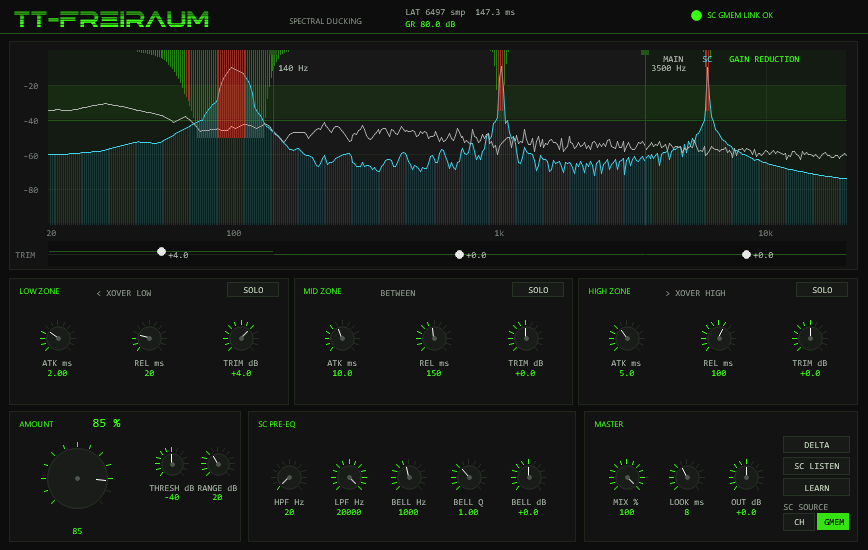
SC GMEM LINK OK, GR 80 dB at the notch floor, LAT 6497 smp ≈ 147 ms at 44.1 kHz (4096 STFT + 2048 link guard + 8 ms LOOKAHEAD).Vocal unmasking: surgical carve on a bus
Goal: a dense bus (guitars, keys, pads) gives way to the vocal only inside the vocal band — everything outside roughly 300 Hz–4 kHz keeps playing untouched.
- Send the vocal track to channels 3/4 of the bus (send
destination 3/4, bus track channel count 4) and leave
SC SOURCE on
CH— the lowest-latency path, no link guard. Header:SC CH 3/4 SIGNAL. - Narrow the work band:
XOVER LOW≈ 300 Hz,XOVER HIGH≈ 4 kHz. The MID zone is now exactly the band the vocal masks — the LOW and HIGH zones should stay near-silent and can even be trimmed down. - Voice the detector with the SC PRE-EQ:
HPF≈ 120–250 Hz against plosives and rumble,LPF≈ 8–10 kHz so sibilance does not overdrive the cut, and aBELLboost (+4–8 dB, Q 1–2) on the masking region (~1–3 kHz) so precisely that band decides when to duck. - MID zone:
ATK5–10 ms,REL200–400 ms — a slow release is what makes this transparent instead of pumping.AMOUNT30–50 % is usually plenty for speech clarity. - Press SOLO on the MID zone while the vocal sings: you hear
that band after ducking — if it sounds hollow, back the
TRIM down. Then set SOLO back to
OFF.
SC LISTEN be the judge: it should contain the vocal and
nothing else.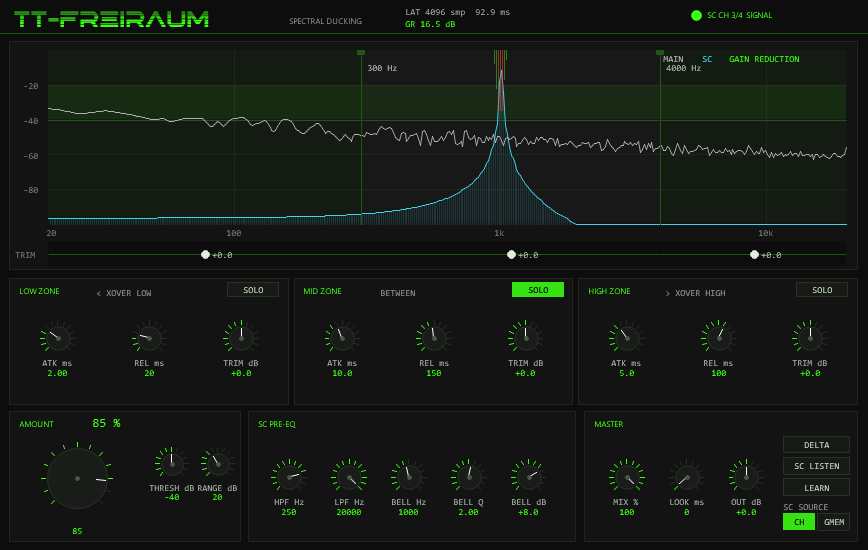
SC CH 3/4 SIGNAL and LAT stays at the 4096-sample base (92.9 ms at 44.1 kHz), because neither the GMEM guard nor LOOKAHEAD is in play.Before you commit: verify it is transparent
Goal: prove the duck removes exactly the collisions — and nothing else — then pin the behaviour.
- DELTA solos the removed energy: it should sound like the
collisions, not the song — the slice of bass that collides with
each kick hit, the guitar bins sitting under the vocal. If DELTA
plays back whole program material,
AMOUNTor the zoneTRIMs are too hot; if it is near-silent while the display shows cuts, the sidechain path is the thing to check. - SC LISTEN plays the sidechain after the pre-EQ — literally what the detector hears. Tune HPF/LPF/BELL here, not blind: if the listen contains the trigger and nothing else, the carve can only be surgical.
- ZONE SOLO is a diagnostic, not an effect — always return it
to
OFF. Its isolation is deep enough (−68 dB at 60 Hz inside a MID solo) that a forgotten SOLO reads as a broken mix. - LEARN freezes the ~200 ms average sidechain spectrum into a static profile: the carve keeps working even while the sidechain pauses — right for "hold space for the lead through the whole section", wrong for punchy groove ducking. The snapshot is not stored in the project — re-learn after a reload.
- LOOKAHEAD 5–10 ms when onsets click: the cut is already
down when the transient arrives. It is not free — check the cost
in the header
LATreadout (4096 smp base + lookahead, + 2048 in GMEM mode) and remember REAPER compensates all of it via PDC.
14Troubleshooting
SC CH 3/4 NO SIGNAL— the send is missing, the track has only 2 channels, or the send lands on channels 1/2. Set the send's destination channels to 3/4 and the track channel count to 4.NO PRE (GMEM)— no TT-TRUEAB PRE alive: it needsACTIVE+DRY RINGon, and must actually run (a bypassed or offline PRE goes stale after ~250 ms). With several PREs the last writer wins — keep it to one.- Ducking feels late on transients — raise
LOOKAHEADto 5–10 ms. - Wide smearing instead of a notch — normal STFT physics; sharpen the
result with a smaller
RANGEand a harderTHRESH, or narrow the sidechain with the pre-EQ bell. - A zone never opens though the spectrum shows energy — THRESH gates the zone detectors too; lower it, or check the zone TRIM.
XOVER HIGHrefuses to go lower — it is held at ≥ 2 ×XOVER LOWby design; lower the low crossover first.- LEARN did nothing after reloading the project — the snapshot is not persisted; press LEARN again with the sidechain playing.
- Pumping on a busy sidechain — shorten the zone releases or drop
MIXbelow 100 % for a subtler blend.