
01The concept
TT-HYPERCLAP is a pure synth handclap. One clap is a train of short noise bursts (1 .. 8) a few milliseconds apart, filtered by a tone band-pass; the last burst rings out with a tail whose shape you draw. Up to three detuned layers widen the sound, HUMANIZE scatters the burst timing like real hands, and a SNAP click sits on the last hit. A room tail with ducking - and an optional reverse swell into the next hit - comes from the same engine as the kick series.
The signal path is fixed and short: burst train + snap → EQ pre →
slot 1..4 → Rawstyle stack → (Punch Protect sum) → room → EQ post → clipper → out → limiter.
Everything from the EQ pre to the Rawstyle stack runs at twice the sample rate.
There are no samples and no randomness you cannot reproduce: the noise comes from a
deterministic generator, so every render of the same clap is identical.
02Quick start
- Insert
TT-HYPERCLAPon a track (it is an instrument: no input needed). - Pick a factory clap from the PRESET bar (arrows step through the 33 claps).
- Play notes from the piano roll, or press PLAY in the PATTERN panel: with
HOSTthe 16 steps follow the transport, withFREEthey run on their own at FREE BPM. - Reshape the sound: CLAPS sets the burst count, SPACING the rhythm of the hands, LENGTH the tail.
- Happy? Actions → TT-HYPERCLAP Render renders the current clap as a 24-bit WAV item on a new track.
03The front
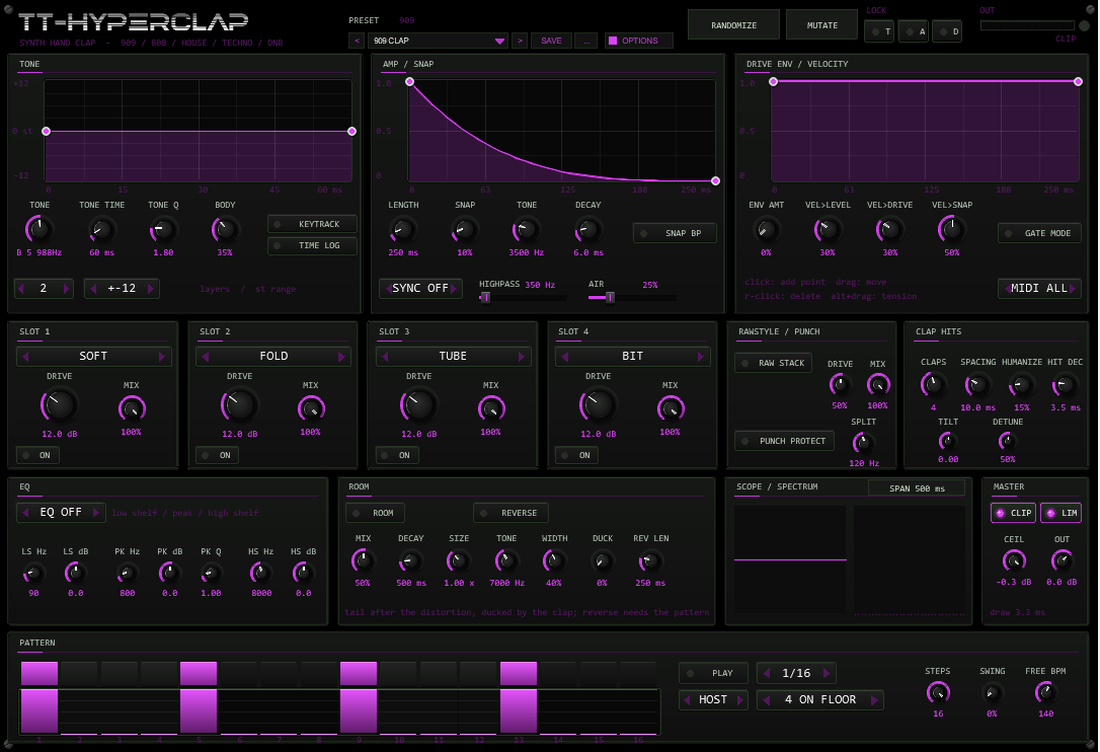
| Area | What it does |
|---|---|
| Header | Preset bar (< name > SAVE ...) with the family label, RANDOMIZE / MUTATE with LOCK T / A / D (tone, amp/hits, distortion), output meter and clip LED, OPTIONS button (colour scheme) |
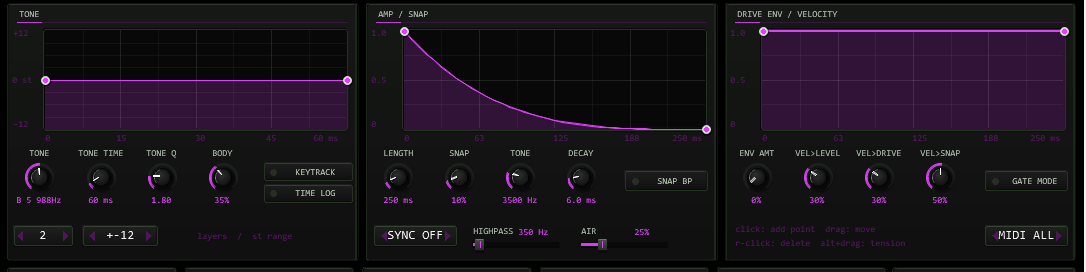
| Row 1 | TONE, AMP / SNAP and DRIVE ENV curve editors with their controls. A white line runs along each curve while a clap plays |
| Row 2 | Four distortion slots, RAWSTYLE / PUNCH, CLAP HITS (burst train) |
| Row 3 | EQ, ROOM, scope + spectrum, MASTER (clipper, limiter, output gain) |
| Row 4 | PATTERN: step buttons, velocity bars, play, sync, rate, template, steps, swing, free-run tempo |
Every value is an automatable parameter (the sliders are hidden in the JSFX list and driven from the front). Curves, the pattern and the lock mask are stored with the project and with REAPER presets.
04Bursts, layers & tone
The burst train is the heart: CLAPS (1..8) bursts start SPACING ms apart (2..30 ms). HUMANIZE scatters each spacing up to +-50 % like real hands (0 = machine grid, deterministic), HIT DECAY (0.5..15 ms) is how fast each pre-burst fades, and TILT weights the pre-bursts towards the front (negative) or the back (positive). The last burst always has full weight and carries the tail.
LAYERS (1..3) stacks independent burst trains; DETUNE offsets the tone filter of each layer by up to +-3 semitones (the first layer stays at pitch, layer 2 down, layer 3 up). More layers = wider, more human wall of hands; the sum is normalised.
| Control | Range | Function |
|---|---|---|
TONE | note 60..108 | Centre of the tone band-pass when KEYTRACK is off (83 = 987.8 Hz, the classic clap band); note name and Hz are shown |
TONE Q | 0.5..8 | Sharpness of the band-pass: low = airy hands, high = tunable, metallic resonance |
BODY | 0..100 % | Amount of a second band-pass one octave below the tone (0.55×) - adds chest |
TONE TIME | 5..1000 ms | Length of the tone curve; after it the pitch stays at the curve end |
TIME LOG | off / on | Logarithmic time axis for the tone curve |
KEYTRACK | on / off | On: the MIDI note sets the tone centre (A4 = 440 Hz; the pattern always plays TONE) |
The TONE curve (curve 1) sweeps the band-pass centre in semitones over TONE TIME -
from a subtle dip to laser sweeps (see the Laser Clap preset). The vertical range is
selectable (+-12 / 24 / 48 / 96 st).
05Amp curve, snap, highpass & air
The amp curve (curve 2) shapes the tail of the last burst over LENGTH
(30 ms..3 s, or a note value with SYNC). It starts at full level - the burst
attack itself is a fixed 0.3 ms ramp - and ends with an automatic 2 ms fade, so a curve
that does not reach zero never clicks. A gated shape (hold, then drop) makes classic
80s gated claps.
| Control | Range | What it is |
|---|---|---|
SNAP | 0..100 % | Click layer on the last burst: noise through a state-variable filter with an exponential decay - the " fingertips" of the clap |
TONE / DECAY / SNAP BP | 300 Hz..14 kHz / 0.5..40 ms | Snap filter (high-pass, or band-pass with SNAP BP) and decay |
HIGHPASS | 100..3000 Hz | Removes the low end behind the layers - tight stage or full body |
AIR | 0..100 % | A pinch of bright (6 kHz high-passed) first-layer noise on top of the tail |
06Drive envelope & velocity
The drive curve (curve 3) scales the drive of all distortion slots (and the
Rawstyle stack) over the tail. ENV AMT is the depth: at 0 the curve is ignored,
at 100 % the drive follows it completely. Velocity: VEL>LEVEL, VEL>DRIVE,
VEL>SNAP (0..100 % each) decide how much a soft note is quieter, cleaner and less clicky than a hard one.
07Distortion chain
Four slots in a fixed order, each with a type, a drive (0..40 dB), a mix and an on
switch - identical to the TT-HYPERKICK chain: SOFT (tanh, normalised), HARD
(clip), FOLD (sine wave-folder), TUBE (asymmetric + DC blocker), BIT (bit crusher +
sample-and-hold), CLIP (cubic soft clip). RAW STACK adds a three-stage saturation.
Everything runs at 2× the sample rate (IIR half-band pair, flat to 20 kHz). PUNCH
PROTECT keeps the low band of the input dry while adding the distorted top.

08EQ & master
One three-band EQ (low shelf, peak, high shelf) sits either PRE (before the chain) or POST (after the room mix), or is off. The CLIPPER is a hard clipper with a ceiling (-12..0 dB) using antiderivative anti-aliasing; LIM is a soft limiter that keeps the output below 0 dBFS; OUT is the output gain. The meter in the header shows the output peak; the clip LED lights when the clipper engages.
09Room & reverse
The ROOM tail is fed from the distorted clap (before EQ post and clipper): four damped
comb filters and two all-pass diffusers per channel build a small-to-medium room, a low-pass at
TONE (1..16 kHz) sets how dark the walls are, SIZE (0.5..2.0) scales the
comb lengths. DECAY is the 60 dB decay time (0.1..3 s), MIX the amount,
WIDTH the stereo spread (0 = mono), and DUCK pulls the room down while the
clap is loud - it blooms back as the tail fades.
REVERSE records the room of the last clap and plays it backwards so that it swells into the
next clap: with the pattern running, the playback ends exactly on the next hit. Without the pattern
a MIDI clap starts the reverse of the previous clap right at the trigger, with the free length REV LEN.

10Pattern player
16 steps with a velocity each: click a step button to switch it on, paint the bars underneath to set
the velocity (0 = off). RATE 1/4..1/32, STEPS 1..16, SWING delays every
second step. HOST follows the transport sample-exactly, FREE runs at FREE BPM.
The pattern plays TONE (not the note).

11Presets: bar, user bank, randomize
33 factory claps in families: 909 (Clap, Tight, Room, Thin), 808 (Clap, Wide), House (Deep House, Garage Snap, Disco Hands, Clap Stack), Techno (Warehouse, Industrial Crush, Reverse Clap, Basement), Hard (Hardstyle, Rawstyle Stack, Hardcore Burst), DnB (Neuro, Liquid, Jungle Hands, Amen Slap), Trap (Trap, Drill Snap, Layered 3x, Trap Double), LoFi (Bitcrushed, Tape Clap), FX (Long Room, Gated Room, Metallic, Laser Clap, Ping Clap) plus INIT.
A preset loads the sound: all sound parameters and the three curves. Not part of a preset: the
pattern, the pattern player settings, the MIDI channel, the scope span, the LOCK buttons, the colour
scheme and the hidden test parameter. The preset bar (< name > SAVE
...) works like in TT-HYPERKICK: 32 user slots that live in the project and in REAPER presets,
with RENAME / COPY / DELETE / INIT.
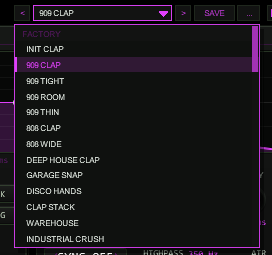
OPTIONS: 33 factory claps plus 32 user slots.RANDOMIZE draws a new clap within sensible ranges, MUTATE nudges the current one by about
12 %. The LOCK buttons protect an area: T tone curve and tone controls, A
amp curve, snap and burst train, D distortion and room.
12Options / Color
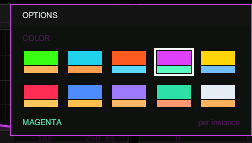
Click OPTIONS in the header to pick one of ten colour schemes (ACID, CYAN, ORANGE, MAGENTA, YELLOW, RED, BLUE, VIOLET, MINT, ICE). The choice applies per plug-in instance and is saved with the project and with REAPER presets. The factory colour of TT-HYPERCLAP is MAGENTA.
13MIDI & voice behaviour
- Note-on triggers a clap; velocity maps to level, drive and snap.
MIDIselects one channel or all. - Note-off is ignored (one-shot) unless
GATE MODEis on: then the clap fades out over 5 ms at note-off (or CC 123). - Triggers are sample-accurate. All other MIDI passes through. Retrigger fades the running clap in 2 ms.
14Render script
TT-HYPERCLAP Render.lua (installed by ReaPack, Actions → Show action list) renders the current sound: it puts a temporary MIDI note at the edit cursor, sizes the range from LENGTH / room decay (plus reserve), renders it as a stereo 24-bit WAV stem on a new track and removes the temporary note. Select the track first.
15Technical notes
- Latency: none reported to the host (an instrument). The oversampling half-band adds a few samples (µs) between trigger and sound; triggers themselves are sample-exact.
- Determinism: the noise comes from a seeded generator (seed changes per trigger), so the same clap state always renders the same audio - ideal for sampling and for the automated test suite.
- Sample rates: 44.1, 48 and 96 kHz are supported; all time constants are computed from the current rate. The engine is verified against a float64 reference model with a tolerance of 5e-6.
- Safety: NaN/Inf never reach the output; with the limiter on, the peak stays below 0 dBFS at any drive.
- Saved state: sliders (REAPER), curves, pattern and lock mask (plug-in state, format version 1), followed by the user preset bank (32 slots).
16Troubleshooting
- No sound - a MIDI item or the pattern must trigger it; check
MIDIchannel andPLAY(HOST needs the transport running). - The clap clips - the limiter is on by default; with
LIMoff, lowerOUT. Layers and the room add on top of the dry clap. - The clap sounds noisy, not tonal - raise
TONE Qand lowerHIGHPASS;BODYadds the lower band. - Reverse does nothing - it needs ROOM on and a previous clap.
- Hidden parameters -
Debug mode1 / 2 are for the test suite (trigger log, neutral curves); leave them at 0.Start phaseandRoom pitchare unused leftovers from the shared skeleton.
17Release notes
- 0.2.0 - Room tail with size/tone/duck/width, reverse, 16-step pattern player with host sync, 33 factory claps, render script, manual.
- 0.1.0 - Core: burst-train engine (1..8 bursts, humanize, hit decay, tilt, 3 detuned layers), tone/amp/drive curves, snap layer, 4-slot distortion chain with 2x oversampling, EQ, clipper, limiter, scope, state save/restore.