
01The concept
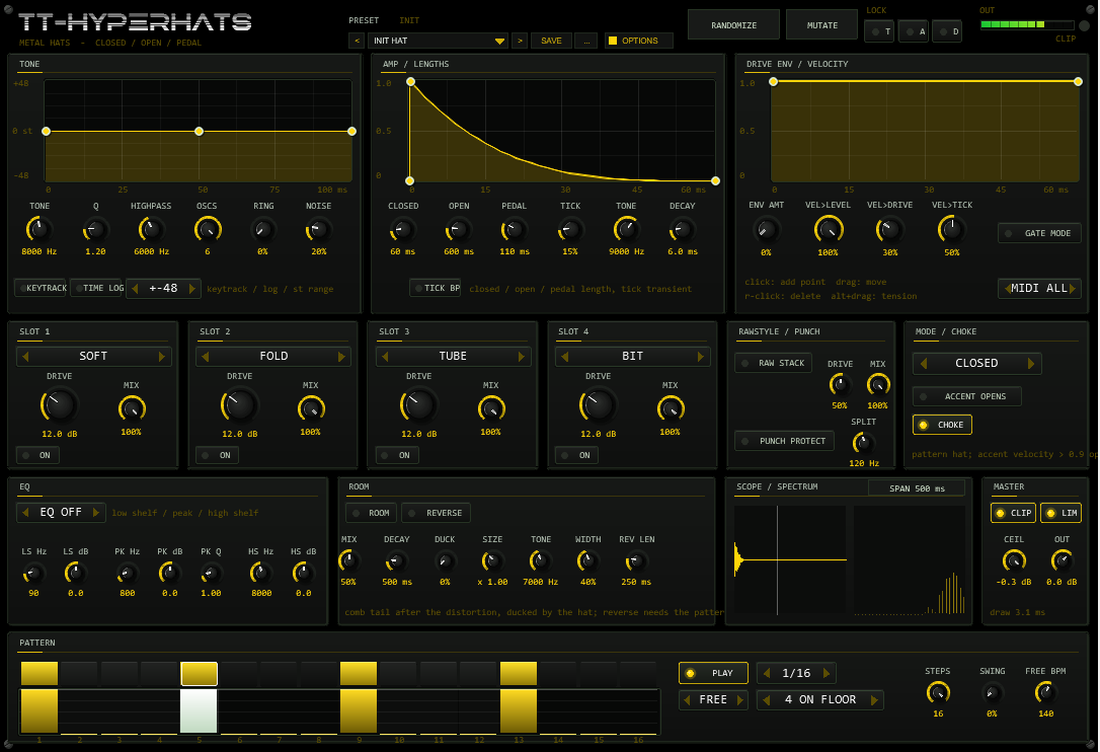
TT-HYPERHATS is a synthetic hi-hat in the classic 808 style: six detuned square oscillators (the original 808 metal frequencies) plus a noise source, filtered by a band-pass whose centre follows a tone curve you draw, an amplitude curve you draw and a drive curve you draw for the distortion chain. Three lengths - CLOSED, OPEN and PEDAL - are selected from the MIDI note, and a choke makes sure an open hat gets out of the way of the next closed hit. A comb-filter ROOM adds space, and REVERSE plays the room backwards into the next hat.
The signal path is fixed and short: oscillator bank + noise → band-pass → high-pass →
amplitude → tick → EQ pre → slot 1..4 → Rawstyle stack → room → EQ post → clipper → out → limiter.
Everything from the EQ pre to the Rawstyle stack runs at twice the sample rate.
02Quick start
- Insert
TT-HYPERHATSon a track (it is an instrument: no input needed). - Pick a factory hat from the PRESET bar (arrows step through the 33 hats).
- Play C2 (note 36) or any note from the piano roll: 42 = closed, 46 = open, 44 = pedal,
every other note maps by
note % 3. - Or press PLAY in the PATTERN panel: with
HOSTthe 16 steps follow the transport, withFREEthey run on their own at FREE BPM. - Reshape the sound: drag the TONE curve, turn Q, shorten CLOSED, switch ROOM on.
- Happy? Actions → TT-HYPERHATS Render Hats renders the current hat as a 24-bit WAV item on a new track.
03The front
| Area | What it does |
|---|---|
| Header | Preset bar (< name > SAVE ...) with the family label, RANDOMIZE / MUTATE with LOCK T / A / D (tone, amp, distortion), output meter and clip LED, OPTIONS button (colour scheme) |
| Row 1 | TONE, AMP / LENGTHS and DRIVE ENV curve editors with the knobs that belong to them. A white line runs along each curve while a hat plays |
| Row 2 | Four distortion slots, RAWSTYLE / PUNCH, MODE / CHOKE (pattern hat, accent opens, choke) |
| Row 3 | EQ, ROOM (mix, decay, duck, size, tone, width, reverse), scope + spectrum, MASTER |
| Row 4 | PATTERN: step buttons, velocity bars, play, sync, rate, template, steps, swing, free-run tempo |
Every value is an automatable parameter (the sliders are hidden in the JSFX list and driven from the front). Curves, the pattern and the lock mask are stored with the project; the preset bar adds a user bank of 32 slots.
04Oscillator bank & tone curve
The raw metal is the sum of six square oscillators at 205.3 / 304.4 / 369.6 / 522.7 / 540.0 / 800.0 Hz
(the 808 ratios), band-limited with a one-sample PolyBLEP at both edges of each square. Their fixed detune is what makes
the 808 hat sound "bell-like" instead of buzzy.
- OSCS - how many oscillators sound (1..6). One oscillator is a pure squared tone, six are the full bank.
- RING - crossfades the mix towards ring modulation (square 1 × 2 + 3 × 4 + 5 × 6): hollow, metallic, clangorous.
- NOISE - crossfades towards deterministic noise (the "sizzle" part). The noise seed changes with every hit, so rolls never sound looped, yet every render is exactly reproducible.
- METAL PITCH - shifts the whole bank in semitones (-24..+24).
- TONE + Q - centre frequency and resonance of the band-pass; HIGHPASS cleans up everything below.
- The TONE curve sweeps the band-pass centre over PITCH TIME: positive points sweep up, negative points sweep down (range set by TONE RANGE and shown left of the curve). TIME LOG stretches the start of the curve, which is where hat transients live. Steep curves turn the hat into a "laser" - see the Laser Hat preset.
- KEYTRACK - every MIDI note adds
note - 42semitones to the metal pitch (42 stays at the set pitch).
05Closed, open, pedal & choke
A hat has three lengths, and the note chooses the mode:
| Mode | MIDI note | Length knob | Default |
|---|---|---|---|
| Closed | 42 (F#1) or note % 3 = 0 | CLOSED | 60 ms |
| Open | 46 (A#1) or note % 3 = 1 | OPEN | 600 ms |
| Pedal | 44 (G#1) or note % 3 = 2 | PEDAL | 110 ms |
The AMP curve shapes the decay inside the length (drawn over the length of the current mode), with a fixed 0.2 ms attack against clicks. CHOKE decides how hats overlap:
- CHOKE on (default): every new hit fades the sounding hat out over 1 ms - an open hat is choked by the next closed hit, like a real cymbal with the pedal down.
- CHOKE off: the newest hat always rings out completely; when a third hit arrives, the oldest hat fades out over 1 ms while the new one takes its place. Two hats can overlap freely - open hats wash under fast closed rolls.
- GATE MODE: a note-off fades the current hat out over 5 ms instead of letting it ring to its length.
TICK adds a short filtered-noise transient at the very start of every hit (level, tone, decay; TICK BP switches the tick from high-passed to band-passed). Velocity can scale level, drive and tick separately (VEL>LEVEL / VEL>DRIVE / VEL>TICK).
06Drive envelope & velocity
The DRIVE ENV curve scales the drive of the whole distortion chain over the hat length: with ENV AMT at 100 % the chain bites hard at the transient and relaxes into the tail. The curve value multiplies the drive in dB of every slot, the Rawstyle stack included.
07Distortion chain
Four slots in series, each with type (SOFT / HARD / FOLD / TUBE / BIT / CLIP), drive in dB and a dry/wet mix - the same chain as its sibling TT-HYPERKICK, running at twice the sample rate so fold and hard clipping stay clean. RAW STACK adds the rawstyle saturation behind the slots; PUNCH PROTECT keeps everything below the SPLIT frequency untouched while only the distorted part is added above it. The 3-band EQ can sit before (EQ PRE) or after (EQ POST) the chain. The master section has the soft clipper with its ceiling and the limiter (both on by default - with LIM and CLIP off, watch your output gain).
08Room & reverse
ROOM is a small comb-filter space fed by the distorted hat: MIX sets the send, DECAY the ring-out (100 ms..3 s), SIZE stretches the comb lengths, TONE darkens or opens the tail, WIDTH sets the stereo spread (0 = mono). DUCK dips the room while the hat itself sounds (default 0 = no ducking).
REVERSE records the room and plays it backwards so it swells into the next hit - like a reversed cymbal that lands exactly on the beat. With the pattern player running, the swell always ends sample-exact on the next pattern hat (REV LEN caps the length); for MIDI hits it starts right at the trigger. Reverse needs ROOM switched on.

09Pattern player & accents
The 16-step player triggers hats with velocity bars, host-synced (HOST) or free-running (FREE BPM), at 1/4..1/32 rate with swing. Templates: 4-on-the-floor, rolling 16th, ACCENT ROLL (velocities 0.55 / 0.75 / 0.95 at the end of the bar) and gabber 16ths. The pattern plays the hat mode chosen in the MODE / CHOKE panel (PATTERN HAT: CLOSED / OPEN / PEDAL). With ACCENT OPENS on, any step harder than 90 % velocity plays an OPEN hat - the classic accent-opens trick, ready-made in the ACCENT ROLL template.

10MIDI mapping
| Input | Behaviour |
|---|---|
| Note 42 (F#1) | Closed hat |
| Note 46 (A#1) | Open hat |
| Note 44 (G#1) | Pedal hat |
| Any other note | note % 3: 0 = closed, 1 = open, 2 = pedal |
| Velocity | Scales level / drive / tick per VEL>... knobs (default: level full) |
| Note-off / CC 123 | With GATE MODE: fade the hat in 5 ms |
| MIDI box | Restrict the instrument to one channel (ALL = omni) |
11Presets: bar, user bank, randomize
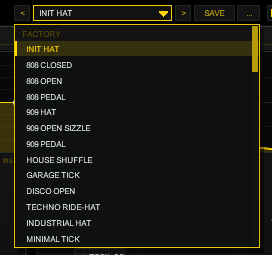
33 factory hats across 808, 909-ish, HOUSE, TECHNO, HARD, DNB, TRAP, LOFI and FX families - from 808 Closed over Techno Ride-Hat and Rawstyle Hat to Ring Metal and Reverse Open. The preset bar (< > arrows, SAVE, ... menu with RENAME / COPY / DELETE / INIT) manages a user bank of 32 slots that lives in the project. RANDOMIZE and MUTATE redesign the sound; the LOCK T / A / D switches protect the tone, amp or distortion group.
OPTIONS.12Options / Color
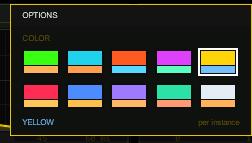
The OPTIONS box offers ten colour schemes (ACID, CYAN, ORANGE, MAGENTA, YELLOW, RED, BLUE, VIOLET, MINT, ICE). TT-HYPERHATS ships in YELLOW (#FFD60A); the choice is per instance and saved with the project.
13Render Hats script
Actions → TT-HYPERHATS Render Hats renders one hit of the selected track as a 24-bit WAV item on a new track, at the edit cursor. The length follows the current pattern-hat mode (closed / open / pedal) plus the room tail, so nothing is cut off. The temporary MIDI note is removed afterwards; cursor and render settings are restored.
14Technical notes
- Signal path: oscillator bank → noise mix → band-pass (swept by the tone curve) → high-pass → amplitude → tick → [EQ pre → slots → Rawstyle → punch sum at 2× sample rate] → room → [EQ post → clipper → out → limiter].
- Deterministic noise: both noise sources are LCGs with per-trigger seeds - identical input renders bit-identical output (the test oracle relies on this).
- State: sliders (REAPER), curves, pattern and lock mask (plug-in state, format version 1), followed by the user preset bank (32 slots) - projects without a bank load unchanged.
- Latency: none reported; the 2× oversampling filters are zero-delay IIR all-pass structures.
15Troubleshooting
- No sound - a MIDI item or the pattern must trigger it; check MIDI channel and PLAY (HOST needs the transport running). Note 36 sounds closed (36 % 3 = 0), 37 open, 38 pedal.
- The hat clips - the limiter is on by default; with LIM off, lower OUT or raise the clipper ceiling. Heavy slots plus room add up: try OUT -6 dB first.
- Reverse does nothing - it needs ROOM on (the reverse plays back the room) and a previous hat; pattern mode aims it at the next pattern step.
- Hats stack up into wash - that is CHOKE off; switch it on to get the classic closed-chokes-open behaviour.
- Hidden parameters -
Start phase,Length ms,Len syncandRoom pitchare kept for framework compatibility but unused (the hats have fixed start phases and their own three lengths).Debug mode1 / 2 is for the test suite.
16Release notes
- 0.1.0 - Erstbau: metal oscillator bank (six squares, 808 frequencies, PolyBLEP, fixed start phases), ring mod, deterministic noise, drawable tone / amp / drive curves, closed / open / pedal with choke and ghost-slot overlap, tick transient, four-slot distortion chain with Rawstyle stack and Punch Protect, room tail with reverse, 16-step host-synced pattern with accent opens, preset bar with 32-slot user bank, 33 factory hats, render-to-item script, manual.