
01The concept
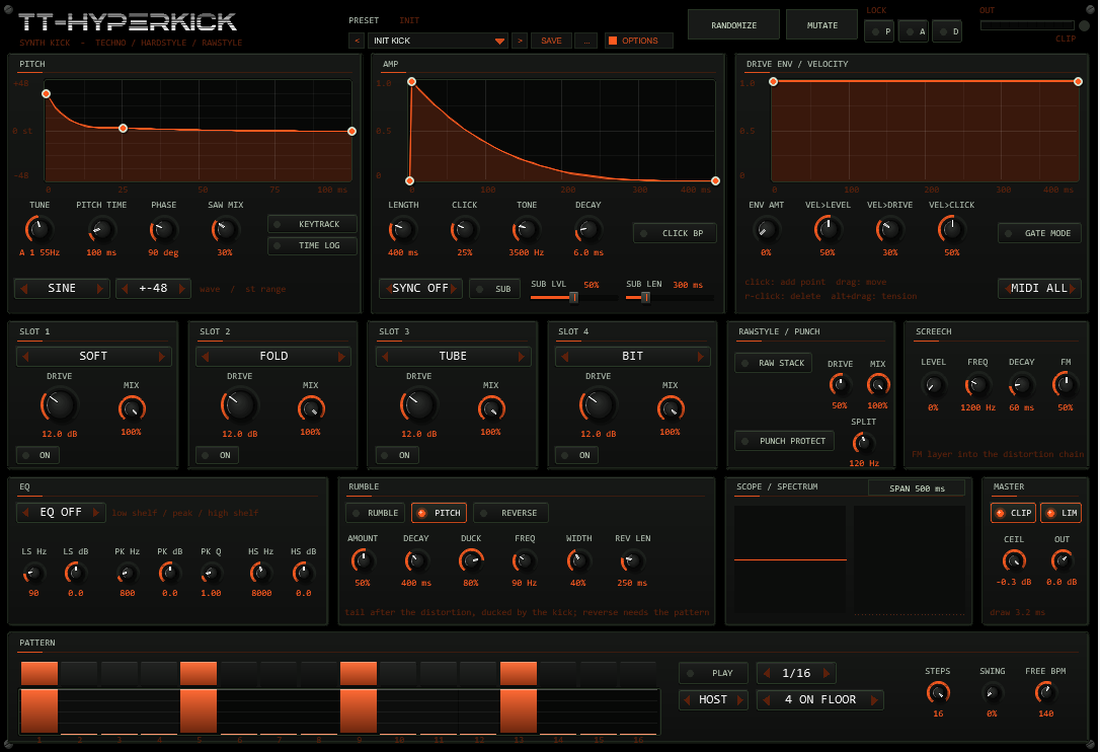
TT-HYPERKICK is a pure synth kick for the hard genres. There is no sample inside: an oscillator follows a pitch curve you draw, an amplitude curve you draw shapes its length, and a drive curve you draw decides how hard the distortion chain works at each moment of the kick. Click, sub and screech layers add transient, weight and bite; a rumble tail and an optional reverse swell turn a single hit into the bass of a whole track.
The signal path is fixed and short: oscillator + layers → EQ pre →
slot 1..4 → Rawstyle stack → (Punch Protect sum) → rumble → EQ post → clipper → out → limiter.
Everything from the EQ pre to the Rawstyle stack runs at twice the sample rate.
02Quick start
- Insert
TT-HYPERKICKon a track (it is an instrument: no input needed). - Pick a factory kick from the PRESET box (arrows step through the 41 kicks).
- Play notes from the piano roll, or press PLAY in the PATTERN panel: with
HOSTthe 16 steps follow the transport, withFREEthey run on their own at FREE BPM. - Reshape the sound: drag the points of the three curves, turn the drive of a slot, switch the rumble on.
- Happy? Actions → TT-HYPERKICK Render Kick renders the current kick as a 24-bit WAV item on a new track.
03The front
| Area | What it does |
|---|---|
| Header | Preset bar (< name > SAVE ...) with the family label, RANDOMIZE / MUTATE with LOCK P / A / D (pitch, amp, distortion), output meter and clip LED, OPTIONS button (colour scheme) |
| Row 1 | PITCH, AMP and DRIVE ENV curve editors, each with the controls that belong to it. A white line runs along each curve while a kick plays |
| Row 2 | Four distortion slots, RAWSTYLE / PUNCH, SCREECH |
| Row 3 | EQ, RUMBLE, scope + spectrum, MASTER (clipper, limiter, output gain) |
| Row 4 | PATTERN: step buttons, velocity bars, play, sync, rate, template, steps, swing, free-run tempo |
Every value is an automatable parameter (the sliders are hidden in the JSFX list and driven from the front). Curves, the pattern and the lock mask are stored with the project and with REAPER presets.
04Pitch curve & body
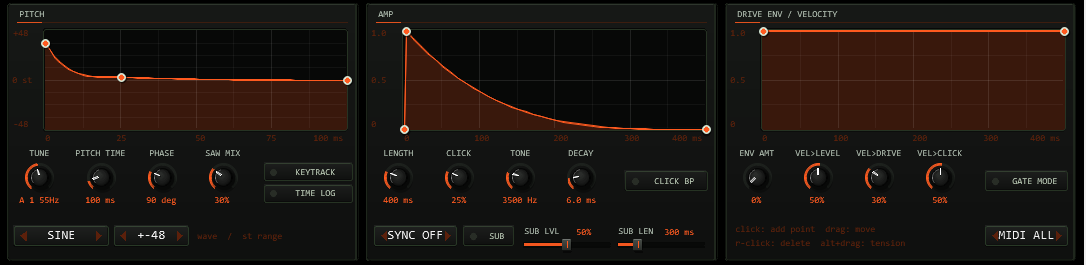
The pitch curve is drawn in semitones relative to the end frequency. The kick always lands at the base pitch when the curve reaches 0 st:
f(t) = f_end · 2curve(t)/12, with f_end = the played note (KEYTRACK on) or TUNE (KEYTRACK off).
The vertical range is selectable (+-12 / 24 / 48 / 96 st); a typical hardstyle start is +48..+60 st.
| Control | Range | Function |
|---|---|---|
TUNE | note 12..60 | Base pitch when KEYTRACK is off (note name and Hz are shown); the pattern always plays TUNE |
PITCH TIME | 5..1000 ms | Length of the pitch curve; after it the pitch stays at the curve end |
TIME LOG | off / on | Logarithmic time axis: the start of the curve gets more room (the first millisecond matters in a kick) |
PHASE | 0..360 deg | Start phase. 90 deg (default) starts at zero rising: no click. The first sample jump is 0; the largest step in the first millisecond of a +60 st kick is 0.04 full scale |
WAVE, SAW MIX | sine / sine+saw / triangle | Oscillator shape; the saw is band-limited (PolyBLEP) |
KEYTRACK | on / off | On: the MIDI note sets the end frequency (C1 = 32.70 Hz) |
05Amp curve, click, sub, screech
The amp curve is the gain envelope of the body (drawn 0..1). LENGTH is 30 ms..1.5 s; SYNC replaces it with a note value at the host tempo
(1/32 .. 1/2). The last 2 ms are faded out automatically, so a curve that does not reach zero never clicks.
| Layer | Controls | What it is |
|---|---|---|
| Click | CLICK, TONE (300 Hz..14 kHz), DECAY (0.5..40 ms), CLICK BP | Noise burst through a state-variable filter (high-pass, or band-pass with CLICK BP) with an exponential decay. The noise is deterministic: every kick clicks the same |
| Sub | SUB, SUB LVL, SUB LEN | A sine one octave below, phase-locked to the body (no phase hole when they add up), with its own polynomial decay |
| Screech | row 2: LEVEL, FREQ, DECAY, FM | Fast fading FM tone through a band-pass, mixed before the distortion so the chain turns it into the rawstyle top |
06Drive envelope & velocity
The drive curve scales the drive of all slots (and the Rawstyle stack) over the length of the kick. ENV AMT is the depth: at 0 the curve is ignored, at 100 %
the drive follows it completely. Hardstyle habit: a lot of drive at the start, less in the tail.
Velocity: VEL>LEVEL, VEL>DRIVE, VEL>CLICK (0..100 % each) decide how much a soft note is quieter, cleaner and less clicky than a hard one.
07Distortion chain
Four slots in a fixed order. Each has a type, a drive (0..40 dB), a mix and an on switch. Every shaper is normalised so that a full-scale input stays a full-scale output; the drive changes character and loudness of the tail, not the peak.
| Type | Shape |
|---|---|
| SOFT | tanh(g·x) / tanh(g) |
| HARD | clip(g·x), normalised |
| FOLD | sine wave-folder sin(π/2 · g·x) (input limited to +-4) |
| TUBE | asymmetric tanh (even harmonics), with a 10 Hz DC blocker |
| BIT | bit-depth reduction (16 bit down to 4 bit) plus sample-and-hold at the oversampled rate; the drive sets both |
| CLIP | cubic soft clipper |
RAW STACK is a three-stage saturation (soft → fold → hard) with one DRIVE and MIX. The whole section from EQ pre to the stack runs at 2×
the sample rate (IIR half-band pair, flat to 20 kHz, 3.1 samples group delay at low frequencies = 64 µs at 48 kHz, so a triggered kick starts that much late).
A fold at 220 Hz with +12 dB drive leaves its non-harmonic (aliasing) products below −140 dBFS; a hard clip at the same drive stays below −90 dBFS.

08Punch Protect
With PUNCH PROTECT on, the low end of the kick bypasses the distortion. The input is split at SPLIT (60..200 Hz, default 120 Hz) with a Linkwitz-Riley
crossover; the dry low band and the high band of the distorted signal are added: out = LP(x) + HP(distort(x)). The harmonics are generated from the
whole kick, including its body, but only what lies above the split is added, so the fundamental keeps its weight and the top gets the drive.
09EQ & master
One three-band EQ (low shelf, peak, high shelf) sits either PRE (before the chain, at the oversampled rate) or POST (after the rumble mix), or is off. Pre shapes what the distortion sees; post shapes the result. The CLIPPER is a hard clipper with a ceiling (-12..0 dB) using first-order antiderivative anti-aliasing; LIM is a soft limiter that keeps the output below 0 dBFS; OUT is the output gain (-24..+12 dB) in front of the limiter. The meter in the header shows the output peak; the clip LED lights when the clipper engages.
10Rumble & reverse
The rumble is fed from the distorted kick (after the chain, before EQ post and clipper): four damped comb filters and two all-pass diffusers per channel build a bass tail,
a low-pass at FREQ (30..250 Hz) keeps it below the top, WIDTH spreads it in stereo. With PITCH on, the delay lengths are integer multiples of the kick period, so the tail
rings on the kick note. DECAY is the 60 dB decay time (0.1..1 s). DUCK pulls the tail down by up to that amount while the kick is loud: the duck follows the kick envelope,
so the tail blooms as the kick fades.
REVERSE records the rumble of the last kick and plays it backwards so that it swells into the next kick: with the pattern running, the playback ends exactly on the next kick (the last sample is one sample before the
kick trigger). The length is REV LEN (50..1000 ms) but never more than half the gap to the previous kick. The very first kick has no predecessor: no reverse. Without the pattern there is no way to know when the next
note arrives, so a MIDI kick starts the reverse of the previous kick right at the trigger, with the free length.

11Pattern player
16 steps with a velocity each: click a step button to switch it on, paint the bars underneath to set the velocity (0 = off). RATE 1/4, 1/8, 1/16, 1/32; STEPS 1..16;
SWING delays every second step by up to half a step. Templates: 4 ON FLOOR, ROLLING 16TH, HS OFFBEAT ROLL, GABBER 16TH, CLEAR.
- HOST follows the transport; steps are scheduled sample-exactly from the host beat position (measured at 120, 140 and 150 bpm: at most 1 sample from the ideal grid).
- FREE runs at
FREE BPMwithout transport. - The pattern plays TUNE (not the note); the drive and length options are the same as for MIDI kicks.

12Presets: bar, user bank, randomize
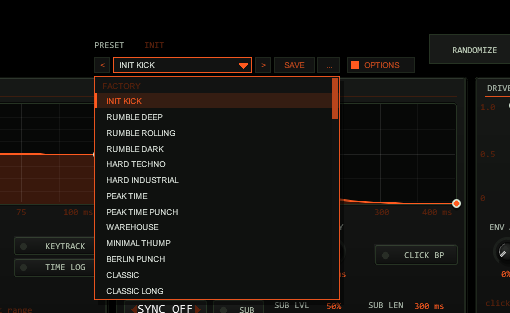
OPTIONS: < name > SAVE .... The name opens the list with the FACTORY (41 kicks) and USER (32 slots) sections; the family of a factory kick is shown above the bar.41 factory kicks in families: Techno (rumble, hard, peak time), Hardstyle (classic, euphoric, rawstyle screech, reverse bass), Gabber, 909/808, Click, Sub.
A preset (factory or your own) loads the sound: all sound parameters and the three curves (pitch, amp, drive). Not part of a preset: the pattern (steps and template), the pattern player settings
(PLAY, sync, rate, steps, swing, free-run tempo), the MIDI channel, the scope span, the LOCK buttons, the colour scheme (OPTIONS) and the hidden test parameter.
| Control | Function |
|---|---|
< / > | Previous / next preset: first the 41 factory kicks, then the used user slots; wraps around and loads immediately. |
| Name field | Opens the list: FACTORY and USER (32 slots, empty ones show - empty -). Mouse wheel scrolls, click loads. A * behind the name means the sound differs from the loaded preset. |
SAVE | Saves the current sound into the selected user slot; with a factory kick (or none) selected, into the first free slot. A name box opens (up to 24 characters, default User 07): type, Enter or OK saves, CANCEL or a click outside cancels. |
... | RENAME, COPY (into the next free slot), DELETE (a second click confirms) for the selected user preset, and INIT (the factory default sound with the INIT KICK curves). |
Where the user bank lives. Plug-ins cannot write files, so the 32 user slots are part of the plug-in state: they are saved with the project, with FX-chain and track-template copies,
and in every REAPER preset of this plug-in (the + button in the FX window toolbar). To take your bank to another project or computer, save a REAPER preset once
(+ → Save preset) and load it there: the whole bank comes with it. Projects saved with earlier versions load unchanged with an empty bank.
Typing names. REAPER keeps Space for the transport, so type Shift+Space for a blank. Depending on your REAPER settings Esc closes the whole FX window; use CANCEL instead. (The + menu of the FX window also has Send all keyboard input to plug-in.)
RANDOMIZE draws a new kick within sensible ranges, MUTATE nudges the current one by about 12 %. The LOCK buttons protect a whole area: P pitch curve and pitch controls,
A amp curve, click and sub, D the distortion, screech, rumble and drive curve.
13Options / Color
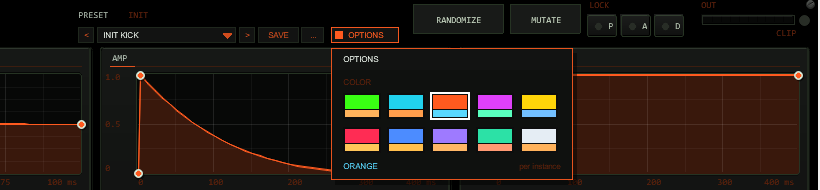
Click OPTIONS in the header to open the box. Under COLOR pick one of ten schemes: ACID, CYAN, ORANGE, MAGENTA, YELLOW, RED, BLUE, VIOLET, MINT or ICE. A click on a swatch changes the whole front at once
(accent, dimmed accent, panel and ground tint, knob discs); a click outside the box closes it. The choice applies per plug-in instance, is saved with the project, with FX chains and with REAPER presets
(hidden parameter UI Color), and is not touched by factory presets, RANDOMIZE or MUTATE. The factory colour of TT-HYPERKICK is ORANGE.
14MIDI & voice behaviour
- Note-on triggers a kick; velocity maps to level, drive and click (see the velocity knobs).
MIDIselects one channel or all. - Note-off is ignored (one-shot) unless
GATE MODEis on: then the kick fades out over 5 ms at note-off (or CC 123). - Triggers are sample-accurate. All other MIDI passes through.
- Retrigger: the running kick fades over 2 ms, the new kick starts from zero: no click (the largest step in the retrigger window is not larger than in a fresh kick).
15Render Kick script
TT-HYPERKICK Render Kick.lua (installed by ReaPack, Actions → Show action list) renders the current sound: it puts a temporary MIDI note at the edit cursor on the track with the plug-in, sizes the range from LENGTH / sub / rumble decay (plus reserve), renders it as a stereo 24-bit WAV stem on a new track and removes the temporary note. Select the track first.
16Technical notes
- Latency: none reported to the host (an instrument). The oversampling half-band adds 3.1 samples (64 µs at 48 kHz) between trigger and sound; the pattern and MIDI triggers themselves are sample-exact.
- CPU: measured as the extra render time of a 30 s offline render at 48 kHz on a Windows 11 desktop (one core): about 4 % for a typical hard-techno kick at 140 bpm, about 8 % for the heaviest case (Xtra Raw preset with reverse, ten kicks per second), about 0.4 % idle. Fewer active stages cost less: the voice with oversampling alone is about 1 %
- Sample rates: 44.1, 48 and 96 kHz are tested against a bit-exact reference; all time constants are computed from the current rate.
- Safety: NaN/Inf never reach the output (inputs of stateful stages are clamped, the output is checked); with the limiter on, the peak stays below 0 dBFS at any drive.
- Saved state: sliders (REAPER), curves, pattern and lock mask (plug-in state, format version 1), followed by the user preset bank (32 slots, run-length packed; projects without a bank load unchanged).
17Troubleshooting
- No sound - a MIDI item or the pattern must trigger it; check
MIDIchannel andPLAY(HOST needs the transport running). If the plug-in shows sound on the scope but the track is silent, check routing. - The kick clips - the limiter is on by default; with
LIMoff, lowerOUTor raise the ceiling of the clipper. Drive normalises the peak, but rumble and screech add on top. - Reverse does nothing - it needs RUMBLE on (the reverse plays back the rumble) and a previous kick.
- Kick is late by a fraction of a millisecond - that is the oversampling delay, see Technical notes.
- Hidden parameters - the two debug parameters
Debug mode1 / 2 are for the test suite (trigger log, neutral curves); leave them at 0.
18Release notes
- 0.6.0 - Preset bar with drop-down, SAVE and a user bank of 32 slots (in the project and in REAPER presets) replaces the preset box.
- 0.5.0 - OPTIONS box with COLOR (10 schemes; factory colour ORANGE).
- 0.4.0 - Reverse rumble, screech layer, randomize / mutate with locks, render script, spectrum, manual.
- 0.3.0 - Rumble tail with kick duck, sub layer, Punch Protect, Rawstyle stack.
- 0.2.0 - Pattern player with host sync.
- 0.1.0 - Core synth, curves, distortion chain, presets.