
01The concept
TT-HYPERSNARE is a pure synth snare. There is no sample inside: a tonal body (two sine partials à la 909, or a six-mode membrane model) follows a pitch curve you draw, a filtered noise bed - the snares - sits under it and can be coupled to the body envelope, and a snap accents the attack. RIMSHOT swaps the centre of the sound for a ringing knock, FLAM plays a second, softer hit a few milliseconds later, and a ROOM tail with ducking and a reverse swell turns the dry hit into a space.
The signal path is fixed and short: hits → EQ pre → slot 1..4 → Rawstyle stack →
(Punch Protect sum) → room → EQ post → clipper → out → limiter.
Everything from the EQ pre to the Rawstyle stack runs at twice the sample rate.
02Quick start
- Insert
TT-HYPERSNAREon a track (it is an instrument: no input needed). - Pick a factory snare from the PRESET bar (arrows step through the 36 snares).
- Play notes from the piano roll, or press PLAY in the PATTERN panel: with
HOSTthe 16 steps follow the transport, withFREEthey run on their own at FREE BPM. - Reshape the sound: drag the pitch curve, tune the noise bed in the SNARE / RIM panel, add a flam.
- Happy? Actions → TT-HYPERSNARE Render renders the current snare as a 24-bit WAV item on a new track.
03The front
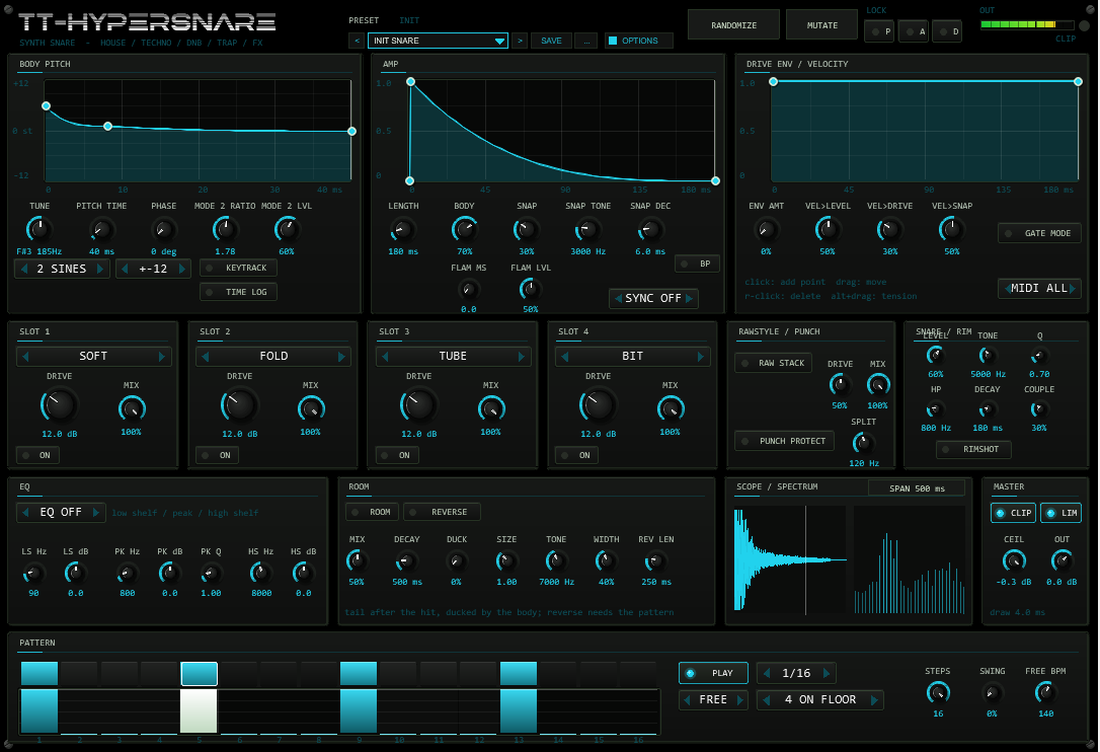
| Area | What it does |
|---|---|
| Header | Preset bar (< name > SAVE ...) with the family label, RANDOMIZE / MUTATE with LOCK P / A / D (pitch, amp, distortion), output meter and clip LED, OPTIONS button (colour scheme) |
| Row 1 | BODY PITCH, AMP and DRIVE ENV curve editors with the controls that belong to them. A white line runs along each curve while a snare plays |
| Row 2 | Four distortion slots, RAWSTYLE / PUNCH, SNARE / RIM (level, tone, Q, high-pass, decay, couple, rimshot) |
| Row 3 | EQ, ROOM (mix, decay, duck, size, tone, width, reverse), scope + spectrum, MASTER (clipper, limiter, output gain) |
| Row 4 | PATTERN: step buttons, velocity bars, play, sync, rate, template, steps, swing, free-run tempo |
Every value is an automatable parameter (the sliders are hidden in the JSFX list and driven from the front). Curves, the pattern and the lock mask are stored with the project and with REAPER presets.
04Body: pitch curve & models
The body always lands at its base pitch when the curve reaches 0 st:
f(t) = f_end · 2curve(t)/12, with f_end = the played note (KEYTRACK on) or TUNE (KEYTRACK off).
A short downward sweep at the start gives the stick attack; a flat curve gives a pure tonal body. PITCH TIME is the length of the curve,
TIME LOG stretches its start, the range button selects +-12/24/48/96 st.
| Model | What it is |
|---|---|
| 2 SINES (default) | 909-style: a sine at f plus a second sine at f · MODE 2 RATIO (1..2.5) with level MODE 2 LVL. Ratio 1.78, level 60 % is the classic. |
| MEMBRANE | Six fixed modes (ratios 1, 1.594, 2.136, 2.296, 2.653, 2.918; levels 1, 0.7, 0.5, 0.4, 0.3, 0.25); each mode dies a little faster than the one below it, so the body darkens as it fades. Ratio/level knobs have no effect here. |
PHASE (0..360°) sets the start angle of every mode. 0° (default) starts the body at zero, rising: no thump of its own.
The noise bed and the snap carry the transient.05Amp curve, snares, rim, snap
The amp curve shapes the body (drawn 0..1). LENGTH (30..1500 ms) is its length; the last 2 ms are faded out automatically.
SYNC replaces the length with a note value at the host tempo.
| Layer | Controls | What it is |
|---|---|---|
| Snares | LEVEL, TONE (1..12 kHz), Q (0.3..4), HP (100..4000 Hz), DECAY (10..1000 ms), COUPLE | Deterministic noise (every hit is identical) through a band-pass into a high-pass. COUPLE fades the bed with the body envelope: 0 = own decay, 100 % = the snares die with the body. |
| Rimshot | RIMSHOT | A ringing 1.7 kHz knock (fixed band-pass, 4 ms) on the same noise, with the body level halved - wire-brush and garage-rim territory. |
| Snap | SNAP, SNAP TONE, SNAP DEC, BP | A click transient like the HYPERKICK click: high-passed (or band-passed with BP) noise with a fast exponential decay. Started per flam hit. |
06Flam
FLAM MS (0..40 ms) adds a second hit that many samples later: the first hit sounds with FLAM LVL
(0..100 %), the second with full level. Both hits share their noise character, so a flam sounds like the same snare played twice -
jungle and drill rolls, ghost-note feels. At 0 ms there is exactly one hit.
07Drive envelope & velocity
The drive curve scales the drive of all slots (and the Rawstyle stack) over the length of the hit; ENV AMT is the depth.
Velocity: VEL>LEVEL, VEL>DRIVE, VEL>SNAP decide how much a soft note is quieter, cleaner and less clicky.
GATE MODE fades the hit out over 5 ms at note-off.
08Distortion chain
Four slots in a fixed order (SOFT / HARD / FOLD / TUBE / BIT / CLIP), each with drive (0..40 dB), mix and an on switch, then the optional
RAW STACK (three-stage saturation) and PUNCH PROTECT (the band below SPLIT stays clean while everything above it is driven).
The whole section runs at 2× the sample rate. DnB cracks live at SLOT 1 HARD 12..20 dB; lo-fi grit wants TUBE or BIT.
09EQ & master
One three-band EQ (low shelf, peak, high shelf) sits either PRE (what the distortion sees) or POST (the result), or is off.
The CLIPPER works at its CEIL ceiling with anti-derivative anti-aliasing; LIM is a soft limiter that keeps the output
below 0 dBFS; OUT is the output gain. The header meter shows the output peak.
10Room & reverse
The ROOM tail is fed from the distorted hit: four damped comb filters and two all-pass diffusers per channel, with fixed delay times
(11.3..19.7 ms) scaled by SIZE (0.5..2). A low-pass at TONE (1..16 kHz) darkens it, WIDTH spreads it in stereo
(0 = both channels identical), DECAY is the reverb time (100..3000 ms). DUCK pulls the tail down while the hit is loud,
so it blooms as the snare fades.
REVERSE plays the room of the previous hit backwards: with the pattern running it swells exactly into the next hit
(REV LEN, never more than half the gap); a MIDI hit starts the reverse right at the trigger with the free length. The very first hit has no predecessor: no reverse.

11Pattern player
16 steps with a velocity each; RATE 1/4..1/32, STEPS 1..16, SWING delays every second step.
Templates: 4 ON FLOOR, ROLLING 16TH, HS OFFBEAT ROLL, GABBER 16TH, CLEAR. HOST follows the transport
(sample-exact), FREE runs at FREE BPM. The pattern plays TUNE, not the note.

12Presets
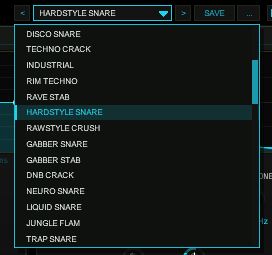
36 factory snares in families: 909 (Snare, Tight, Fat, Gated), 808 (Snare, Snappy), House (House Snare, House Classic, Garage Rim, Disco Snare), Techno (Techno Crack, Industrial, Rim Techno, Rave Stab), Hard (Hardstyle Snare, Rawstyle Crush, Gabber Snare, Gabber Stab), DnB (DnB Crack, Neuro Snare, Liquid Snare, Jungle Flam), Trap (Trap Snare, Drill Rim, Pitched Snare, Trap Roll), Acoustic (Tight Acoustic, Room Kit, Brush-ish), LoFi (Dusty Snare, Crushed), FX (Laser Snare, Reverse Snare, Tom-Snare, Big Room Snare) and INIT SNARE.
A preset (factory or your own) loads the sound: all sound parameters and the three curves. Not part of a preset: the pattern,
the pattern player settings, the MIDI channel, the scope span, the LOCK buttons, the colour scheme and the hidden test parameter.
The bar (< name > SAVE ...) stores 32 user slots inside the plug-in state: they live in the project
and in every REAPER preset of this plug-in. RANDOMIZE draws a new snare within sensible ranges, MUTATE nudges the current one;
the LOCK buttons protect pitch / amp / distortion.
OPTIONS.13Options / Color
OPTIONS opens ten colour schemes: ACID, CYAN, ORANGE, MAGENTA, YELLOW, RED, BLUE, VIOLET, MINT, ICE. The choice is per plug-in instance, saved with the project and with REAPER presets, and untouched by presets, RANDOMIZE or MUTATE. The factory colour of TT-HYPERSNARE is CYAN.
14MIDI & voice behaviour
- Note-on triggers a snare; velocity maps to level, drive and snap.
MIDIselects one channel or all. - Note-off is ignored (one-shot) unless
GATE MODEis on: the hit fades out over 5 ms at note-off (or CC 123). - Triggers are sample-accurate. All other MIDI passes through.
- Retrigger: the running hit fades over 2 ms, the new one starts from zero.
15Render script
TT-HYPERSNARE Render.lua (installed by ReaPack, Actions list) renders the current sound: it puts a temporary MIDI note at the edit cursor, sizes the range from LENGTH / snares decay / room decay (plus reserve), renders it as a stereo 24-bit WAV stem on a new track and removes the temporary note. Select the track first.
16Technical notes
- Latency: none reported to the host (an instrument). The oversampling half-band adds ~3 samples (~64 µs at 48 kHz) between trigger and sound.
- Sample rates: 44.1, 48 and 96 kHz are supported; all time constants are computed from the current rate (44.1/96 kHz are covered by the test matrix).
- Safety: NaN/Inf never reach the output; with the limiter on, the peak stays below 0 dBFS at any drive.
- Saved state: sliders (REAPER), curves, pattern and lock mask (plug-in state, format version 1), followed by the user preset bank (32 slots).
- Determinism: the noise bed and the snap are seeded per trigger, so a hit rendered twice is bit-identical - ideal for drum replacement.
17Troubleshooting
- No sound - a MIDI item or the pattern must trigger it; check
MIDIchannel andPLAY(HOST needs the transport running). - The snare clips - the limiter is on by default; with
LIMoff, lowerOUT. Body, snares, snap and room add up before it. - Reverse does nothing - it needs ROOM on (the reverse plays back the room) and a previous hit.
- Membrane ignores MODE 2 RATIO - those two knobs belong to the 2 SINES model only.
- Hidden parameters -
Debug mode1 / 2 are for the test suite (trigger log, neutral curves); leave them at 0.Room pitch followis a legacy placeholder and does nothing.
18Release notes
- 0.1.0 - Core: two-sine / membrane body with drawable curves, snares noise bed with envelope couple, rimshot, snap, flam, room tail with duck and reverse, 4-slot distortion chain with 2x oversampling, pattern player, 36 factory presets, preset bar, render script, manual.