01The concept
TT-KICK builds one kick from three sequential segments on the time axis — TRANSIENT (the click), BODY (the punch) and TAIL (the room) — joined by equal-power crossfades. Unlike layered kick tools, the segments play one after another, so each stage can be crafted without the stages fighting each other.
Every segment is switchable between SYNTHESIZED and SAMPLE: mix your own sample attack with a synthesized body, or run the whole kick purely from the synth engines — no sample pack required (a fresh instance is all-synth and sounds immediately). The synth path carries its oscillators phase-coherent across the segment boundaries: a successor segment starts at the exact phase its predecessor holds at the boundary — phase-continuous by construction, not by phase-offset tinkering.
A fourth row below the lanes — FUSION — always shows the kick as it is currently built: the segments in sequence on one output time axis, the crossfade zones shaded, and the total chain length in milliseconds.
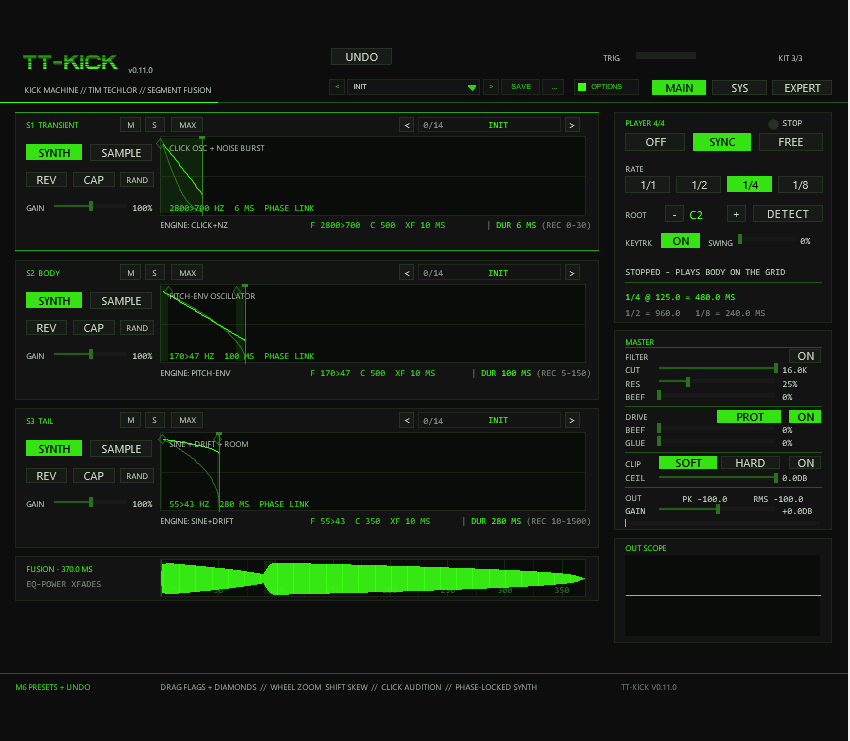
< n/14 NAME >) in the headers, the FUSION row below them, the PLAYER panel and MASTER rack on the right, the preset bar and UNDO in the header. The EXPERT switch next to MAIN|SYS opens a knob row under every lane.02Quick start
- Drop
TT-KICKfrom your effects browser onto a track (REAPER 7.x; it is an instrument — feed it MIDI). Play instantly:the factory state is pure SYNTH on all three lanes — press a note (or switch the built-in player on) and a complete kick sounds with no kit loaded.Use your own samples:run one of the TT-KICK Load Kit actions (section 09) and assign one file per slot — the FX adopts the kit within ~0.5 s. Or click a lane's CAP and record a source straight into the slot (section 06).- Watch the FUSION row for the assembled result, shape the master rack (section 07), dial in the player (section 08), pick a preset (section 10).
KIT n/3 vs NO KIT FILE), make sure the lane is
set to SAMPLE with a loaded slot (or to SYNTH), that its Mute is off
(and it is not left out by another lane's Solo), and that the master
OUT gain is up. In SYNC mode the player only runs while the REAPER transport
plays.
03The three segments
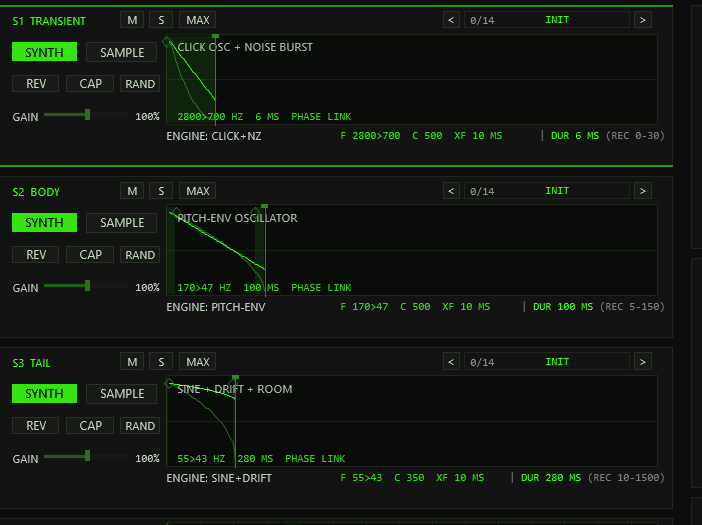
| Lane | Role | Recommended (REC) | Synth engine |
|---|---|---|---|
| S1 · TRANSIENT | Attack / click | 0–30 ms | Click oscillator + noise burst |
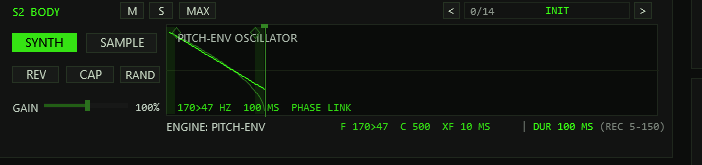
| S2 · BODY | The punch | 5–150 ms | Pitch-envelope oscillator (core) |
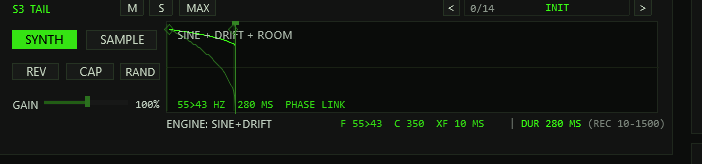
| S3 · TAIL | Room / sub tail | 10–1500 ms | Sine + drift + room component |
The lane header carries the segment title plus Mute, Solo and MAXimize. Below it sit the SYNTH|SAMPLE switch, REV (reverse), CAP (record into the slot, section 06), RAND (randomize the lane within musical bounds — CTRL+click resets it to INIT) and a GAIN fader (0–200 %). The START and LENGTH flags cut the sample window — on SYNTH lanes there is no start offset and the LENGTH flag sets the window duration against a per-type maximum (60 ms transient / 500 ms body / 2000 ms tail). The crossfade diamonds (0–100 ms) at the window edges edit two independent fades since v0.9.1: the right-edge diamond is the lane's XF-OUT (its exit fade into the next segment — on the TAIL it doubles as the kick's fade-out), the left-edge diamond of lanes 2/3 is that lane's XF-IN (the entry side of the same boundary). A shared boundary fades over the minimum of the previous lane's XF-OUT, the following lane's XF-IN and both window durations. Empty or unplayable slots simply drop out of the chain — the remaining segments play on.
The status line under each waveform shows the file name plus
S/L/XF values on SAMPLE, or the engine name plus
F/C/XF values on SYNTH (section 05) — with the
DUR (REC) check right-aligned in the same row. A muted lane is
dimmed, title included; an engaged lane filter warns
LANE FILTER ACTIVE - SEE EXPERT in the compact view (the knobs
only exist in EXPERT mode). White lines inside a box are
the playheads of sounding voices; a kick trigger fires up to three chained
spans, and the 8-voice pool keeps about 2.7 kicks overlapping before stealing
(stolen voices get a 64-frame fade-out, never a hard cut).
Mute / Solo (M / S)
The M and S buttons in every lane header are always visible — also on collapsed strips. Mute takes its lane out of the kick chain; Solo leaves only the soloed lanes playing (any solo drops all non-soloed lanes like mutes, and mute wins over solo on the same lane). The FUSION row follows the gate — it closes the chain without the excluded lanes — while each lane's own DUR readout stays. The gate applies to triggered kicks only: CAP recording and lane audition ignore it, so a muted lane can still be captured into or previewed. CTRL+click returns a button to its default (off). Solo lights warning-orange when active.
Lane maximize (MAX)
MAX blows one lane up to fill the whole lane area: its controls move into a toolbar row and the waveform box grows to full width and height for precise flag, diamond and zoom work (the EXPERT knob row stays on board). The other two lanes collapse to thin strips showing title, M/S, MAX and a short SYNTH/SAMPLE + DUR info. Click a strip — or its own MAX — to switch the maximized lane; MAX on the big lane returns to the three-lane view. The state is a pure view setting: it is not saved with the project and never enters the undo ring.
EXPERT mode — the knob row
The EXPERT switch next to MAIN|SYS (saved with the project, kept
across presets and undo like the tooltip switch) reveals an indented row of
ten knobs under every lane. The waveform box shrinks to make room. Slots
0–3 hold the lane's engine parameters on SYNTH lanes —
F0/F1 (logarithmic sweep start/target, per-type ranges), then
NOISE on S1, CURVE on S2 and DRIFT+ROOM on S3 —
and read NO ENGINE KNOBS (SAMPLE) on SAMPLE lanes. Slots 4–9 are
the same on every lane and mode: PITCH (±24 st detune), LEN
(window length — SYNTH shows milliseconds, SAMPLE per-mille of the slot),
XF-IN and XF-OUT (the split boundary fades, 0–100 ms;
XF-IN on S1 is locked dim — the chain head has no predecessor and the
kick head always gets a short anti-click fade), and the lane filter
CUT/RES (below). Drag a knob vertically (120 px = full travel,
SHIFT = fine), CTRL+click resets it; all values are drawn under the knob and
freeze into the trigger snapshot like every span parameter.
Lane filter (CUT / RES)
Each lane carries its own resonant low-pass — a 2-pole TPT
state-variable design (the same math as the master FILTER stage):
CUT sweeps 40 Hz–16 kHz exponentially, RES drives Q 0.5–8.
The knobs only exist in EXPERT mode, but the filter keeps working in the
compact view, which then flags LANE FILTER ACTIVE - SEE EXPERT.
At the default (CUT fully open = 16 kHz, RES = 0) the stage is
bypassed bit-exactly — no processing happens at all; just below the
stop the wet amount eases in quadratically, so there is no level jump at the
top of the travel. The state lives per voice: overlapping hits of the
same lane never push each other through the filter and stay click-free —
that is what distinguishes it from the master FILTER, which sees the summed
output.
DUR / REC — the duration check
Every lane prints DUR <ms> (REC <lo>-<hi>)
right-aligned in its status line: the segment's effective output duration —
at reference pitch ROOT — next to the recommended range for its role (the REC
column above); on a tight layout the (REC …) part shortens away
first. DUR is green inside the range and orange outside; a slot that
cannot play shows DUR -. On the INIT preset all three lanes read
green since v0.9.2: the factory synth windows are 6 / 100 / 280 ms
(S1/S2/S3), inside their recommended ranges.
The FUSION row
Below the lanes, the FUSION row previews the kick exactly as the chain
builds it at the ROOT note: the segments in sequence on the output time axis
with the equal-power crossfade overlaps shaded behind the waveform. Sample
segments are drawn from their peak cache, synth segments as their analytic
envelopes, each scaled by its lane gain; the header prints the total length
(FUSION - 312.5 MS) and an empty chain shows -. The
row mirrors the M/S gate — muted or non-soloed lanes drop out and the chain
closes without them. It is a passive display — edit on the lanes and the
fusion follows.

04Editing conventions
- Drag the START/LENGTH flags in a lane to cut the sample window. START is SAMPLE-only — on SYNTH lanes the LENGTH flag sets the window duration against the type maximum.
- Diamond markers set the crossfades: the diamond at a window's right edge is that lane's XF-OUT (its fade into the next segment), the diamond at the left edge of lanes 2/3 is that lane's XF-IN — the same boundary handled from the entry side (0–100 ms each; the boundary fades over the smaller of the two).
- Mouse wheel zooms horizontally around the pointer (up to 64×),
Shift + wheel skews the waveform vertically (up to 16×) —
a
Z/SKreadout in the box corner reports the factors — and dragging the dimmed background pans a zoomed view. - Millisecond ruler (new in v0.9.3): every wave box — the normal lanes, a maximized lane and the FUSION row — draws vertical scale lines in the background. The tick spacing follows the zoom on a 1-2-5 ladder (0.5 / 1 / 2 / 5 / 10 / 25 / 50 / 100 / 250 / 500 / 1000 / 2500 ms, at least 55 px apart), with fainter half-alpha intermediate lines when there is room. Integer ms labels sit at the bottom edge, and the lane start is drawn as the stronger line. The ruler shares the waveform's mapping, so zoom, skew and pan move content and scale together.
- Click the waveform to select the segment (acid frame) — releasing without a drag auditions it solo; on SYNTH lanes you hear the engine itself. A pan drag never fires the audition, and the audition ignores the M/S gate.
- Drag an EXPERT knob vertically to change it — the value follows the movement relative to where you grabbed it (120 px = full travel); holding SHIFT gives a 4× finer ratio. A click without movement changes nothing.
- CTRL+click resets almost everything: all master and lane faders (incl. SWING), the START/END flags, the crossfade diamonds, every EXPERT knob and the M/S buttons return to their default — one shared default table feeds both the reset and the INIT state, so they can never diverge. CTRL+click on RAND resets the whole lane to INIT.
- Hover any control for a short tooltip in a floating panel (English, up to three lines — CTRL lines highlight in acid). Tooltips stay out of the way while you drag and can be switched off on the SYS page (TOOLTIPS button in the INTERFACE section, saved with the project).
- Edits never disturb a sounding kick — all span parameters (window, fades, gain, pitch, curve) are frozen at trigger time and apply to the next hit.
- Every ended drag or button edit pushes one undo state (section 10); pure view changes (zoom, skew, pan, lane selection, page, lane maximize) never create one.
05Synth engines & phase
The three engines are tuned to their segment role:
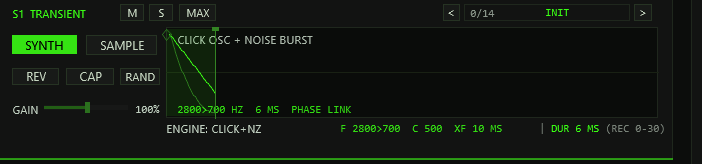
- S1 TRANSIENT — click oscillator + noise burst: a sine click with a fast internal decay, blended with a noise burst. The noise is a deterministic position hash, so every trigger renders bit-identically.
- S2 BODY — pitch-envelope oscillator: the core of the kick; the frequency glides from F0 to F1 across the window along the curve set by C (0–1000 ‰ → exponent 0.125…16; 500 ≈ the classic kick sweep).
- S3 TAIL — sine + drift + room: a sustained sine under a slow amplitude drift (≈5–14 Hz), plus a room component — a slightly detuned beating copy and a noise share that lives in the decay.
A SYNTH lane draws the engine's frequency trajectory F0 → F1
inside the window (bright curve) over its dim internal amplitude envelope,
labelled CLICK OSC + NOISE BURST, PITCH-ENV OSCILLATOR
or SINE + DRIFT + ROOM. The readout
<F0>><F1> HZ <dur> MS PHASE LINK sits
in the box, and the status line below shows
ENGINE: <name> F <f0>><f1> C <curve> XF <ms> MS.
PHASE LINK is the phase-coherence badge: chained synth segments share one phase trajectory — the oscillator phase is a closed-form function of position, so a successor starts at the exact phase its predecessor holds at the boundary and the fusion stays click-free and tight. The chain head, and a synth segment following a sample, start at phase 0 by convention; a per-segment phase offset (PH) exists in the serialized state. A reversed synth segment runs the same trajectory backwards. Keytrack and the played note scale the engine frequencies — window durations stay absolute in time. The per-lane PITCH knob (section 03) detunes a single engine ±24 st on top of keytrack.
06Capture (CAP)
Since v0.8.2 each lane carries a CAP button (next to REV) that records the plug-in's audio input straight into that lane's sample slot — no file dialog, no disk, no Lua. Capture ignores the M/S gate: a muted lane can be recorded into, and the audition of its result plays regardless.
- Click CAP on a lane — the waveform box blinks
REC ARMED - PLAY YOUR SOURCEand the input is now monitored at the output so you can aim. - Play the source into the plug-in's audio input (the track's input or items before it on the track). Recording starts when the mono input exceeds −40 dBFS for three consecutive samples — the two samples just before the threshold crossing are kept, so the attack is not cut.
- Recording stops after 8 s, after 1 s of silence (with at least 0.2 s captured), or at the bank limit at very high sample rates — the silent tail is trimmed back, a 32-frame fade is applied, and the lane switches to SAMPLE automatically.
- Clicking CAP again on the armed/recording lane aborts (discards). Arming another lane moves the arm; a running recording is never interrupted by a different lane.
Outside an armed/active capture the input is not passed through and the
instrument stays bit-identical to a pure kick generator — silent on MIDI-only
tracks. If the extended memory is unavailable (embedded/limited hosts) the
button shows N/A instead of arming.
07Master rack
| Stage | Controls | What they do |
|---|---|---|
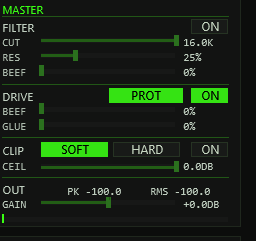
| FILTER | ON · CUT · RES · BEEF | Resonant 24 dB/oct low-pass (two TPT state-variable stages): CUT sweeps 40 Hz–16 kHz exponentially, RES drives Q 0.5–14, and BEEF pulls the resonance peak up to three octaves below the cutoff — a bass-heavy bump while the HF rolloff stays. |
| DRIVE | ON · PROT · BEEF · GLUE | BEEF is a parallel bass-band drive (one-pole split ≈140 Hz into a level-matched waveshaper, up to ~+27 dB into the knee); GLUE is a sum saturation on top. PUNCH PROTECT keeps the dry remainder — punch and mids — out of the shaper; switched off, the band morphs to the full signal for classic all-over drive. GLUE deliberately touches everything, so bit-exact transparency needs BEEF=0 and GLUE=0. |
| CLIP | ON · SOFT/HARD · CEIL | Final clipper as a creative tool: SOFT is a true tanh knee (linear below 0.7, continuous slope), HARD a flat clamp; CEIL sets the ceiling −36…0 dBFS and is enforced explicitly. |
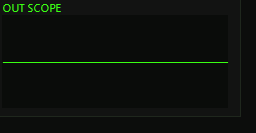
| OUT | GAIN · meters · scope | Output level −24…+24 dB with an exact 0 dB centre detent; peak/RMS metering (~300 ms ballistics, the peak tick turns red on overs) and the OUT SCOPE — it always shows the post-chain output. No final limiter: the ceiling is the clipper's job. |
All stage switches and faders are click-free — every change glides over a ~20 ms slew, and bypassed stages keep tracking the live signal so re-engaging never jumps. Every fader resets to its factory value on CTRL+click (the shared default table, section 04).
08Player & MIDI
- MIDI: a note-on triggers the whole segment chain — the note sets the pitch relative to ROOT (when keytrack is on), velocity sets the level. Note-off is ignored (one-shot), CC 120/123 kill all voices, and everything else (CC, pitch bend, clock) passes through.
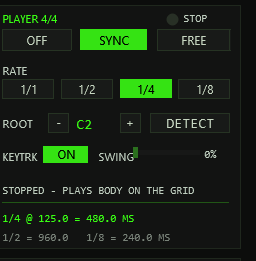
- PLAYER: the built-in 4/4 player fires the chain at ROOT pitch on
the rate grid — 1/1, 1/2, 1/4 or 1/8 — with an accented downbeat
(velocity 118 vs. 100). SYNC follows the project timeline: it
plays only while the transport runs and re-anchors on real position jumps
(
SYNCED BAR n.m). FREE RUN ignores the transport state — it still runs at the host tempo (FREE RUN n BPM, 120 BPM if none is reported). - SWING shifts the off-grid (odd) eighths later by SWING/200 of an eighth — 66.7 % lands exactly on the triplet point (TT-303 convention: on-grid eighths stay strict). At rates 1/1–1/4 every hit sits on an on-grid eighth, so swing is deliberately inaudible there. CTRL+click on the fader returns it to 0 %.
- BPM→ms reference: the panel prints a live note-length table for the
host tempo —
1/4 @ 135.0 = 444.4 MSwith the1/2and1/8values below — so segment lengths and crossfades can be tuned against the groove. - ROOT & DETECT: ROOT is the keytrack base (−/+ steppers with a
note readout). DETECT is a one-shot autocorrelation of the BODY
segment — the loaded window on SAMPLE, the settled fundamental at the
window's end on SYNTH. The result line reports the source (SMP/SYN), the
detected note, the cent offset, Hz and a CONFidence percentage;
ROOT is written only at CONF ≥ 30 %, otherwise the panel answers
NO BODY SIGNALinstead of guessing. An octave guard picks the first strong correlation peak rather than a subharmonic. - KEYTRK: the global keytrack switch — OFF pins every note to ROOT
(factor 1 on any key), and the header flags
KTRK OFF. - Header readouts: a TRIG LED with the last note and its source
(
MIDI/PLAYER/LANE), and the kit state (KIT n/3orNO KIT FILE).
09Sample kits & loaders
JSFX has no file dialogs, so kit assignment runs through companion
ReaScripts. All of them write tt-kick-kit.bin next to the plugin
file (plus a readable tt-kick-kit.txt); the FX polls that file
every ~0.5 s and adopts the kit automatically. Each file is resampled to the
project rate, mixed to mono and capped at 20 s per slot. The assigned paths
travel inside the project — after a reload the WAVs are pulled from the stored
paths again, so the .bin is only needed to assign new kits.
| Action | Workflow | Notes |
|---|---|---|
TT-KICK Load Kit | Three file dialogs — pick one WAV per slot (1 = TRANSIENT, 2 = BODY, 3 = TAIL) | Cancelling a dialog keeps that slot; cancelling all three changes nothing. Exact control per slot. |
TT-KICK Load Kit (Folder) | Pick any one file inside a kit folder — the script scans the folder (*.wav/*.aif/*.aiff) and maps files to slots by name, then asks for confirmation | Stem matching: trans/click/att → TRANSIENT, body/mid/punch → BODY, tail/sub/room/end → TAIL; leftover slots fill alphabetically, surplus files are ignored (listed in the confirmation). Copies the kit files into the folder and pushes it onto Recent Kits. |
TT-KICK Load Kit (from Items) | Drop up to 3 audio files onto a track as items, select them, run the action — selection order becomes slot order (track, then position, then lane) | MIDI items and items without a file source are skipped; the confirmation lists the mapping before writing. Pushes the slot-1 folder onto Recent Kits. |
TT-KICK Recent Kits | Zero-dialog re-load: a menu lists the last 8 kit folders and activates the chosen one | Works across projects. Folders whose copy of tt-kick-kit.bin is missing are greyed out; kits assigned via the plain Load Kit action are not listed (it writes no folder copy). |
Install the scripts once via Actions → Show action list → New action → Load ReaScript, then run them from the action list (or bind them to keys/toolbar).
LOAD ERROR. Keep
paths reachable: the loader stores absolute paths, so moving the WAVs breaks
the kit on next load.10Presets, undo, system page
Preset bar & user bank
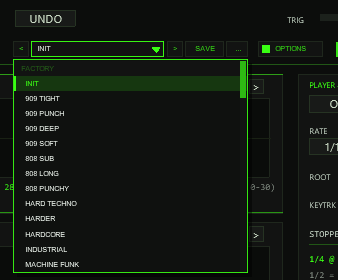
OPTIONS: < name > SAVE .... The name opens the list with the FACTORY (INIT plus 44 kicks) and USER (32 slots) sections.The bar loads and saves the whole kick in one step: all lane and segment
data of the three lanes (including the lane preset assignments), the master rack
(filter, drive, clipper, output) and the player head (rate, sync, root, swing,
keytrack) — exactly what a factory preset replaces. Not part of a preset: the kit
paths (sample assignments stay), the colour scheme (OPTIONS), the lane
view (zoom, skew, pan), the player ON switch, the page, the lane selection and the
TOOLTIPS / EXPERT switches. Presets load with UNDO like every other edit.
| Control | Function |
|---|---|
< / > | Previous / next preset: the 45 factory kicks first, then the used user slots; wraps around and loads immediately. |
| Name field | Opens the list: FACTORY (INIT + 44 kicks) and USER (32 slots, empty ones show - empty -). Mouse wheel scrolls, click loads, a click outside just closes. A * behind the name means the state differs from the loaded preset. |
SAVE | Saves the current kick into the selected user slot; with a factory preset (or none) selected, into the first free slot. A name box opens (up to 24 characters, default User 02): type, Enter or OK saves, CANCEL or a click outside cancels. |
... | RENAME, COPY (into the next free slot) and DELETE (a second click confirms) for the selected user preset. |
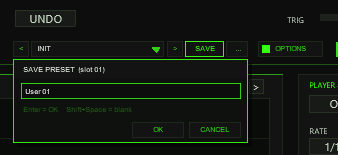
Where the user bank lives. Plug-ins cannot write files, so the 32 user slots are part of the
plug-in state: they are saved with the project, with FX-chain and track-template copies, and in every
REAPER preset of this plug-in (the + button in the FX window toolbar). To take your bank to
another project or computer, save a REAPER preset once (+ → Save preset) and load it there: the
whole bank comes with it. Projects saved with earlier versions load unchanged with an empty bank; the bar then shows
the factory preset the project was last on.
Typing names. REAPER keeps Space for the transport, so type Shift+Space for a blank.
Depending on your REAPER settings Esc closes the whole FX window; use CANCEL instead. (The + menu of the
FX window also has Send all keyboard input to plug-in.)
The 45 factory kicks are INIT (the factory state) plus 44 designs in eight families: 909 (7), 808 (4), HARD (6), RUMBLE (5), MINIMAL (6), DEEP (5), ROLL (4) and CHAR (7 — glide, reverse, warehouse and classic characters). Every one of them is purely synthesized — license-free, and they sound with no kit loaded; each candidate was rendered through the exact engine formulas and passed an offline peak and duration gate before shipping. On the SYSTEM page the FACTORY PRESETS panel still groups the collection into tabs: pick a family, click a name to load it (the bar follows).
Lane preset browsers
Every lane header carries its own small preset browser —
< n/14 NAME > on the right. The three lanes have three
independent banks of 14 lane presets each, one level below the factory kicks:
S1 holds attacks and clicks (909 SNAP, WOOD KNOCK, METAL EDGE …),
S2 tonal bodies (909 PUNCH, 808 ROUND, ACID GLIDE …) and S3 tails
(TECH TAIL, RUMBLE WIDE, REVERSE …). The arrows step through the lane's bank,
the mouse wheel steps too, and clicking the name opens the lane's list:

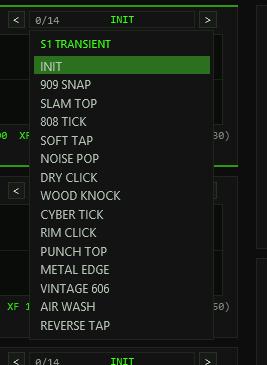
A lane preset is a recipe for exactly that lane: it sets the 16 engine
parameters of the segment (level, pitch, length, fades, phase, sweep, curve,
noise/drift/room, the lane filter) and switches the lane to SYNTH — your sample
window, the view (zoom/pan), MUTE/SOLO and everything else stay untouched.
Position 0 = INIT resets the lane to the factory state (CTRL+click on
the name does the same). After loading, the usual edit rules apply: dragging
any lane control (or running DETECT) adds an asterisk * in the
name box — the entry is modified since load. The starred state survives save
and reload, and UNDO walks lane preset changes back like any other step.
The whole state rides in @serialize (blob 'KICK' v8, 994 words, followed by the user bank; older blobs
from v1–v7 still load — v0.9.x migrates them so they sound identical, e.g.
the old single crossfade becomes XF-IN = the previous lane's XF). UNDO
(header and SYSTEM page) walks back through the last 20 edit states: a
snapshot is pushed when a drag or a button edit ends — preset changes
included. Lane view (zoom/skew/pan, maximize), segment selection, the current
page and the interface switches never enter the ring, and there is
deliberately no redo.
The SYSTEM page (MAIN|SYS tabs in the header) hosts the factory preset
row, the undo depth readout (n/20 SAVED), a short export guide,
the INTERFACE section and the status block. INTERFACE holds the
TOOLTIPS ON/OFF switch (saved with the project, default on) next to a
compact recap of the editing conventions — hover hints, CTRL+click reset,
RAND and MAX. Both interface switches are pure view settings: EXPERT (header)
and TOOLTIPS are serialized but kept out of the undo diff and survive preset
changes untouched. The status block lists sample rate, serialize format,
sample RAM incl. the undo head, kit slots, last trigger source and note,
player/swing/keytrack state — plus a drag-ID registry note and build info.
slider63 = root
note, slider64 = last loaded factory preset index. The export
action uses them to pitch and name the rendered item.11Exporting a kick
Select the track holding TT-KICK, put the edit cursor at the start (or make a
time selection), then run TT-KICK Export Kick.lua from the action list.
The script fires a single trigger note at the current ROOT pitch across the
export range — the time selection, or four bars from the cursor — and renders
it in place through the track's FX chain ("Item: apply track/take FX"). The
resulting audio item is named TTKICK_<preset>.wav after the
last loaded factory preset (kick as fallback): the REAPER-native
equivalent of drag & drop export — drag the item wherever you need it.
Cursor position, time selection and your item selection are restored.
12Options / Color
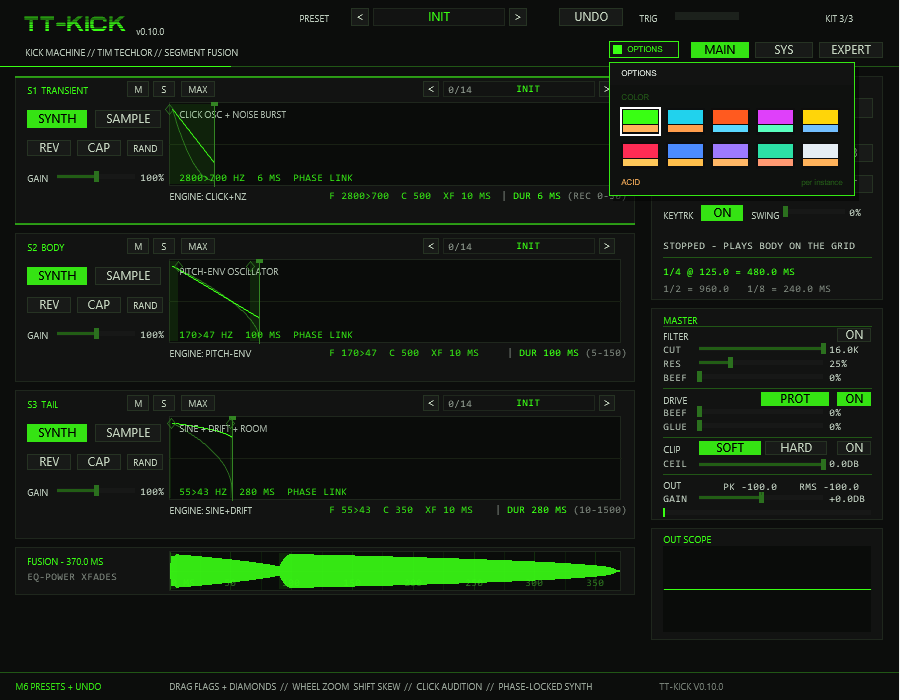
OPTIONS in the header (left of MAIN | SYS | EXPERT), then a swatch. A click outside the box closes it.Options / Color. The OPTIONS button opens the box; COLOR offers ten schemes:
ACID, CYAN, ORANGE, MAGENTA, YELLOW, RED, BLUE, VIOLET, MINT and ICE. A scheme changes the accent colour (active switches,
knob rings, waveforms, LEDs), the warning colour (a DUR outside its target range, SOLO) and, for RED to ICE, the slightly tinted panel
background of the whole front at once — on both pages (MAIN and SYS) and in EXPERT mode. The choice applies
per plug-in instance, is saved with the project and with FX-chain copies, and is not touched by factory presets,
lane presets, RAND or undo. The factory colour is ACID (the classic acid green). The colour is stored in the hidden
slider 65 (UI Color, 0–9); it is the third listed parameter after the two Lua mirrors.
13Release notes
TT-KICK is a pre-release under active test — the engine is numerically verified (the full check suite passed for v0.9.5; v0.10.0 only touches the front-end colours) and the current front end compiles and renders in REAPER, while the final listening pass of the newest additions is still being collected. Honest state of the build:
- New in v0.11.0: the preset bar (section 10) — dropdown with the 45 factory kicks and a 32-slot user bank, SAVE / RENAME / COPY / DELETE, saved in the project and in REAPER presets; it replaces the old header stepper. Sound and blob format unchanged; older projects load with an empty bank.
- Fixed in v0.10.1: project and preset state was not restored on load (saved projects, track chunks and presets came back at factory values); the state format is unchanged, so older projects load too.
- New in v0.10.0: the OPTIONS box with COLOR (section 12) — ten colour schemes per instance, factory ACID unchanged; sound and state format untouched.
- New in v0.9.5: lane preset browsers (section 10) — a
< n/14 NAME >stepper plus click-list in every lane header, three banks of 14 lane presets (attacks, bodies, tails) baked from the engine-verified lab, INIT position, wheel stepping, modified asterisk, undoable applies; the collapsed strips keep mini browsers. - New in v0.9.4: the factory collection grew from 6 to 45 kicks (INIT + 44 in eight families) — the SYSTEM page now groups them into tabs with a category list.
- New in v0.9.3: adaptive time rulers (1-2-5 grid) in the wave editors and the FUSION row.
- New in v0.9.2: lane MAXIMIZE (section 03), factory INIT windows now 6 / 100 / 280 ms (all lanes read green on INIT), and the canvas grew to 900 × 700 — taller wave boxes and a roomier player/master/scope column.
- New in v0.9.1: EXPERT mode — the knob row under each lane (engine parameters, PITCH, LEN, split XF-IN/XF-OUT, lane filter CUT/RES); per-lane Mute/Solo; the per-lane resonant low-pass filter with per-voice state and bit-exact bypass at the stop. Serialize blob is 'KICK' v8 — older projects migrate transparently.
- New in v0.9.0: hover tooltips on every control (switch on the SYS page), CTRL+click reset on all faders, flags, diamonds and knobs from one shared default table, and per-lane RAND (CTRL+click = lane back to INIT). The DUR/REC check moved into the status line.
- Earlier: v0.8.2 per-lane CAP live capture; v0.8.0/0.8.1 FUSION row, DUR/REC badges, BPM→ms reference, direction-independent voice-steal fade.
- Only the per-segment phase offset (PH) still has no control — it is serialized and written by presets and undo; everything else the engines read now sits in the EXPERT row.
- Cosmetic lag: the player's stopped status line still reads "PLAYS BODY ON THE GRID" from the first milestone — the player triggers the whole chain.
- Capture is volatile (RAM only, never serialized) and capped at 8 s —
~7.3 s at 192 kHz, less at 384 kHz; the button shows
N/Aif the extended memory is unavailable. - Known workflow limits: kits loaded with the plain
TT-KICK Load Kitdo not appear in Recent Kits (no folder copy); the undo ring has no redo; kit assignment needs the Lua actions — there is intentionally no in-plugin file dialog.
14Troubleshooting
- Fixed: project and preset state was not restored on load (v0.10.1) — update to v0.10.1 or newer; projects saved with older versions load again.
NO KIT FILE— run one of the Load Kit actions once, or keep the lanes on SYNTH (they need no kit).EMPTY SLOT - ASSIGN WITH TT-KICK Load Kit.lua— the slot has no path;LOAD ERROR - NOT A READABLE WAV/AIFF— the assigned file is unreadable or the path moved; reassign via a loader.DETECT: NO BODY SIGNAL— the body is too quiet or toneless (confidence under 30 %);BODY WINDOW TOO SHORT— lengthen the body window;LOADING - TRY AGAIN— a kit scan is still running.- Orange
DURvalues — the segment sits outside its recommended range; fine if deliberate. On INIT all lanes read green (the factory windows are 6/100/280 ms, inside their ranges). - Player shows
SYNC - WAITING FOR TRANSPORT— SYNC mode only plays while the transport runs; switch to FREE RUN for an always-on beat. CAPshowsN/A— the host denied the extended sample memory; capturing is unavailable, everything else still works.- A recording never starts — the input must exceed −40 dBFS at the plug-in's pins: check that audio actually reaches the track input or items before the FX (MIDI-only tracks carry no audio).
- A lane stays silent — check its M/S buttons first (a muted or
non-soloed lane drops out of the chain; audition still plays it), then
its SYNTH|SAMPLE state (SAMPLE needs a loaded slot or a committed
capture), its window length, and the master OUT gain;
KTRK OFFin the header is only a reminder that every note sounds at ROOT pitch. - A lane sounds darker than expected — its lane filter may be engaged:
the compact view flags
LANE FILTER ACTIVE - SEE EXPERT; open EXPERT and set CUT fully right / RES to 0 (or CTRL+click both) to bypass it bit-exactly.