
01The concept
A compressor-based sidechain reacts to a signal and needs threshold, ratio, attack and release to approximate the shape you actually want. TT-KICKSHAPE skips the approximation: you draw the volume curve, and the plug-in plays it back every time it is triggered. The result is the same as a perfectly tuned kick sidechain — or a trance gate, an offbeat duck, a swell, a tremolo — with exact timing and no detector in the way.
trigger  →  curve phase 0..1  →  c = curve(phase)
gain = max( 1 − DEPTH · (1 − c'), floor )     c' = c, or 1 − c with INVERT
gain → 1-pole SMOOTH → multiplies the signal (or one band, or a low-pass cutoff)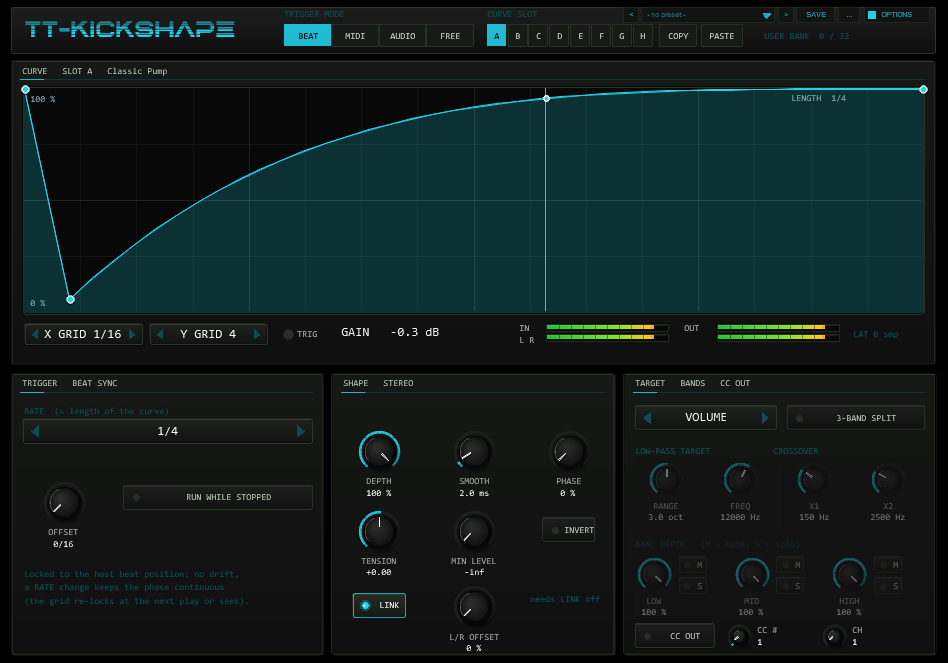
02Quick start
- Insert
TT-KICKSHAPEon the track that should pump (bass, pad, bus). A new instance starts in BEAT mode with the preset Classic Pump on a quarter-note grid: press play and the track ducks on every beat. - Pick another shape in the preset bar in the header (arrows, or click the name for the list) or draw your own: click on the curve to add a point, drag points, right-click a point to delete it, Alt-drag or double-click a segment for its tension.
- Set the length with RATE (1/32 … 8 bars, triplets and dotted values). DEPTH scales the effect, SMOOTH rounds sharp edges against clicks.
- For a sidechain from a kick track instead of the beat grid: switch to MIDI (a note-on restarts the curve) or AUDIO (a transient does).
03Trigger modes
| Mode | The curve restarts … | Timing |
|---|---|---|
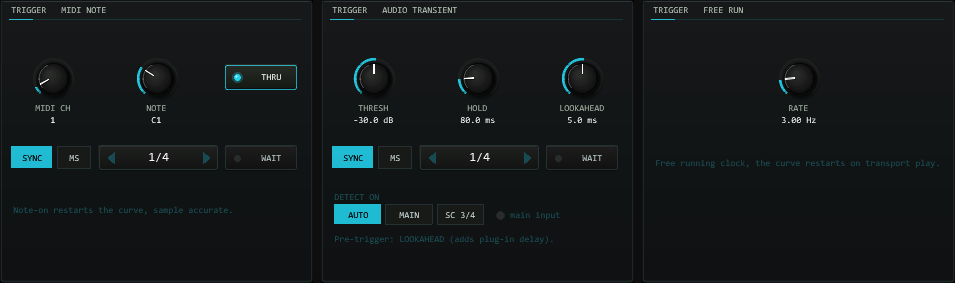
BEAT | continuously, locked to the host position; one period = RATE | sample-accurate, drift-free (phase re-derived from beat_position every block) |
MIDI | on every note-on that passes the channel / note filter | sample-accurate (measured: 0 samples offset) |
AUDIO | when the transient detector fires | follows the transient; LOOKAHEAD makes the curve start before it |
FREE | continuously, at a free rate in Hz (0.05–20) | restarts on transport play; runs while stopped |
BEAT
RATE is the length of the curve: 1/32T … 1/2 dotted and
1, 2, 4, 8 bars (bars follow the project time signature). OFFSET
shifts the grid in sixteenth notes, PHASE shifts the start inside the curve.
Changing RATE while playing keeps the phase continuous (measured jump
< 1e-13); the grid re-locks at the next play or seek. When the transport stops the
phase freezes (so the gain stays where it was); RUN WHILE STOPPED
keeps the clock running at the host tempo instead.
MIDI
A note-on restarts the curve at exactly its sample. MIDI CH and
NOTE filter which notes count (ALL = any). Note-offs are ignored: the curve
runs out to its end value and stays there until the next trigger. The curve length is
LENGTH — a note value (SYNC) or milliseconds (MS).
THRU decides whether notes are passed on; controllers, pitch bend and clock
always pass. WAIT chooses what a trigger during a running curve does:
off = restart at once, on = it is remembered and starts exactly when the running curve
ends. Only one trigger is remembered.
AUDIO
A peak at or above THRESH (−60…0 dB) starts the curve. After a trigger the
detector is locked for HOLD ms and until its 10 ms envelope has fallen
6 dB below the threshold, so a decaying kick cannot retrigger itself. DETECT ON
selects the source: the sidechain pins 3/4, the main input, or AUTO (pins 3/4 as
soon as they carry signal). An audio trigger can only fire when the transient has
arrived — use LOOKAHEAD (0–10 ms) to delay the audio and start the
curve earlier; it reports the delay to REAPER (PDC). Without lookahead the plug-in adds no latency.
FREE
A free-running clock at RATE Hz. The phase restarts at transport play.
04Curve, slots & presets
The editor holds up to 32 points; each segment has its own tension (Alt-drag it up or
down, double-click resets). The grid snaps points in time (X GRID: off, 1/4 … 1/32 of the
length) and level (Y GRID); hold Shift to place a point without snapping.
The vertical line is the playhead. A thin white line shows the effective curve after
TENSION, INVERT, DEPTH and MIN LEVEL. The number under the editor is the real gain in dB
right now.
Slots A–H each hold a complete curve and are saved with the project (they are
part of the plug-in state, so presets you save in REAPER carry all eight). COPY /
PASTE move a curve between slots. A preset is a built-in curve that is
loaded into the active slot; a star after its name marks a curve you edited since.
The 19 preset curves are the factory list of the preset bar (next chapter); a new instance fills the slots as listed below the table.
| Preset | Made for | Shape |
|---|---|---|
| Classic Pump | any RATE | steep dive to 6 %, exponential recovery |
| Hard Gate | any | open for the first half, closed for the second |
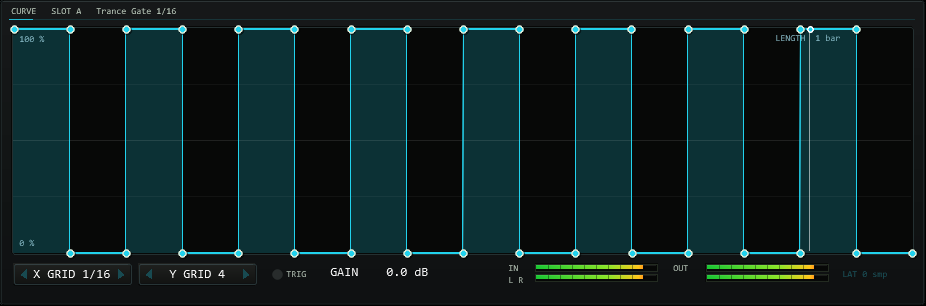
| Trance Gate 1/16 | 1 bar | 16 alternating steps |
| Triplet Gate | 1 bar | 12 alternating triplet-eighth steps |
| Offbeat Duck | 1/4 | dip on the “and” of every beat |
| Half-Time Swell | 1–2 bars | slow swell, sudden cut |
| Reverse Saw | any | curved swell |
| Sine Wobble | any | cosine, 17 points |
| Fast Pump | 1/4 | very short dive, recovery within 60 % |
| Long Breathe | 1 bar | soft dip and rise |
| Stutter 8ths | 1 bar | 8 short dips |
| Trap Chop | 1 bar | irregular 16-step gate |
| Ramp Up / Ramp Down | any | linear ramps |
| Pluck | any | instant rise, curved decay |
| Saw x2 | 1/2 | two falling ramps per period |
| Sidechain Kick 4/4 | 1 bar | four dips, one per beat |
| Flat / Triangle | any | constant 1 / up and down |
Factory presets are code, not saved data: they never overwrite anything you did not load yourself. A new instance fills the slots with Classic Pump, Trance Gate, Sine Wobble, Offbeat Duck, Fast Pump, Reverse Saw, Trap Chop and Sidechain Kick.
05Preset bar & user bank
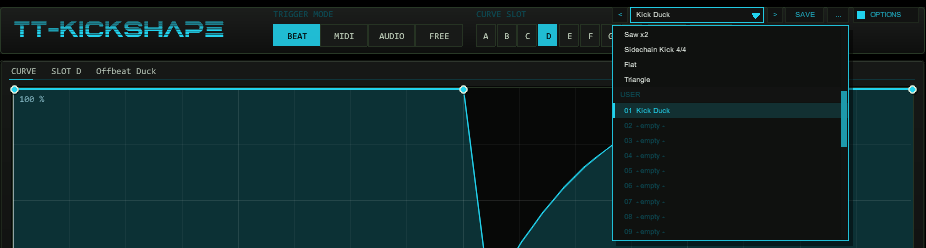
OPTIONS: < name > SAVE .... The name opens the list with the FACTORY and USER sections.The bar loads and saves the whole sound of the instance in one step: all timing, shape, stereo, target, band and detector settings plus all eight curve slots
with their preset names. Not part of a preset: the colour scheme (OPTIONS), the grid snapping of the editor, the MIDI channel / note filter and THRU,
the CC number and channel, RUN WHILE STOPPED and the hidden test parameters.
| Control | Function |
|---|---|
< / > | Previous / next preset: first the 19 factory presets, then the used user slots; wraps around and loads immediately. |
| Name field | Opens the list: FACTORY (19 curves) and USER (32 slots, empty ones show - empty -). Mouse wheel scrolls, click loads. A * behind the name means the state differs from the loaded preset. |
SAVE | Saves the current state into the selected user slot; with a factory preset (or none) selected, into the first free slot. A name box opens (up to 24 characters, default User 07): type, Enter or OK saves, CANCEL or a click outside cancels. |
... | RENAME, COPY (into the next free slot), DELETE (a second click confirms) for the selected user preset, and INIT (factory settings of all preset parameters and the default slot curves). |
A factory preset loads a curve into the active slot and leaves every other setting alone (exactly like the old preset selector). A user preset restores everything, including which slot is active and all eight slot curves.
Where the user bank lives. Plug-ins cannot write files, so the 32 user slots are part of the plug-in state: they are saved with the project, with FX-chain and track-template copies,
and in every REAPER preset of this plug-in (the + button in the FX window toolbar). To take your bank to another project or computer, save a REAPER preset once
(+ → Save preset) and load it there: the whole bank comes with it. Projects saved with earlier versions load unchanged with an empty bank.
Typing names. REAPER keeps Space for the transport, so type Shift+Space for a blank. Depending on your REAPER settings Esc closes the whole FX window; use CANCEL instead. (The + menu of the FX window also has Send all keyboard input to plug-in.)
06Shaping the gain
| Control | Range | Function |
|---|---|---|
DEPTH | 0–100 %, def. 100 | gain = 1 − DEPTH · (1 − c). 0 % is bit-exact transparent (tested on noise, with every target). |
SMOOTH | 0–50 ms, def. 2 | One-pole smoothing of the gain, applied last. At 2 ms the gain never jumps more than 0.0104 per sample (48 kHz). |
INVERT | off / on | Mirrors the curve (c' = 1 − c) before the depth, so DEPTH 0 stays transparent. |
PHASE | 0–100 % | Start offset inside the curve (BEAT / FREE: shifts the phase; MIDI / AUDIO: the curve starts this far in). |
TENSION | −1 … +1 | Added to the tension of every segment (result limited to ±1). |
MIN LEVEL | −96 dB (= −inf) … 0 dB | Floor of the gain, applied after the depth: max(gain, floor). 0 dB switches the effect off. |
07Stereo & 3-band split
LINK (default on) gives both channels the same curve. With LINK off,
L/R OFFSET delays the right channel’s curve by that share of the length —
a ping-pong pump; in MIDI/AUDIO mode the run is extended by the offset so the right
channel finishes its curve.
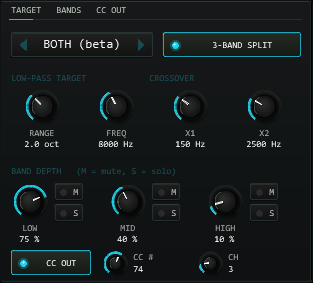
3-BAND SPLIT divides the signal at X1 (40–400 Hz) and X2
(400 Hz–8 kHz) with 4th-order Linkwitz-Riley filters. Each band has its own
DEPTH (multiplied by the global DEPTH) plus M (mute) and S
(solo). The typical use: duck only the bass region under a kick and leave the top untouched.
The low band passes an all-pass at X2, so the three bands add up to a flat magnitude
response (measured ±0.013 dB from 60 Hz to 16 kHz; the null test against the input passed
through the same two all-passes is −135 dB).
08Low-pass target
TARGET chooses what the curve controls: VOLUME (default),
LP FILTER or BOTH. The low-pass is a 12 dB/oct state-variable filter
whose cutoff follows the gain: cutoff = FREQ · 2^(−RANGE · (1 − gain)). At gain 1 the cutoff is
FREQ; a full dip lowers it by RANGE octaves. At gain 1 the filter is blended out exactly
(bit-exact). Beta: the target is verified against the analytic filter response (within 0.1 dB at
1 kHz cutoff), but not yet tuned by ear. With the split on, the low-pass acts on the summed output.
09MIDI CC output
CC OUT sends the current curve value (after DEPTH, INVERT, MIN LEVEL, before SMOOTH)
as a controller, 0–127, on CC # / CH. A value is sent only when it changes
(at most one per block), so a constant curve sends nothing after the first message. Use it to
modulate a synth filter or a send from the same curve that ducks the volume — the LFOTool
principle. Measured: value = round(127 · curve) exactly, position and value identical at the
receiver. MIDI that enters the plug-in still passes through.
10Latency, routing & lookahead
- The plug-in adds no latency (BEAT, MIDI, FREE; AUDIO with LOOKAHEAD 0). With LOOKAHEAD > 0 in AUDIO mode the audio is delayed by that time and the plug-in reports it, so REAPER realigns everything: the curve then starts 0–10 ms before the transient. In the other modes LOOKAHEAD does nothing.
- Sidechain pins: the plug-in has four inputs; pins 3/4 are the sidechain. Send the trigger track to
channels 3/4 of the plug-in’s track (set that track to 4 channels), then pick
DETECT ON: SC 3/4(or AUTO). - MIDI: feed the note-ons from a MIDI track (MIDI-only send) or the track’s own MIDI input. In MIDI mode, notes are removed
from the output unless
THRUis on.
11Controls
All sliders are hidden by design; the drawn front (1000×700, scales with the window) is the interface. Knobs: drag vertically, Shift = fine, mouse wheel, right-click / double-click / Ctrl-click = default. Hover any control for a tooltip.
| Area | Controls |
|---|---|
| Header | Trigger mode BEAT / MIDI / AUDIO / FREE · slots A–H · COPY / PASTE · preset bar (< name > SAVE ...) · OPTIONS (COLOR) |
| Editor strip | X GRID, Y GRID · TRIG LED · GAIN readout · IN / OUT meters (L, R) · latency in samples |
| TRIGGER | BEAT: RATE, OFFSET, RUN WHILE STOPPED · MIDI: MIDI CH, NOTE, THRU, SYNC/MS + LENGTH, WAIT · AUDIO: THRESH, HOLD, LOOKAHEAD, DETECT ON, LENGTH, WAIT · FREE: RATE (Hz) |
| SHAPE / STEREO | DEPTH, SMOOTH, PHASE, TENSION, MIN LEVEL, INVERT, LINK, L/R OFFSET |
| TARGET / BANDS / CC OUT | TARGET, 3-BAND SPLIT, RANGE, FREQ, X1, X2, LOW / MID / HIGH depth with M and S, CC OUT, CC #, CH |
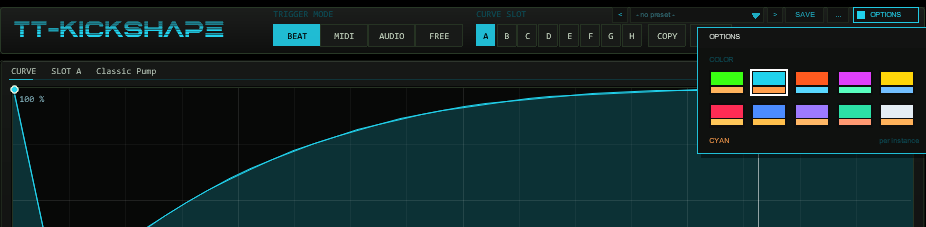
OPTIONS in the header, then a swatch. A click outside the box closes it.Options / Color. The OPTIONS button at the right end of the header (right of the preset bar) opens the box; COLOR offers ten schemes:
ACID, CYAN, ORANGE, MAGENTA, YELLOW, RED, BLUE, VIOLET, MINT and ICE. A scheme changes the accent colour (curve, knob rings, active buttons, LEDs, meters),
the second colour and, for RED to ICE, the slightly tinted panel background of the whole front at once. The choice applies per plug-in instance, is saved with the project
and with FX-chain copies, and is not touched by preset or slot changes (it is not part of a preset). The factory colour is CYAN. The colour is stored in the hidden parameter 58
(UI Color, 0–9).
12Hidden readouts
Sliders 46–56 (Q IDX … Q CMD) are a test interface used by the regression suite (phase, gain, trigger and CC
logs, slot checksums); PRESET LOAD (slider 44) is a momentary parameter that loads a factory curve into the active slot and
jumps back to 0 (for automation). Slider 58 (UI Color) stores the colour scheme of the OPTIONS box. None of the other sliders are needed in normal use.
13In practice
- Kick sidechain on the beat: BEAT, RATE 1/4, preset Classic Pump or Sidechain Kick 4/4 (RATE 1 bar), DEPTH 70–100 %, SMOOTH 1–3 ms.
- Kick sidechain from the actual kick: MIDI mode with the kick’s MIDI on the sidechain track, or AUDIO mode with the kick routed to pins 3/4, LENGTH 1/4 or 300 ms.
- Trance gate: BEAT, 1 bar, Trance Gate 1/16, MIN LEVEL −inf, SMOOTH 1 ms; L/R OFFSET 25 % with LINK off for stereo movement.
- Duck only the low end: 3-BAND SPLIT on, LOW 100 %, MID 30 %, HIGH 0 %, X1 around 200–300 Hz.
- Modulate a filter with the same curve: CC OUT on CC 74, map it in your synth.
14Troubleshooting
- The gain stays low while the transport is stopped — BEAT freezes the phase; enable
RUN WHILE STOPPEDor use FREE. - Nothing happens in MIDI mode — check the channel / note filter (ALL), that notes actually reach the track, and that
MIDI CHcounts channels 1–16. - AUDIO mode fires too often or never — raise or lower
THRESH, raiseHOLD; with a sidechain send useDETECT ON: SC 3/4. - Clicks on hard edges — raise
SMOOTH(1–3 ms is usually enough). - Gate presets look rounded — the editor draws the drawn points; the playback curve is a 8192-step table, so an edge is up to 0.012 % of the length wide.
- The three bands do not sum to the input — expected, see “good to know”: the sum is an all-passed copy (flat magnitude).