
01The concept
TT-LuckyMidiChance sits between your MIDI source and the instrument and
decides — note by note — what happens to each event. It is not a random
filter that gives different results every run: every stochastic decision
comes from an internal XorShift32 PRNG, and the stream is fully determined
by SEED. A locked seed produces an identical performance on
every play, bounce and project reload; seed 0 runs free.
The unit is operated entirely from its drawn front panel (680×440, Tim Techlor design) — all 45 JSFX sliders are hidden by release policy but stay alive as the parameter/automation channel. The verdict chain per incoming note-on:
note on
  → COND      bar-position gate   (host transport timeline)
  → EUCLID    step-pattern gate   (16th-note grid)
  → CHANCE    probability gate    (seeded draw)
  → MUTATE    per-note hit        (flip / velocity / division)
  → DEVIATE   velocity ±VEL DEV, delay +0…TIME DEV
  → STRUM     chord-window spread (rank × TIME)
  → RATCHET   replaces the note by a K-hit burst in one 16th
  → QUEUE     time-sorted output, note-off tracking
Events stay on their input channel — no MPE remapping, so drum racks and monosynths keep working — and the plug-in adds zero latency: every delay it creates is a scheduled event offset inside the MIDI stream.
02Quick start
- Insert
TT-LuckyMidiChancebefore the instrument in the track's FX chain (it is a MIDI-only FX — no audio passes through). - Make sure the header button reads
ENABLED(click toggles toBYPASS). - Leave
SEEDat0000(LED green = FREE) for fresh variation every pass, or dial in any number 1–9999 to lock a performance (LED amber = LOCKED). - Start with
CHANCE≈ 70 andVEL DEV≈ 12 — instant organic feel without touching your part. - Add
RATCHET DIV1/8 or 1/16 for trap-style rolls, or setEUCLID PULSES/STEPSto gate notes onto a rhythmic pattern. - Short on time? Pick one of the five factory presets in the
preset bar (
Subtle Humanis a good start) and save your own settings withSAVE.
03The front panel
Everything you touch is drawn by the plug-in — there is no slider page. Layout top to bottom:
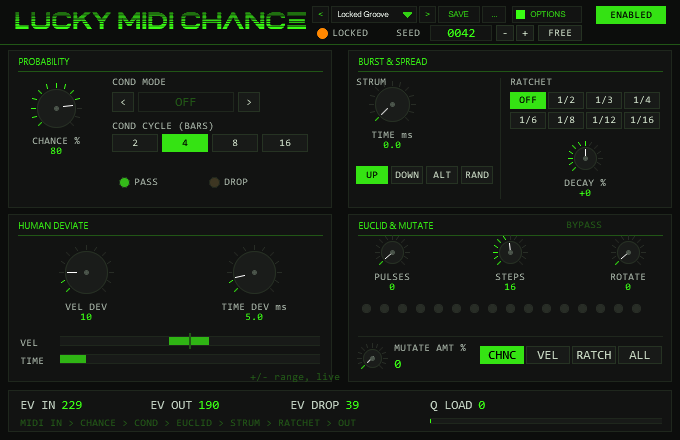
- HEADER
- Wordmark LUCKY MIDI CHANCE; to its right the
preset bar and the
OPTIONSbutton, at the far right theENABLED/BYPASSbutton. The second header row holds the seed LED (green FREE / amber LOCKED) and the SEED readout box with − + and FREE buttons. Mouse wheel over the readout steps ±1 (Shift = ±10), right-click resets to 0. - PROBABILITY
- Top left:
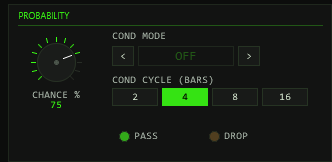
CHANCEknob, the COND cycler (< name >, click or wheel to step through 11 states), theCOND CYCLEbuttons 2/4/8/16 and the PASS (green) / DROP (amber) verdict LEDs. - BURST & SPREAD
- Top right:
STRUM TIMEknob,UP/DOWN/ALT/RANDbuttons;RATCHETdivision buttons OFF…1/16 and theDECAY %knob. - HUMAN DEVIATE
- Bottom left:
VEL DEVandTIME DEVknobs plus two live range bars that pulse with every passed note. - EUCLID & MUTATE
- Bottom right: status readout
(
E(k,n) RrorBYPASS), thePULSES/STEPS/ROTATEknobs, up to 32 step LEDs, theMUTATE AMTknob with value and theCHNC/VEL/RATCH/ALLtarget buttons. - READOUTS
- Bottom strip:
EV IN,EV OUT,EV DROPcounters,Q LOADnumber and bar (turns amber above 384 of 512 queue slots), and the legend lineMIDI IN > CHANCE > COND > EUCLID > STRUM > RATCHET > OUT.
| Widget | Gesture | Behaviour |
|---|---|---|
| Knob | drag vertically | set value; Shift = fine |
| mouse wheel | ±2 % of range per detent | |
| right-click / double-click | reset to default | |
| Button / cycler | click | set / step (cyclers wrap around) |
04Preset bar & user bank
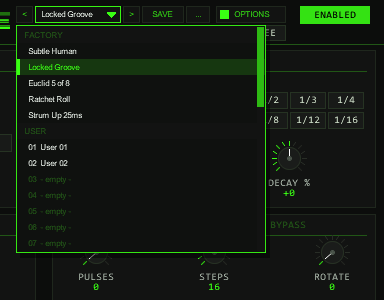
OPTIONS: < name > SAVE .... The name opens the list with the FACTORY and USER sections; the preset in use is marked.The bar loads and saves the whole musical setting of the instance in one step: SEED, CHANCE, the condition mode and cycle, strum time and direction,
ratchet division and decay, velocity and time deviation, the three Euclid values and the mutate amount and target (parameters 2–16). Not part of a preset: the ENABLED/BYPASS switch
(a preset must never silence the track), the colour scheme (OPTIONS) and the hidden diagnostic and test parameters.
| Control | Function |
|---|---|
< / > | Previous / next preset: first the five factory presets, then the used user slots; wraps around and loads immediately. |
| Name field | Opens the list: FACTORY (5 presets) and USER (32 slots, empty ones show - empty -). Mouse wheel scrolls, click loads. A * behind the name means the settings differ from the loaded preset. |
SAVE | Saves the current settings into the selected user slot; with a factory preset (or none) selected, into the first free slot. A name box opens (up to 24 characters, default User 07): type, Enter or OK saves, CANCEL or a click outside cancels. |
... | RENAME, COPY (into the next free slot) and DELETE (a second click confirms) for the selected user preset, and INIT (all preset parameters back to their defaults). |
| Factory preset | Settings | Use |
|---|---|---|
Subtle Human | VEL DEV 12, TIME DEV 6 ms; everything else default | Organic feel without dropping a note; free seed. |
Locked Groove | SEED 42, CHANCE 80, VEL DEV 10, TIME DEV 5 ms | A sparse but reproducible variation: the same notes drop on every play. |
Euclid 5 of 8 | EUCLID 5 pulses / 8 steps | Five of eight 16th steps pass (x.xx.xx.) — a classic rhythm gate. |
Ratchet Roll | RATCHET 1/4, DECAY −40 % | Every note becomes a four-hit roll that fades out. |
Strum Up 25ms | STRUM TIME 25 ms, UP | Chords roll upward, 25 ms per note. |
A factory preset starts from the defaults (INIT) and changes only the listed parameters, so it never inherits settings from what you had before. ENABLED and the colour stay as they are.
Where the user bank lives. Plug-ins cannot write files, so the 32 user slots are part of the plug-in state: they are saved with the project, with FX-chain and track-template copies,
and in every REAPER preset of this plug-in (the + button in the FX window toolbar). To take your bank to another project or computer, save a REAPER preset once
(+ → Save preset) and load it there: the whole bank comes with it. Projects saved with earlier versions load unchanged with an empty bank.
Typing names. REAPER keeps Space for the transport, so type Shift+Space for a blank. Depending on your REAPER settings Esc closes the whole FX window; use CANCEL instead. (The + menu of the FX window also has Send all keyboard input to plug-in.)
The preset bar is narrower than in the larger plug-ins (194 instead of 250 units) to fit the 680×440 header; long names are shortened with .. in the bar and shown in full in the list.
05SEED: FREE & LOCKED
| SEED | LED | Behaviour |
|---|---|---|
0000 | green · FREE | Free-running: a fresh seed is drawn from time at every transport start — every pass differs |
0001–9999 | amber · LOCKED | Locked: identical decisions on every play from the same material — reproducible across plays, bounces, reloads and even between two instances |
The PRNG is re-seeded on every transport start and immediately when you change SEED in the panel, so A/B-ing two seeds is instant. With a locked seed, the same input after play start always yields bit-identical decisions — the same notes drop, the same strums roll, the same mutations hit. Change one digit and the performance changes completely.
Note: MUTATE hits, DEVIATE jitter and RAND strums all draw from this one stream — a locked seed locks everything, not just CHANCE.
06CHANCE: probability gate
| Control | Values | Function |
|---|---|---|
CHANCE | 0–100 %, def. 100 | Per-note pass probability: each note-on draws against the seeded stream; 100 = all pass, 0 = all dropped |
At 100 the gate is open and costs no random draw. Below 100, dropped notes are removed completely — their note-off is swallowed too, so nothing hangs. The PASS (green) and DROP (amber) LEDs in the PROBABILITY panel flash with every verdict.
07COND: bar conditions
COND gates notes by where in the song they land — it reads the host transport, not the clip. The cycler steps (and wraps) through 11 states:
| Mode | Meaning |
|---|---|
OFF | No condition (default) |
1:2 · 2:2 | Pass only in bar 1 / bar 2 of every 2-bar cycle |
1:4 · 2:4 · 3:4 · 4:4 | Pass only in bar n of every 4-bar cycle |
FILL | Pass only in the last 2 beats of the last bar of the COND CYCLE |
!FILL | Inverse of FILL — everything except those 2 beats |
FIRST | Pass only inside the bar where playback started |
LAST | Pass only in the last bar of the COND CYCLE |
The COND CYCLE buttons (2 / 4 / 8 / 16 bars) set the cycle
length used by FILL, !FILL and LAST
— the 1:2…4:4 modes have their own fixed 2- or 4-bar grid. Two honest
details: bars are counted on the project timeline (bar position in
the song, time-signature aware), and with the transport stopped COND
passes everything, exactly like OFF.
08STRUM & RATCHET
| Control | Values | Function |
|---|---|---|
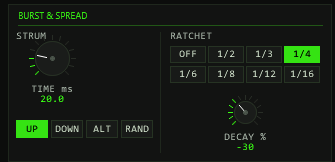
STRUM TIME | 0–100 ms, 0.1 steps | Spacing per note: within a 15 ms chord window, passing notes get sorted ranks and the k-th note is delayed k × TIME — a 4-note chord at 20 ms lands 0/20/40/60 ms |
STRUM DIR | UP · DOWN · ALT · RAND | Rank order: low→high, high→low, alternating per chord (first UP), or a seeded shuffle |
RATCHET DIV | OFF · 1/2 · 1/3 · 1/4 · 1/6 · 1/8 · 1/12 · 1/16 | Replaces each note by a burst of N hits inside one 16th note at the note's position — the original note-off is swallowed, so the burst length follows tempo, not your finger |
RATCHET DEC % | −100…+100 | Linear velocity ramp across the burst hits: negative fades out (−50 % at vel 100 → 100/83/66/50), positive builds, clamped 1–127 |
Strum note-offs are delayed by the same amount as their ons — chords
stay intact, just rolled. A chord arriving across an audio-block boundary
still joins the open window. Ratchet bursts consist of note-on/note-off
pairs (off halfway to the next hit) and every hit counts in
EV OUT.
09DEVIATE: human jitter
| Control | Values | Function |
|---|---|---|
VEL DEV | 0–64, def. 0 | Uniform ± velocity jitter around the played value, clamped 1–127 |
TIME DEV | 0–50 ms, 0.1 steps | Random late per note: adds a seeded delay between 0 and TIME DEV. Never early — that is why the plug-in needs no lookahead and adds zero latency |
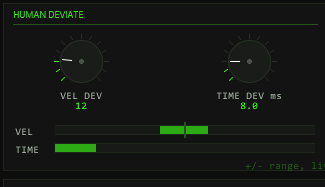
The two range bars under the knobs show the live ± window and pulse brighter with every note that passes. Both jitter sources draw from the master seed — a locked seed gives you the same “human” player every time, dragging and pushing identically on each bounce.
10EUCLID pattern gate
EUCLID is a gate, not a generator: it distributes
PULSES hits over a STEPS-long ring using the
Bjorklund algorithm — the same maximally-even distribution as every
classic Euclidean box — and lets a note pass only when its onset lands on
a pulse step of the 16th-note grid. ROTATE shifts which step
the pattern starts on.
| Control | Values | Function |
|---|---|---|
PULSES | 0–32, def. 0 | Active hits in the ring. 0 = EUCLID bypassed (status shows BYPASS, no gating) |
STEPS | 1–32, def. 16 | Ring length in 16th steps (16 = one 4/4 bar) |
ROTATE | 0–31, def. 0 | Rotates the pattern (mod STEPS) — moves where the hits sit against the beat |
While transport plays, the step is the project's 16th-note position — the pattern repeats every STEPS sixteenths across the timeline. With transport stopped, a step counter advances per played note group (notes closer than ~15 ms share a step), so live playing is gated too. Notes on the same step share the verdict — a chord passes or drops together.
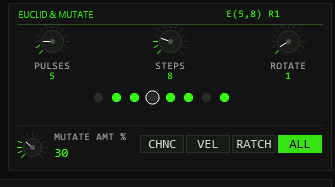
The step LEDs show the rotated pattern (acid dot = pulse, white ring =
current step). Classic references: E(3,8) = x..x..x.,
E(5,8) = x.xx.xx., E(7,16) =
x..x.x.x..x.x.x.
11MUTATE
MUTATE is a per-note seeded dice roll, not a slow drift: every
note-on draws once against MUTATE AMT; on a hit, the chosen
target is perturbed for that note only.
| MUTATE TGT | What a hit does |
|---|---|
CHNC | Flips the pass/drop verdict — a dropped note plays, a passing note drops |
VEL | Offsets velocity by a seeded ±48 (clamped 1–127) |
RATCH | Replaces the ratchet division for this note by a random one (1/2…1/16) |
ALL | All three at once |
MUTATE AMT (0–100 %) is the hit probability — low values
give occasional “wrong” notes, high values reorganise whole passages.
COND is never mutated: the bar condition is a hard rule. Like everything
else, mutation is fully seeded — a locked SEED replays the same hits.
12In practice
Three recipes that show how the modules are meant to work together. Every control named here is documented in the sections above — what matters here is the order of moves and what to watch while it runs.
1 · A real-player lane — humanize only
Goal: make a quantized keys, pad or drum lane feel played without losing a single note.
- Leave
CHANCEat 100,EUCLID PULSESat 0 (BYPASS),RATCHETOFF,MUTATE AMT0 andSTRUM TIME0 — the whole verdict chain now passes every note; only DEVIATE touches the events. - Play the loop and raise
VEL DEVuntil the accents breathe — 8–14 is the sweet spot; much beyond ~20 reads as sloppy rather than human. - Add
TIME DEV3–8 ms. It only ever adds lateness (that is what keeps the unit zero-latency), so if the part drags, nudge the clip a few milliseconds earlier instead of hoping for pushes. - Keep
SEEDFREE while writing; before printing, lock any number so every bounce reuses exactly the same “player”.
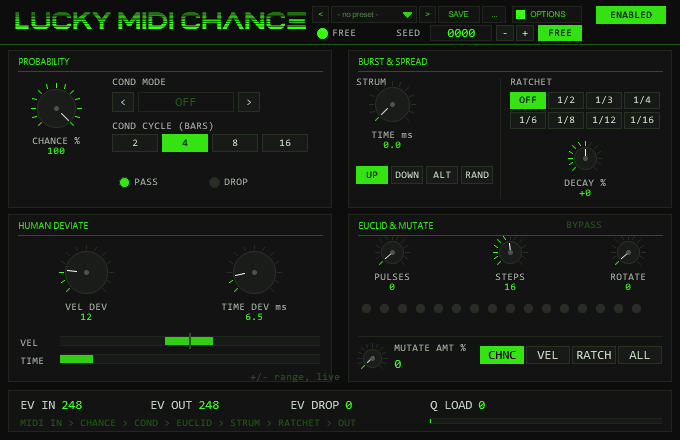
Watch: EV IN must equal EV OUT and
EV DROP stays at 0 — if DROP moves, a gate you forgot is still
on. The VEL/TIME range bars pulse with every note.
Pitfalls: a locked seed makes every replay identical — when you
double-track, give the second take a different seed (or FREE), otherwise
both “players” deviate in perfect unison and the double sounds like one.
Jitter applies per note-on, so held chords smear slightly — halve
TIME DEV for chord material.
2 · Find it, lock it, print it — reproducible variation
Goal: thin a busy loop into a controlled variation that survives bounce and reload bit-identically.
- Set
CHANCE60–75 and, if you want phrase-level structure, aCOND—2:4passes only the second bar of every four,FILL/!FILLgate the last two beats of the COND CYCLE. - Add
MUTATE AMT~15 onVELorALLfor occasional flipped verdicts and accents. - Lock the seed first: dial any number ≥ 1 (amber LOCKED LED), then step the SEED box +1 per looped pass — every number is a different but perfectly repeatable arrangement.
- When a pass lands, stop touching SEED: from that moment every replay, freeze and bounce is bit-identical — same drops, same strum shuffles, same mutation hits, same deviate jitter (one shared stream).
- Print via freeze/render-in-place; the committed take is exactly what you auditioned.
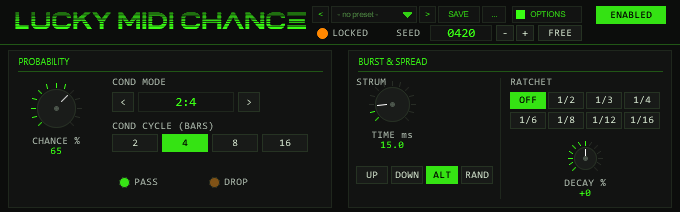
Watch: the PASS/DROP LEDs and the counters — expect
EV OUT + EV DROP ≈ EV IN (ratchet bursts inflate EV OUT, see
below). If the verdicts do not match your mental picture, the counters tell
you which stage is eating notes.
Pitfalls: in FREE mode the drawn seed is never shown — a magic pass you hear while FREE cannot be recovered, so audition locked from the start (or freeze the moment you like it). Editing the clip changes the note stream, so the same seed then yields different decisions. Changing SEED mid-play reseeds instantly — ideal for A/B, but decisions before the edit do not repeat.
3 · Rolls and gates — ratchet meets euclid
Goal: trap-style hi-hat rolls and grid-locked rhythmic gating.
- Feed a steady 16th-note lane. Set
RATCHET DIVto 1/8 or 1/16 — each note is replaced by a burst inside one 16th at the note’s position, so rolls stay tempo-locked at any BPM. - Turn
RATCHET DEC %negative (−30…−60) for fade-out rolls; positive values build toward the next hit. - Layer the gate:
EUCLID PULSES 3 / STEPS 8passes only onsets on the x..x..x. pattern — an instant maximally-even rhythm.ROTATEshifts the hits on or off the beat. - Rolls only where they belong: add
COND FILL(the last two beats of the cycle’s last bar) and the rest of the loop stays straight.
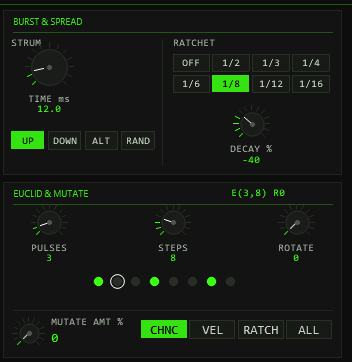
Watch: the step-LED ring (white marker = current 16th) and
Q LOAD — dense bursts fill the 512-slot queue quickly and the
bar turns amber past 384. EV OUT counts every burst hit
individually, so it legitimately runs far ahead of EV IN.
Pitfalls: a burst always fits inside one 16th regardless of note
length — the original note-off is swallowed, so for sustained rolls
retrigger the note. EUCLID sits before CHANCE, STRUM and RATCHET in the
verdict chain: a note on a dead step never reaches the burst. A strummed
chord under ratchet becomes a staircase of mini-rolls (rank × TIME shifts
each burst). With transport stopped the pattern advances per note group
(~15 ms) rather than along the timeline — judge the real alignment
while the loop plays. If a burst ever hangs, a transport jump or
CC 123 flushes everything instantly.
13MIDI thru & panic
- Non-note traffic (CC, pitchbend, aftertouch, program change) passes with its original timing — everything travels through one time-sorted queue, so output order is always sample-correct.
- Panic fires on
CC 123(All Notes Off),CC 120(All Sound Off), a transport jump of more than one bar, switchingENABLED → BYPASS, and on every transport start: queued generated notes are discarded and a note-off is sent for every note still sounding on the output — no hangers, ever. CC and pitchbend already in the queue survive a panic. - Note-offs are tracked per channel+note: a dropped note's off is swallowed, a passed note's off is delivered (shifted by the same strum/deviate delay as its on), and offs for notes the unit never saw pass straight through.
- Everything stays on the input channel — no MPE splitting, so drum racks and channel-sensitive instruments keep working.
14Automation & parameters
All panel controls are ordinary JSFX parameters — hidden from the generic slider page by design, but fully exposed to REAPER: they appear in the parameter list for envelopes, MIDI/OSC learn, track controls and parameter modulation. Every panel gesture also reports itself as a real parameter change, so touch/latch/write automation recorded from the front panel works exactly like automating the slider.
| Param # | Parameter | Panel control |
|---|---|---|
| 1 | ENABLE | Header button ENABLED/BYPASS |
| 2 | SEED (0=free) | Header readout, −/+/FREE, wheel, right-click |
| 3 | CHANCE % | PROBABILITY knob |
| 4 | COND MODE | COND cycler |
| 5 | COND BARS | COND CYCLE buttons 2/4/8/16 |
| 6 | STRUM TIME ms | STRUM TIME knob |
| 7 | STRUM DIR | UP/DOWN/ALT/RAND buttons |
| 8 | RATCHET DIV | division buttons OFF…1/16 |
| 9 | RATCHET DEC % | DECAY % knob |
| 10 | VEL DEV | VEL DEV knob |
| 11 | TIME DEV ms | TIME DEV knob |
| 12–14 | EUCLID PULSES / STEPS / ROT | EUCLID knobs |
| 15 | MUTATE AMT % | MUTATE knob |
| 16 | MUTATE TGT | CHNC/VEL/RATCH/ALL buttons |
| 40 | UI Color | OPTIONS box, COLOR (colour scheme 0–9) |
Parameters 41–45 (PB CMD/ARG/A/B/C) are the test interface of the preset bank (save, load and check slots without the mouse); leave them alone.
Parameters 17–39 (and only these besides 41–45; 40 is the colour scheme above) are a diagnostic/test bus used by the automated test
harness: the SNT sanity tag, the live counters
(EV IN/OUT/DROP, Q LOAD, ACT), a
per-note query bus (Q NOTE → Q STATUS/DELAY/VEL), an event
log ring buffer (LOG EN/IDX/KIND/M1–M3/T/N) and environment
echoes (SRATE, TEMPO, BEATSAMP).
Most are read-only outputs the DSP overwrites every block — automating
them is pointless, and users can safely ignore them; the interesting ones
are mirrored on the front panel anyway.

15Options / Color
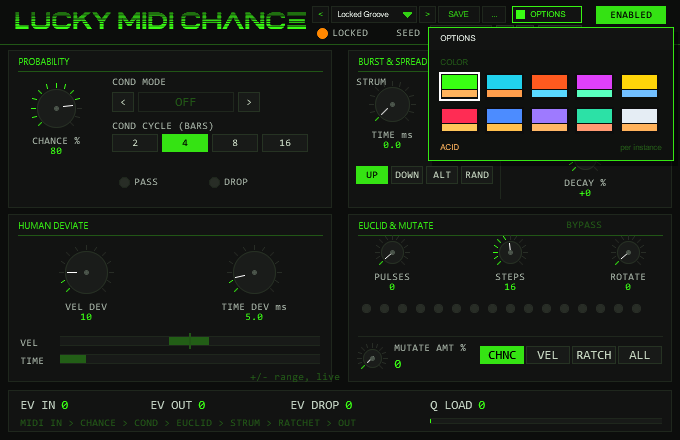
Click OPTIONS in the header to open the box. Under COLOR pick one of ten schemes: ACID, CYAN, ORANGE, MAGENTA, YELLOW, RED, BLUE, VIOLET, MINT or ICE.
A click on a swatch changes the whole front at once (accent, dimmed accent, panel and ground tint, knob discs); a click outside the box closes it. The choice applies per plug-in instance
and is saved with the project and with FX chains (hidden parameter UI Color, parameter 40). The factory colour of TT-LuckyMidiChance is ACID.
The LOCKED seed LED and the overloaded Q LOAD bar use the warning colour of the scheme (orange under ACID). Colour has no effect on the MIDI processing.
16Troubleshooting
- Everything passes regardless of settings — the header button is on
BYPASS, or the FX sits after the instrument in the chain (it must see the MIDI before the instrument does). - Different results on every bounce —
SEED = 0000is free-running; lock any number for a reproducible performance. - EUCLID seems to do nothing —
PULSES = 0bypasses the gate (status readsBYPASS). Set PULSES ≥ 1. If notes drop, check ROTATE: your onsets may land between pulses; notes quantize to the nearest 16th step. - COND does nothing — it only works while transport plays; stopped, it passes everything by design. Also check that the song position actually reaches the gated bars.
- FILL never triggers — FILL is the last 2 beats of the cycle's last bar; make sure COND CYCLE matches your musical phrase length.
- Strum spreads a chord too far —
STRUM TIMEis the per-note step, not the total: an n-note chord spreads (n−1) × TIME. Halve it for bigger chords. - Ratchet notes hang or the queue fills during dense bursts — panic
clears automatically on transport jump or ENABLE→off, and a
CC 123always flushes. TheQ LOADbar turns amber above 75 % of the 512-slot queue: shorten bursts or lower the ratchet division.