
01The concept
TT-MICROTUNE is a pure MIDI-effect JSFX — it has no audio path of its own. It reads a Scala scale, computes each incoming note's deviation from 12-TET in cents and transmits that deviation as a per-note 14-bit pitchbend on a private MIDI channel. The synthesizer behind it stays tuned to 12-TET; the retuning happens entirely inside this plug-in. Arbitrary scales — 19-TET, just intonation, historical temperaments, non-octave periods — run on any synth that honours pitchbend on multiple MIDI channels.
There is exactly one operating mode: every sounding note gets its own channel (MPE-style). There is no mono or single-channel mode switch — one pitchbend lane per channel is simply the only way to keep a chord in tune.
02Install & signal flow
TT-MICROTUNE ships through the TimTechlor ReaPack repository. Its
@provides header drops two starter files plus this manual alongside
the effect — no manual file copying is needed:
| Package file | Lands as |
|---|---|
scales/just12.scl | Data\tt-scales\just12.scl.txt — 12-tone just intonation test scale |
scales/linear.kbm | Data\tt-scales\linear.kbm.txt — linear keyboard map (one scale degree per key, octave-locked) |
Signal flow: insert TT-MICROTUNE before the instrument in the same FX chain (MIDI FX first, synth second). The track's MIDI output must reach the synth on all 16 channels — use an omni or MPE-capable instrument, or set the synth's channel to all. Then pick a scale (section 03), match PB RANGE to the synth (section 08) and play.
03Scala files & the tt-scales folder
Scales and keyboard maps live in the REAPER data folder:
C:\Users\<name>\AppData\Roaming\REAPER\Data\tt-scales\.txt,
.wav, .ogg, .raw). Scala files therefore
must be stored as *.scl.txt and keyboard maps as
*.kbm.txt — i.e. 19tet.scl →
19tet.scl.txt, linear.kbm →
linear.kbm.txt. The file content stays untouched; the bundled parser
reads it character by character and tolerates CR, LF and CRLF endings.Data\tt-scales\. Selecting a file re-parses it immediately..scl — the scale
Layout: one description line, the degree count, then one interval per line. The last degree is the period — usually 1200 ct (the octave), but scales with a different period (e.g. a stretched octave or a 3/1 period) work as well.
| Form | Example | Meaning |
|---|---|---|
| Comment | ! scale name | Lines starting with ! are skipped |
| Cents | 123.456 | Number with a decimal point = cents above degree 0 |
| Ratio | 3/2, 5/4 | Integer ratio, internally 1200·log2(a/b) |
! just5.scl
Just intonation, 5 degrees
5
9/8
5/4
3/2
15/8
2/1
Entries that do not parse (negative cents, zero denominators, junk) are skipped silently. Hard caps: up to 999 stored degrees, header scan capped at 200 lines, 4096 lines total.
.kbm — the keyboard map (optional)
One value per non-comment line — seven header fields, then exactly
map size map entries (x = unmapped key):
! linear.kbm — the shipped example
12      ! map size
0       ! first mapped MIDI note
127     ! last mapped MIDI note
60      ! middle note = degree-0 anchor
69      ! reference note
440.0   ! reference frequency (Hz)
19      ! formal octave degree (scale degrees per map cycle)
0
1
2
…       ! 12 entries total, one degree per line
Each map cycle of map size keys advances octave degree
scale degrees — the shipped map makes every 12-key block climb 12 degrees of the
scale, locked so the same keys always hit the same scale positions per octave. A
map is accepted only if it passes sanity checks (size 1–128,
first ≤ last ≤ 127, reference frequency 20–20000 Hz); otherwise the plug-in
silently falls back to the linear ROOT KEY mapping and the panel's KBM row stays
linear. Keys outside first–last or on x entries produce
no output at all (Scala convention).
04In practice: three setups
Three end-to-end setups, from the first retuned note to a full
multi-channel rig. All of them assume TT-MICROTUNE sits before the
instrument (section 02) and that scale and map files live in
Data\tt-scales\ (section 03).
Retune a stock synth to a Scala scale
Goal. Play a non-12-TET scale — 19-TET here — on a completely ordinary virtual instrument that knows nothing about microtuning.
- Insert TT-MICROTUNE before the synth in the same FX chain.
- Set the synth to listen on all MIDI channels (omni or MPE mode) — retuned notes land on up to 15 different channels, and a single-channel synth only hears the voices that happen to land on its channel.
- Set the synth's own pitchbend range, then pick the matching value in
the PB RANGE drop-down —
+-2for most classic synths,+-48typical for MPE instruments. This single step decides whether the scale is actually in tune: the plug-in computes bends as a fraction of the configured range, the synth applies them as a fraction of its own (section 08). - Open Param → FX parameter list (or pin the parameter to the
track controls) and pick a file for
SCALE. - Play. The header LED must read SCALE OK and the SCALE row
must show the degree count —
19 DEGfor a 19-TET file.
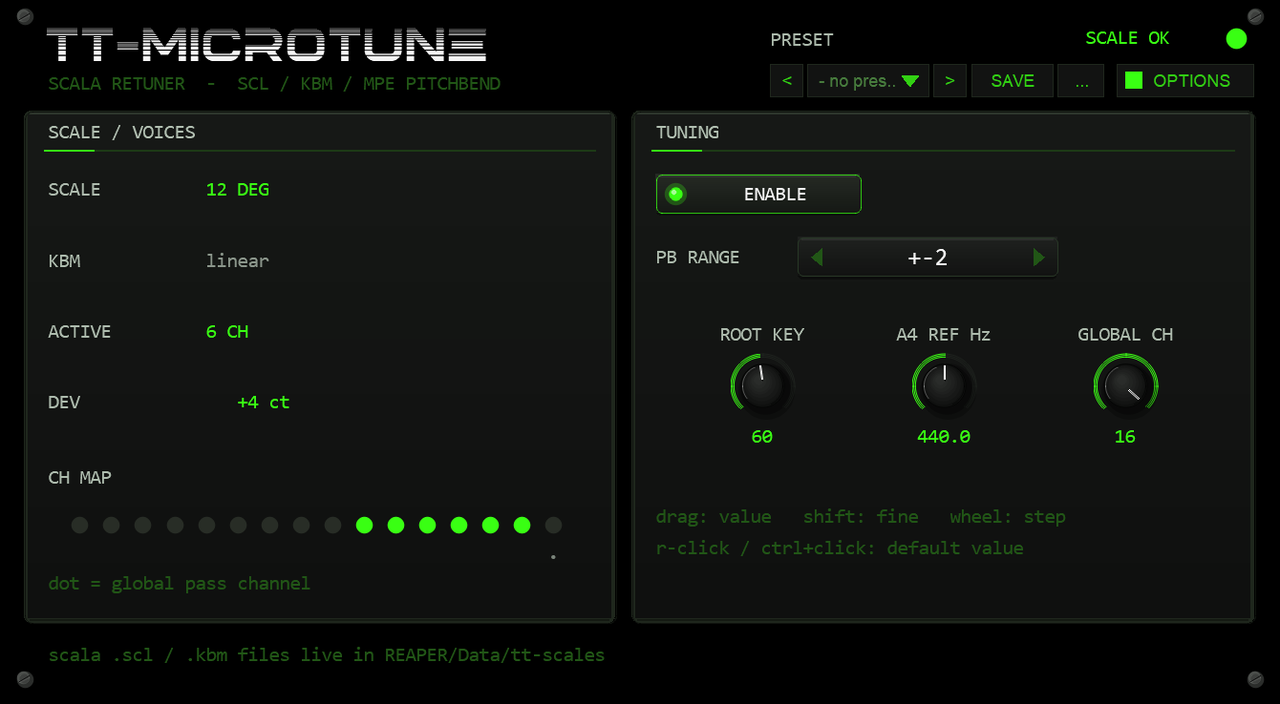
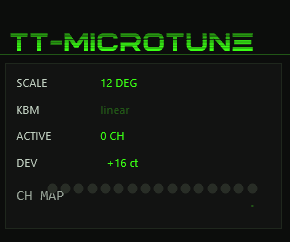
SCALE 12 DEG), six voices sounding on their own channels, DEV showing the last computed deviation, PB RANGE at +-2 for a classic synth.What to watch while playing. ACTIVE counts the
channels in use — one per sounding note — and CH MAP shows
which ones; the dotted LED is GLOBAL CH and stays dark by design.
DEV is the last computed deviation from 12-TET in cents.
With a 19-TET scale every key steps one ≈63 ct scale degree against
100 ct of 12-TET, so the deviation drifts about −37 ct per ascending
key — low hundreds of cents are normal, not an error.
A/B sanity check. ENABLE → BYPASS is a bit-exact MIDI thru — held voices get their note-offs first, then the untuned stream passes through. That is the fastest way to hear exactly what the retuner contributes.
DEVshows healthy values but the synth sounds like plain 12-TET → the bends are under-applied: the synth's bend range is wider than PB RNG (classic trap: plug-in at+-2against an MPE synth at+-48). Set both equal.- Header says
NO SCALE→ check the SCALE row:FILE?means the file was not found,PARSE ERRmeans it is broken — in both cases MIDI passes through unchanged (section 13). - Notes play but intervals jump wildly → the synth's range is narrower than PB RNG; the bend is exaggerated.
- |DEV| beyond
PB RANGE × 100ct clamps the bend at the rail — keys far from the reference can exceed+-2quickly; prefer+-12/+-24/+-48when the synth allows (section 08).
Pin the layout with a keyboard map (.kbm)
Goal. Fix which keys hit which scale degrees, octave-locked —
the bundled linear.kbm advances one full scale octave per
12-key block, so the same piano keys always land on the same scale
positions.
- Keep the scale loaded as above.
- In the parameter list pick a
*.kbm.txtfile forKBM— the row must flip fromlineartoON (n)with the number of mapped entries.
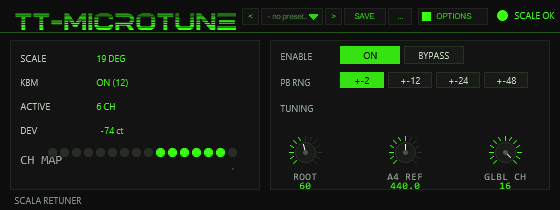
KBM ON (12) — the shipped linear map anchors a 19-degree scale to the keyboard so each 12-key block covers one full scale octave; PB RNG at +-2 for a classic synth.What changes vs. scale-only. The map's middle note anchors
degree 0 (60 in the shipped file), so ROOT KEY no longer does
anything; the map's reference note and frequency anchor the absolute
tuning (key 69 → 440 Hz in the shipped map) while A4 REF still
adds a global offset on top. Keys outside the map's first–last range or
on x entries are silent by design — Scala convention,
not a bug. Note that the shipped map reaches only a 12-degree subset of
each 19-TET octave; reaching all 19 degrees takes a 19-entry map.
- KBM still reads
linearafter choosing a file → the map failed the sanity checks (size 1–128, first ≤ last ≤ 127, reference frequency 20–20000 Hz) and was ignored — inspect the file, not the synth. - Pairing a map whose octave-degree count does not fit the scale
produces legal but confusing layouts — check that
octave degreematches the scale's period before blaming the tuning.
A multi-channel rig: GLOBAL CH as the control lane
Goal. Keep modwheel, sustain and the pitch wheel reaching the synth without corrupting the per-note bends — and read the channel map correctly while dense chords play.
- Decide which channel should carry global controllers, then turn the GLBL CH knob to it (default 16; 1 below) — before playing a note.
- Verify in
CH MAP: the dotted LED marks GLOBAL CH and must stay dark while notes play; the sounding voices light the other LEDs. - Play a cluster.
ACTIVEcounts allocated voices; past 15 simultaneous notes the allocator steals channels round-robin and sends the old voices' note-offs first (section 12).
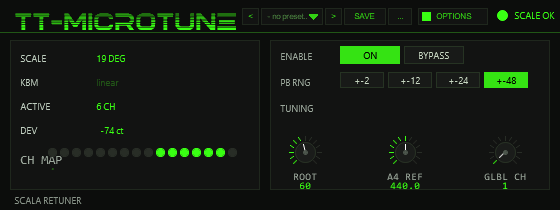
All remaining CC, channel/poly aftertouch, program changes and your own pitchbend are forwarded on GLOBAL CH regardless of their input channel (the panic CCs 120/123 are the only exception — they are consumed, section 14). On a per-channel synth that lane carries no notes, so the wheel bends nothing unless the synth treats it globally (section 10).
- Never move GLBL CH while notes are sounding — the allocator rebuilds from scratch and held notes lose their tracking; they hang until the next panic (CC 120/123, transport stop or an ENABLE off/on, section 14). Flip it only when the track is silent.
- Channel-specific controller nuances (per-note CC 74 lanes, MPE-style) are flattened into the single global channel — the note channels stay clean, the expressiveness merges.
05The front panel
The drawn panel (560 × 210, Tim Techlor design) is the whole user interface — the two file parameters are the only controls living outside it.
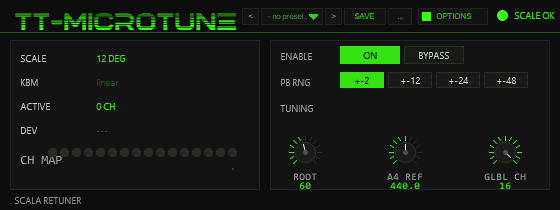
- HEADER
- Wordmark TT-MICROTUNE, the preset bar and the
OPTIONSbutton; on the right a status LED plusSCALE OK/NO SCALE. The tagSCALA RETUNERsits in the footer line. - SCALE
NN DEGwhen a scale is loaded;FILE?when the file could not be opened;PARSE ERRwhen parsing failed.- KBM
ON (n)with the number of mapped entries when a valid keyboard map is loaded, otherwiselinear.- ACTIVE
n CH— channels currently carrying a retuned note (max 15).- DEV
- Last computed deviation from 12-TET in cents
(
+x ct), or---before the first note. - CH MAP
- 16 LEDs, one per MIDI channel: lit = a note is sounding on that channel. The GLOBAL CH slot stays dark and carries a dot marker — it is never used for notes.
- ENABLE
ON/BYPASSbuttons (parameter 1).- PB RNG
- Four buttons
+-2+-12+-24+-48semitones (parameter 2). - TUNING
- Three knobs with numeric readouts: ROOT (0–127, default 60), A4 REF (400.0–480.0, default 440.0) and GLBL CH (1–16, default 16) — parameters 3, 4, 5.
06Preset bar & user bank
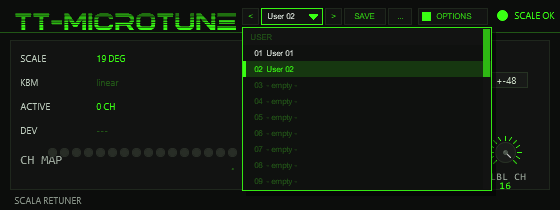
OPTIONS: < name > SAVE .... The name opens the list of the 32 user slots; the preset in use is marked.A preset stores the tuning setup of the instance: PB RANGE, ROOT KEY, A4 REF, GLOBAL CH and the selection of the scale and keyboard-map files
(parameters 2–7). Not part of a preset: ENABLED/BYPASS (a preset never mutes the track), the colour scheme and the readouts. The bar is narrower than in the larger plug-ins (170 instead of 250 units) to fit the 560×210 window;
long names are shortened with .. in the bar and shown in full in the list. There are no factory presets — the first things to save are your own.
| Control | Function |
|---|---|
< / > | Previous / next used user slot; wraps around and loads immediately. |
| Name field | Opens the list of the 32 user slots (empty ones show - empty -). Mouse wheel scrolls, click loads. A * behind the name means the settings (or the file selection) differ from the loaded preset. |
SAVE | Saves the current setup into the selected user slot, or the first free one. A name box opens (up to 24 characters, default User 07): type, Enter or OK saves, CANCEL or a click outside cancels. |
... | RENAME, COPY (into the next free slot; the selection stays on the original), DELETE (a second click on the same entry confirms) for the selected slot, and INIT (PB RANGE ±2, ROOT 60, A4 440, GLOBAL CH 16 — the scale and keyboard-map selection is left alone). |
Scale and keyboard-map files. A preset remembers which files you picked (their position in the tt-scales list plus their names), not the files themselves — the scale is read from disk as usual.
When a preset is loaded, the two file parameters are set and the files are read again a moment later. If a file with that name is no longer at that position of the list (you added, renamed or removed files in tt-scales since saving),
the footer shows PRESET: FILE SELECTION DIFFERS - CHECK SCALE / KBM; pick the file by hand in the parameter list and save the preset again.
Where the user bank lives. Plug-ins cannot write files, so the 32 user slots are part of the plug-in state: they are saved with the project, with FX-chain and track-template copies,
and in every REAPER preset of this plug-in (the + button in the FX window toolbar). To take your bank to another project or computer, save a REAPER preset once
(+ → Save preset) and load it there: the whole bank comes with it (the .scl.txt / .kbm.txt files themselves stay in Data t-scales and have to be copied separately). Projects saved with earlier versions load unchanged with an empty bank.
Typing names. REAPER keeps Space for the transport, so type Shift+Space for a blank. Depending on your REAPER settings Esc closes the whole FX window; use CANCEL instead. (The + menu of the FX window also has Send all keyboard input to plug-in.)
07Parameters & readouts
All controls are ordinary JSFX parameters — automatable, MIDI/OSC-learnable and visible in REAPER's parameter list, even though most users will only ever touch the drawn panel.
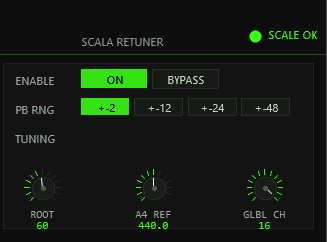
| # | Parameter | Range / default | Function |
|---|---|---|---|
| 1 | ENABLE | OFF/ON, def. ON | Master switch — OFF is a bit-exact MIDI thru and sends note-offs for all sounding voices |
| 2 | PB RANGE | ±2 / ±12 / ±24 / ±48 st, def. ±2 | Pitchbend range — must equal the synth's setting (section 08) |
| 3 | ROOT KEY | 0–127, def. 60 | MIDI note mapped to scale degree 0 when no .kbm is active |
| 4 | A4 REF Hz | 400–480, def. 440 | Global tuning reference — MIDI 69 always sounds at this frequency |
| 5 | GLOBAL CH | 1–16, def. 16 | Channel excluded from the note pool; receives all non-note traffic (section 10) |
| 6 | SCALE | file | *.scl.txt picker from Data\tt-scales\ |
| 7 | KBM | file | Optional *.kbm.txt keyboard map |
| 8 | SCALE deg | read-only | Degree count of the loaded scale |
| 9 | SCL ST | read-only | Load status code (section 13) |
| 10 | ACTIVE | read-only | Allocated channels right now |
| 11 | LAST dC | read-only | Last computed deviation, rounded cents |
Parameters 12–19 are hidden diagnostic hooks, 20 is the colour scheme and 21–24 the test interface of the preset bank — see the appendix (section 18).
08Bend math & PB RANGE
For a key k the plug-in computes the target deviation from 12-TET
in cents and maps it onto the configured bend range, centre 8192:
bend = clamp( 8192 + dev_ct(k) / (PB_RANGE[st] × 100) × 8192, 0 … 16383 )PB RANGE (±2, ±12, ±24, ±48
semitones) must match the pitchbend range of the instrument behind it
exactly. TT-MICROTUNE computes the bend as a fraction of the configured
range; how many cents that becomes in the end is decided by the synth's own
range.
- TT-MICROTUNE at
±48, synth at±2: the synth only applies 1/24 of the intended bend — the scale sounds almost like 12-TET. - TT-MICROTUNE at
±2, synth at±48: the bend is exaggerated 24-fold; even small micro-intervals turn into extreme jumps.
MPE synths usually run at ±48, classic synths at
±2. If the synth cannot set the range per channel, it must be
identical on every channel. When a deviation exceeds the range the bend clamps
hard at 0 or 16383 — audibly wrong on purpose, never a wraparound.
09Per-note channel allocation
Standard MIDI only has one pitchbend per channel. Several simultaneous notes on one channel would have to share a single bend — a chord in 19-TET would be unavoidably out of tune. TT-MICROTUNE therefore maintains a pool of all 16 channels minus GLOBAL CH (15 voices max) and allocates dynamically:
- Note-on: the deviation is computed; if the key is unmapped under a .kbm the note is dropped. Otherwise a free channel is popped from the free stack — or, when exhausted, stolen (section 12).
- On that channel the 14-bit pitchbend is sent first, then the note-on with its velocity and timing offset unchanged.
- The note-off leaves on the same channel; afterwards the channel returns to the pool (most-recently-freed first).
- Re-triggering an already-sounding note number frees its old channel first — no stuck duplicates.
10GLOBAL CH
GLOBAL CH (1–16, default 16) has two jobs:
- Excluded from the note pool — no retuned note is ever placed on it; in CH MAP its LED stays dark with a dot marker.
- Non-note sink — every incoming CC, aftertouch, program change and played-in pitchbend is forwarded on this channel, regardless of its original channel. That keeps your controller's pitch wheel from corrupting the per-note bends: on a per-channel synth it bends the (empty) global channel and leaves the retuned voices untouched.
Use GLOBAL CH as the landing spot for controllers the synth should still see (modwheel, sustain, channel pressure). Note that channel-specific automation loses its channel identity — everything merges into the one global lane.
11ROOT KEY, A4 REF & .kbm reference
- A4 REF Hz (400–480, default 440): global tuning reference. Without a .kbm, MIDI note 69 always sounds at exactly this frequency (415 Hz ≈ baroque ≈ −100 ct shift; 432; 442). With a .kbm, the file's reference note/frequency becomes the anchor and A4 REF still adds a global offset on top (440 = neutral).
- ROOT KEY (0–127, default 60 = C4): which key plays scale degree 0 under the linear (no-.kbm) mapping. It rotates the pattern only — the absolute tuning anchor stays at note 69 = A4 REF.
- .kbm anchor: when a map is loaded, its middle-note, reference-note and reference-frequency fields define where degree 0 sits and which key is in tune; ROOT KEY is then unused.
12Voice stealing
More simultaneous notes than free pool channels (15 maximum, i.e. every channel except GLOBAL CH) trigger stealing: a rotating pointer picks the next victim channel, sends its note-off and immediately reassigns it to the new note — bend first, then note-on. Nothing hangs and dense playing stays playable; the oldest-sounding voices simply cut off in round-robin order.
13Fallback & status codes
If no scale is selected or the file cannot be read, TT-MICROTUNE switches to
12-TET pass-through: MIDI travels through completely unchanged — same channels,
no added bend, no interruption, no crash. The SCL ST readout and
the panel show the state:
| SCL ST | Panel | Meaning |
|---|---|---|
| 1 | SCALE OK · NN DEG | Scale loaded, retuning active |
| −1 | NO SCALE · FILE? | No file chosen / file could not be opened → pass-through |
| −2 | NO SCALE · PARSE ERR | File broken / zero degrees parsed → pass-through |
An invalid .kbm never breaks tuning: the map is simply ignored and the linear
ROOT KEY mapping applies (KBM → linear).
14Panic & bypass
- CC 120 / CC 123 (All Sound Off / All Notes Off): every allocated channel gets a note-off, the allocation table is wiped. These CCs are consumed — they are not forwarded to the synth, the generated note-offs do the cleanup instead.
- ENABLE → OFF while notes are held performs the same cleanup before switching to pass-through, so no notes are orphaned on foreign channels.
- Panic does not re-centre pitchbend — deliberately unnecessary: every note-on is always preceded by its own freshly computed bend, so a stale value on an idle channel can never detune anything.
15Re-bend while notes are held
Changing PB RANGE, A4 REF, ROOT KEY or loading a new scale/map recomputes all active voices immediately and sends the updated bend — no retrigger needed. Held chords glide into the new tuning. (After changing PB RANGE, remember the synth's own range has to follow.)
16Known limitations
- MPE-style only — there is no mono or single-channel mode; every sounding note always takes a private channel. Maximum polyphony is 15 retuned voices, voice stealing beyond that.
- Synth requirements — the instrument must apply pitchbend per MIDI channel (omni or MPE reception) and its bend range must equal PB RANGE. Synths with global-only pitchbend will not retune chords.
- Non-note traffic merges — all CC/aftertouch/program data lands on GLOBAL CH; per-channel controller nuances (e.g. MPE per-note CC 74) are flattened.
- Played-in pitchbend affects nothing — it is forwarded on GLOBAL CH, which carries no notes, unless the synth treats that channel's bend globally.
- Note identity = note number — the same note arriving on two input channels shares one slot; the second trigger cuts the first.
- GLOBAL CH change while playing can orphan sounding notes — see section 15.
- System-exclusive data is not forwarded — the JSFX message interface delivers channel messages only.
- Parser caps — 999 scale degrees, 256 .kbm map entries, map size 1–128; malformed lines are skipped rather than reported.
17Options / Color
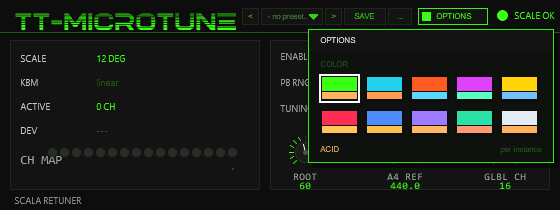
Click OPTIONS in the header to open the box. Under COLOR pick one of ten schemes: ACID, CYAN, ORANGE, MAGENTA, YELLOW, RED, BLUE, VIOLET, MINT or ICE.
A click on a swatch changes the whole front at once (accent, dimmed accent, panel and ground tint, knob discs); a click outside the box closes it. The choice applies per plug-in instance
and is saved with the project and with FX chains (hidden parameter UI Color, index 19). The factory colour of TT-MICROTUNE is ACID. The colour has no effect on the retuning.
18Appendix: diagnostic parameters
Sliders 12–19 (SNT, EV, ONS,
Q NOTE, Q CH, Q BEND, MAXACT,
COLL) carry a - prefix in their names: they appear
neither in the generic slider view nor in the parameter list. They stay
addressable by index (TrackFX_SetParam/GetParam) and
serve the automated regression harness: a test script writes a note number into
Q NOTE (index 14) and reads the channel and exact 14-bit bend back
from Q CH/Q BEND (indices 15/16); a Python oracle then
compares against independently computed expectations.
| Index | Parameter | Meaning |
|---|---|---|
| 11 | SNT | Sentinel — reads 77 when @init ran to completion |
| 12 | EV | Received MIDI event count |
| 13 | ONS | Note-on count |
| 14 | Q NOTE | Query input: note number to inspect |
| 15/16 | Q CH / Q BEND | Last allocated channel / last sent bend for that note |
| 17 | MAXACT | Peak channel occupancy |
| 18 | COLL | Allocation collisions — invariant 0 |
Index 19 is UI Color (colour scheme 0–9, see Options / Color). Indices 20–23 (PB CMD, PB ARG, PB A, PB B) are the test interface of the preset bank: the test script writes a command (save a slot, load a slot, read a checksum, …) and reads the results without any mouse clicks.
For day-to-day use these parameters are meaningless; they exist so the test suite can verify bends sample-exactly without recording audio.