
01Introduction
TT-PHALYX is a 16-pad drum and loop sampler implemented as a REAPER JSFX instrument. Each pad plays two sample slots (A and B) with a crossfade, and offers per-pad sound shaping — transpose, filter, envelopes, loops — plus a per-pad arpeggiator, a scratcher, a modulation matrix with two LFOs, and a shared master FX chain with a four-band EQ and four insert effects.
Pads are triggered exclusively via MIDI: from the piano roll, a keyboard, or pad controllers. Two trigger modes can be mixed freely — a Drum Kit mode listening on channel 1 with a General-MIDI note map, and a Multitrack mode where each pad owns its own MIDI channel and plays tonally with keytrack.
Highlights
- 16 pads × 2 sample slots, crossfaded, reverse, start / random offset, sample delay, phase invert
- 64-voice engine, per-pad voice limiting and choke (killnote)
- Amp / filter / pitch envelopes, loop editor with ping-pong and crossfade
- 8-row modulation matrix, 2 LFOs, mod envelope, velocity curves
- Per-pad arpeggiator with shuffle and tempo sync; scratcher
- Master 4-band EQ + 12 insert effect types with tempo-syncable delay
- 8 parameter banks, per-pad undo, full MIDI Learn via REAPER automation
Requirements
- REAPER 7.x (developed and tested on 7.79) — any platform that runs JSFX
- No third-party libraries, no binaries — everything is one
.jsfxtext file - Your own WAV/AIFF samples, arranged in kit folders (see §06)
- Two optional Lua helper scripts for kit loading and bank saving (§02)
02Installation
Files
| File | Location | Purpose |
|---|---|---|
tt-phalyx.jsfx | …/REAPER/Effects/TimTechlor/TT-PHALYX/ | The instrument. REAPER scans the Effects folder — the FX appears as
JS: TimTechlor/TT-PHALYX/tt-phalyx. |
TT-PHALYX Load Kit.lua | …/REAPER/Scripts/ | Kit loader — spreads a folder of WAVs across the 16 pads (§06). |
TT-PHALYX Save Bank.lua | …/REAPER/Scripts/ | Bank saver — writes the complete state to a bank file (§17). |
Steps
- Copy
tt-phalyx.jsfxinto the Effects folder as shown above (create the folder if needed). - In REAPER, open View → FX Browser, find
JS: TimTechlor/TT-PHALYX/tt-phalyxand drop it on a track. If it does not appear, run FX Browser → Rescan. - Copy both Lua scripts into the Scripts folder. In REAPER: Actions → Show action list → New action → Load ReaScript… and pick each file once. They then run as normal actions.
03Quick Start
- Insert TT-PHALYX on an empty track. Set the track's MIDI input to your controller or to All channels.
- Run the Load Kit action. Pick any WAV from a folder that holds your drum samples — the folder's contents are sorted and spread across the 16 pads automatically.
- Play. Kit mode listens on MIDI channel 1 with the GM map (C2 = 36 kick, D2 = 38 snare, F#2 = 42 closed hat …). The kit note of each pad is printed under its waveform.
- Click a pad to select it — the full panel below now edits that pad. Turn TRANSPOSE, draw the amp envelope in the AMP tab, or add a delay in the FX tab.
- When your kit sounds right, run the Bank speichern action and store it in slot 1–8 so any project can recall it (§17).
04UI Conventions
Every control follows the TT-303 behaviour — once learned, nothing new:
| Gesture | Result |
|---|---|
| Drag vertically | Adjust knobs, faders, envelope points, loop flags, numbers |
| Right-click drag | Fine adjustment (higher resolution) |
| Double-click | Reset the control to its default value |
| Mouse wheel | Step the control in increments |
| Right-click a stepped button | Step back (e.g. ARP mode, EQ band type) |
| Click a slim pad | Select the pad (its full panel opens below) |
The current pad is highlighted with an acid frame in the pad grid. All editing always refers to the selected pad and its currently chosen A/B slot.
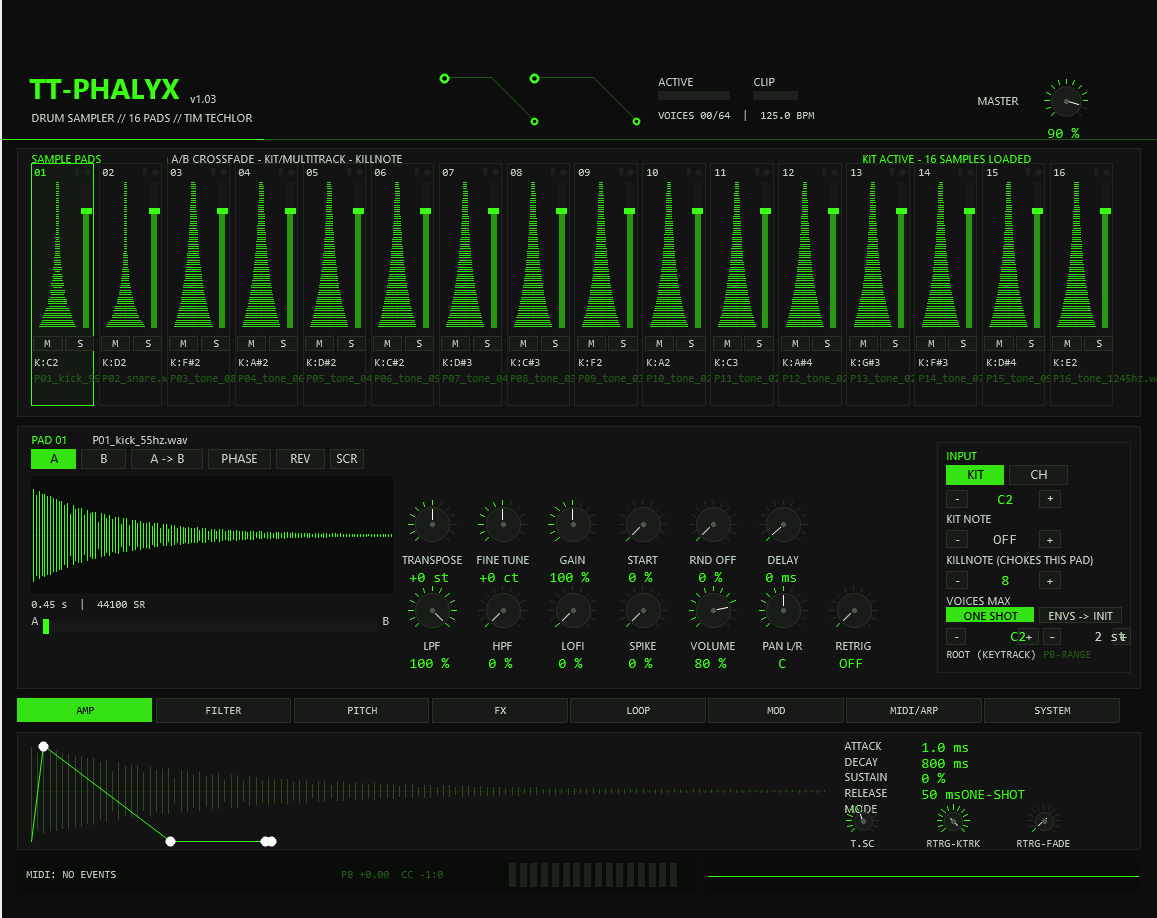
05The Front Panel
Slim pads (top row)
Each of the 16 pads shows, from top to bottom: pad number, name, its vertical waveform and the volume fader, the kit note / MIDI channel label, and the M/S buttons.
- Waveform — bright line: Sample A. A dark ghost contour behind it is Sample B (drawn as soon as slot B holds a sample).
- M / S — mute / solo the pad. Soloing one pad mutes all others.
- Fader — pad volume, 0–100 % (default 80 %).
- LED (top right) — lights while voices of this pad are sounding.
- Small bar (left of the LED) — arp marker; lit while this pad's arpeggiator is running.
- Bottom label — kit note in drum mode (
K:C2) or MIDI channel in multitrack mode.
Full panel (selected pad)
The row of buttons on the left switches which sample slot the two knob rows edit:
Knob row 1 — sample
Knob row 2 — colour & level
INPUT box (right side)
The header shows active voices against the polyphony limit, the project tempo, and the CLIP LED — it lights when the output stage exceeds 0.95 and decays after the overload.
06Loading Kits
JSFX cannot open file dialogs, so samples arrive through a kit file. The Lua action “TT-PHALYX Load Kit” builds it:
- Run the action. A file dialog opens — pick any WAV inside your kit folder.
- The script lists the folder, sorts it alphabetically, and writes
tt-phalyx-kit.bin: entries 1–16 become Sample A of pads 1–16, entries 17–32 become Sample B. A readablett-phalyx-kit.txtdocuments the mapping. - The plugin polls the kit file about twice per second and reloads any slot whose path changed — new kit takes effect without restarting.
01_kick.wav,
02_snare.wav …) to control the sort order. Subfolders are ignored.
To audition a single new snare, drop it alone in a folder and load — the rest of
your banks/parameters stay untouched because only samples move, not parameters.
07AMP Tab
The amp envelope is drawn as breakpoints over the sample waveform of the selected slot. Drag the points to shape attack, decay, sustain and release stages; the horizontal axis is controlled by TIMESCALE — below 100 % the envelope runs faster than drawn, above 100 % slower. Timescale also applies to the filter envelope.
- One-shot pads ignore note-off and run the envelope to the end of the sample.
- Sustain pads hold at the sustain level until note-off, then release.
- RETRIG adds keytrack and fade behaviour for fast repeated notes — useful for rolls without clicking.
- ENV → INIT (front panel) restores the drum defaults of all envelopes of the pad.
The overview screenshot in §04 shows the AMP editor with its envelope points over the pad's waveform.
08FILTER Tab
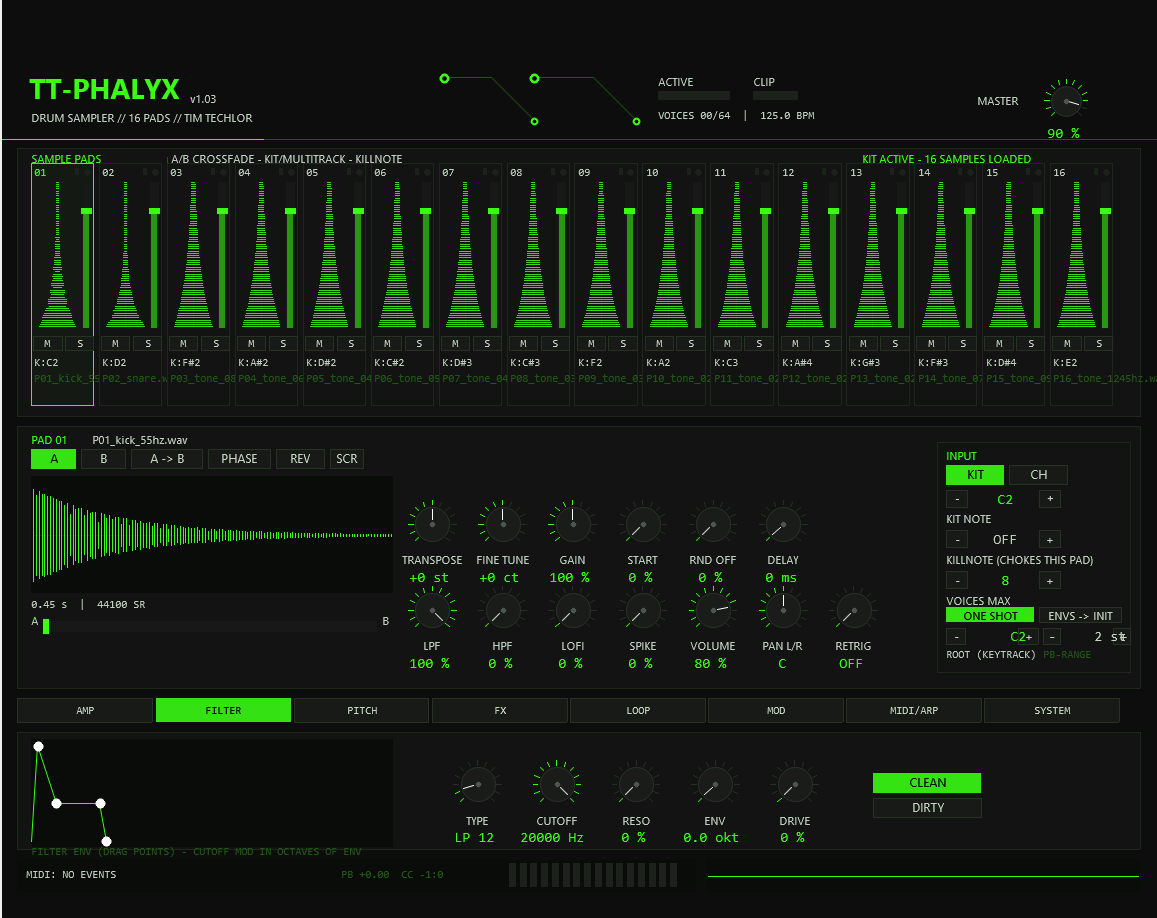
Each pad has one state-variable filter with envelope and drive, applied after the A/B mix of the sample slots.
Types
| Family | Slopes |
|---|---|
| LP — low pass | 6 / 12 / 24 dB/oct |
| HP — high pass | 6 / 12 / 24 dB/oct |
| BP — band pass | 12 / 24 dB/oct |
| NO — notch | 12 / 24 dB/oct |
Controls
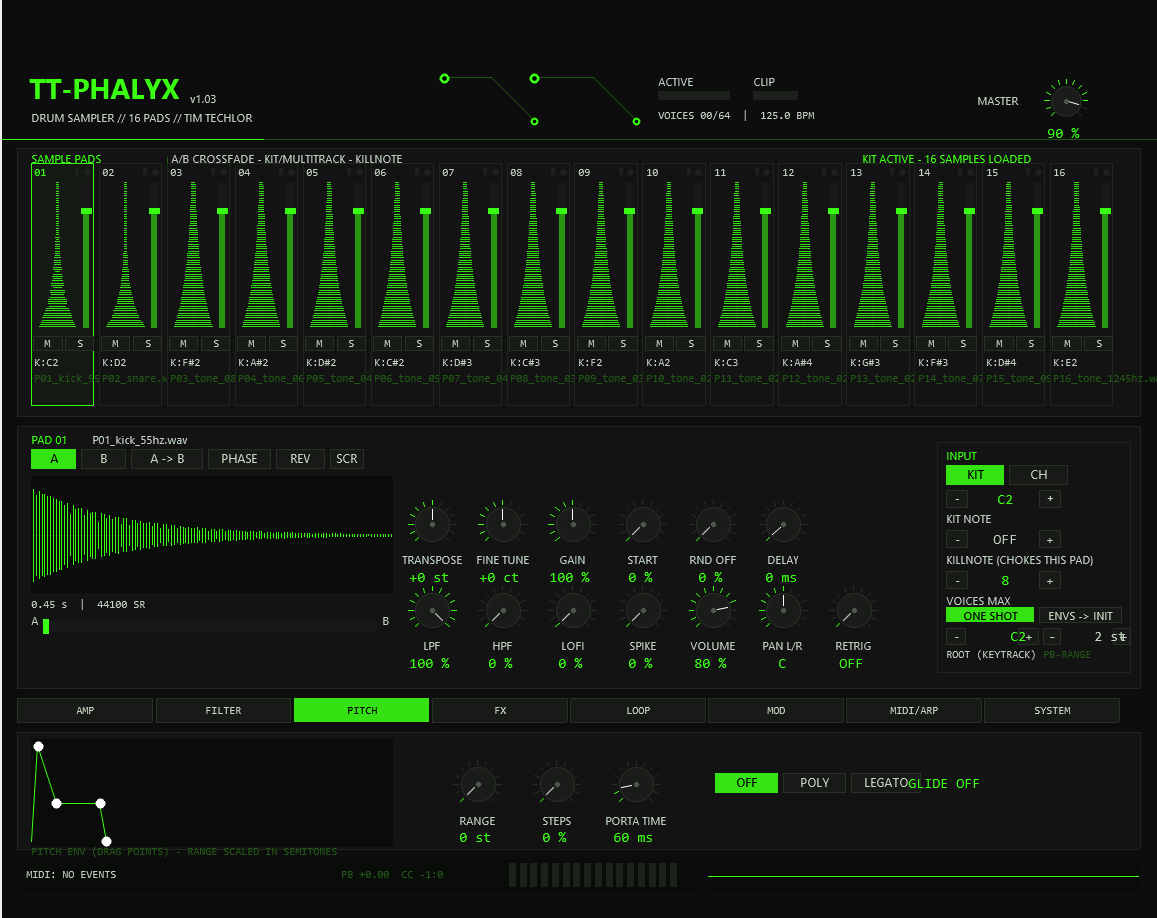
09PITCH Tab
10FX Tab
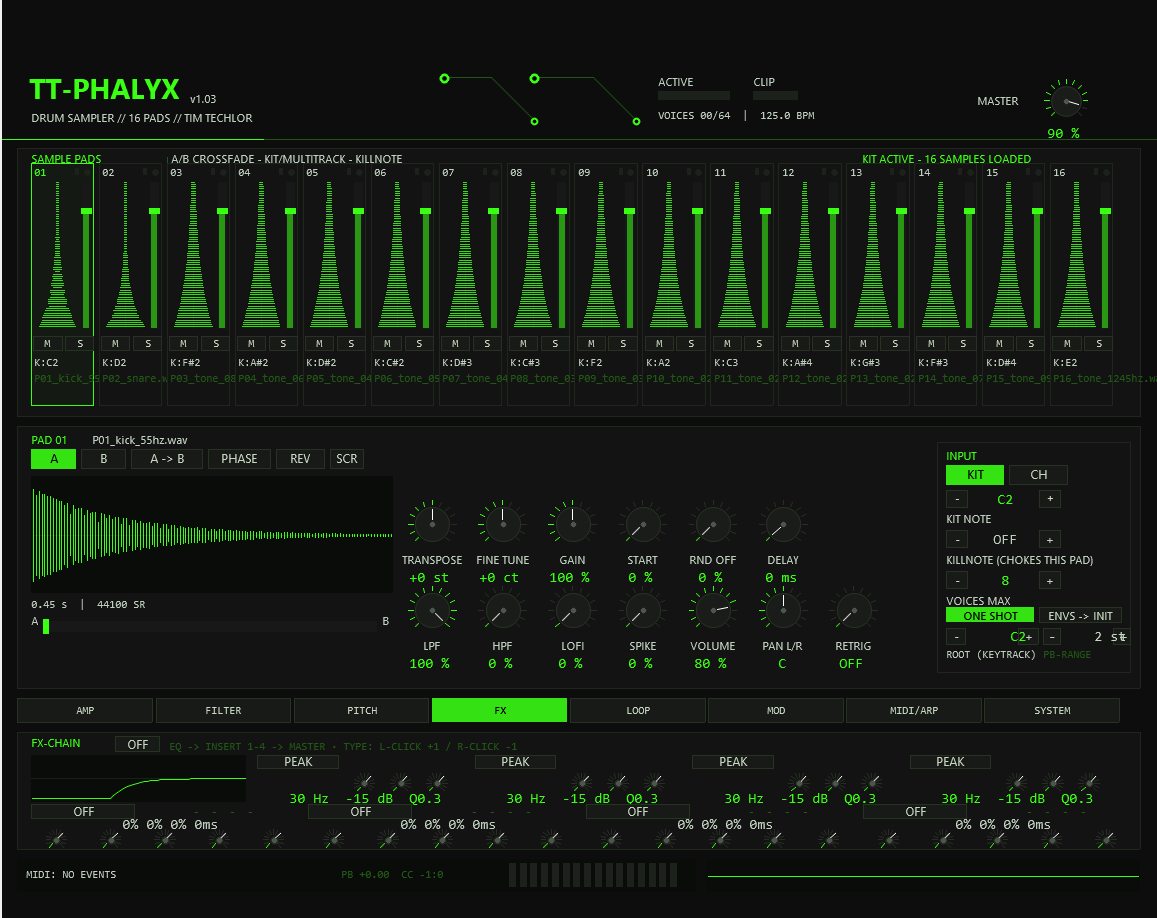
The FX tab is the shared master chain, identical for all pads: 4-band EQ → insert 1 → insert 2 → insert 3 → insert 4. Each insert slot can host one of twelve effect types with four parameters and a mix control; OFF bypasses the slot.
Four-band EQ
- Bands: PEAK, LO-SHELF, HI-SHELF, LO-CUT, HI-CUT — click a band's type to step forward, right-click to step back.
- Frequency 30 Hz – 20 kHz (logarithmic), gain ±15 dB, Q 0.3 – 8.
- The response curve is drawn live and updates while you drag.
Insert effects — parameter reference
| Type | P1 | P2 | P3 | P4 |
|---|---|---|---|---|
| DELAY | TIME — 0–1000 ms, or a note raster with tempo sync (see below) | FEEDBACK 0–100 % | SPREAD — widens L vs R delay time | DAMP — feedback low-pass 100 Hz…18 kHz |
| CHORUS | RATE 0.1–8 Hz | DEPTH | BASE 5–30 ms | SPREAD — L/R modulation phase |
| FLANGER | RATE 0.05–4 Hz | DEPTH | FEEDB 0–95 %, HF-damped (~2.5 kHz) | BASE 0–10 ms |
| PHASER | RATE | DEPTH | FEEDB | SPREAD |
| DISTORT | DRIVE | TONE 500 Hz–18 kHz | — | — |
| CRUSH | BITS 1–16 | SRR — sample-rate reduction | — | — |
| COMP | THRESH −48…0 dB | RATIO up to 20:1 | ATTACK 0–10 ms | RELEASE 0–1000 ms |
| LIMIT | THRESH | RELEASE | — | — |
| ROOM | SIZE | DAMP | WIDTH | PRE — predelay 0–250 ms |
| TRASH | DECAY | CRUSH | DRIVE | PRE — predelay |
| GATE | DECAY | HOLD | THRESH | PRE — predelay |
| STEREO | WIDTH 0–200 % | — | PAN — L / C / R placement | — |
Every slot has its own MIX knob (dry/wet). CHORUS uses two modulation voices per channel (v1.02) — noticeably fuller than a single-voice chorus. ROOM is a dense algorithmic room, TRASH a degraded “zero verb”, GATE a gated reverb — all three accept a predelay on P4 to keep transients in front of the wash.
Tempo sync for the delay
With SYNC (SYSTEM tab) set to DELAY or DELAY+ARP, the DELAY TIME parameter selects a note value instead of milliseconds:
| TIME position | 0 | 1 | 2 | 3 | 4 | 5 | 6 | 7 |
|---|---|---|---|---|---|---|---|---|
| Note value | 1/16 | 1/8T | 1/8 | 1/4T | 1/4 | 1/2 | 3/4 | 1/1 |
The value row of the slot shows the note name while sync is active. The delay buffer holds 1 s per channel at 96 kHz — very long values at low tempos are clipped to the buffer length. Value changes are stepped, not ramped; retrigger a hit if you change the raster mid-groove.
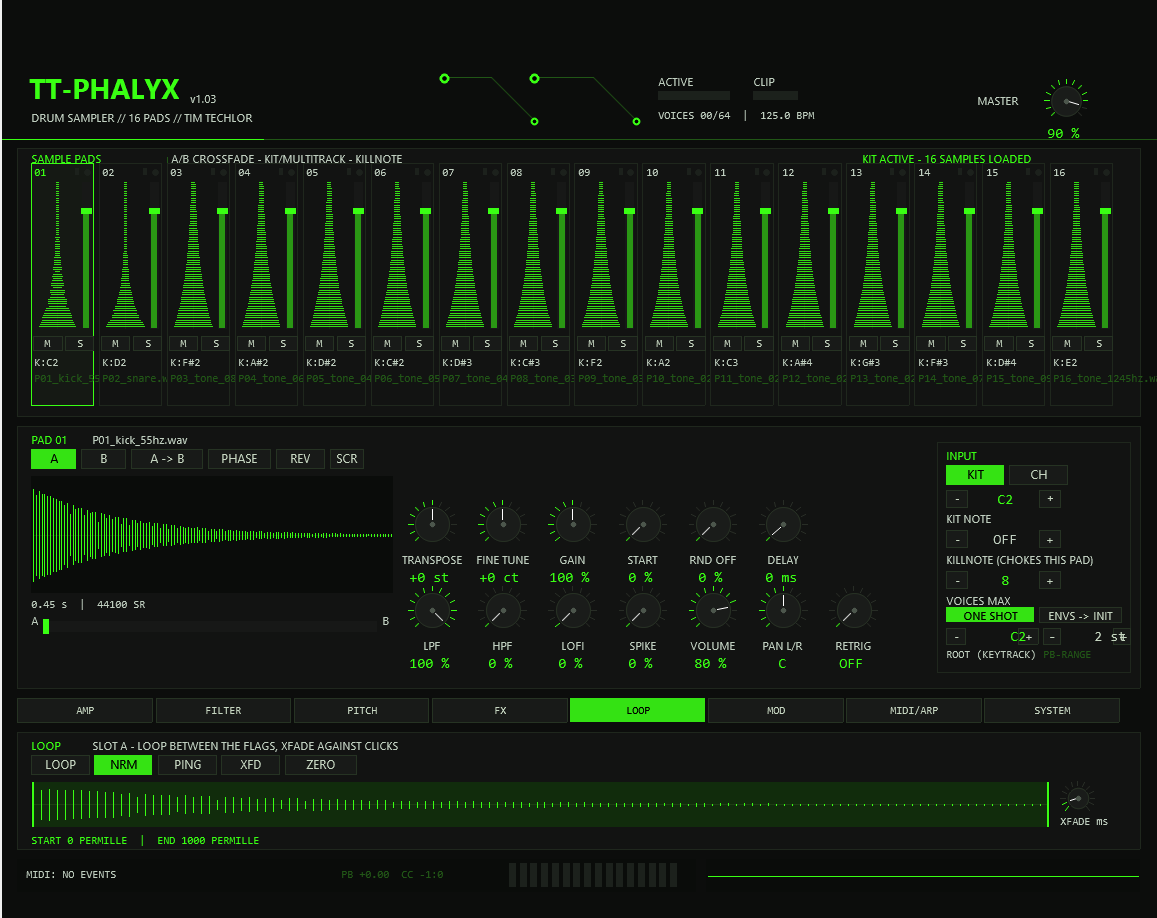
11LOOP Tab
The loop editor works on the selected slot (A or B — choose it in the full panel).
12MOD Tab
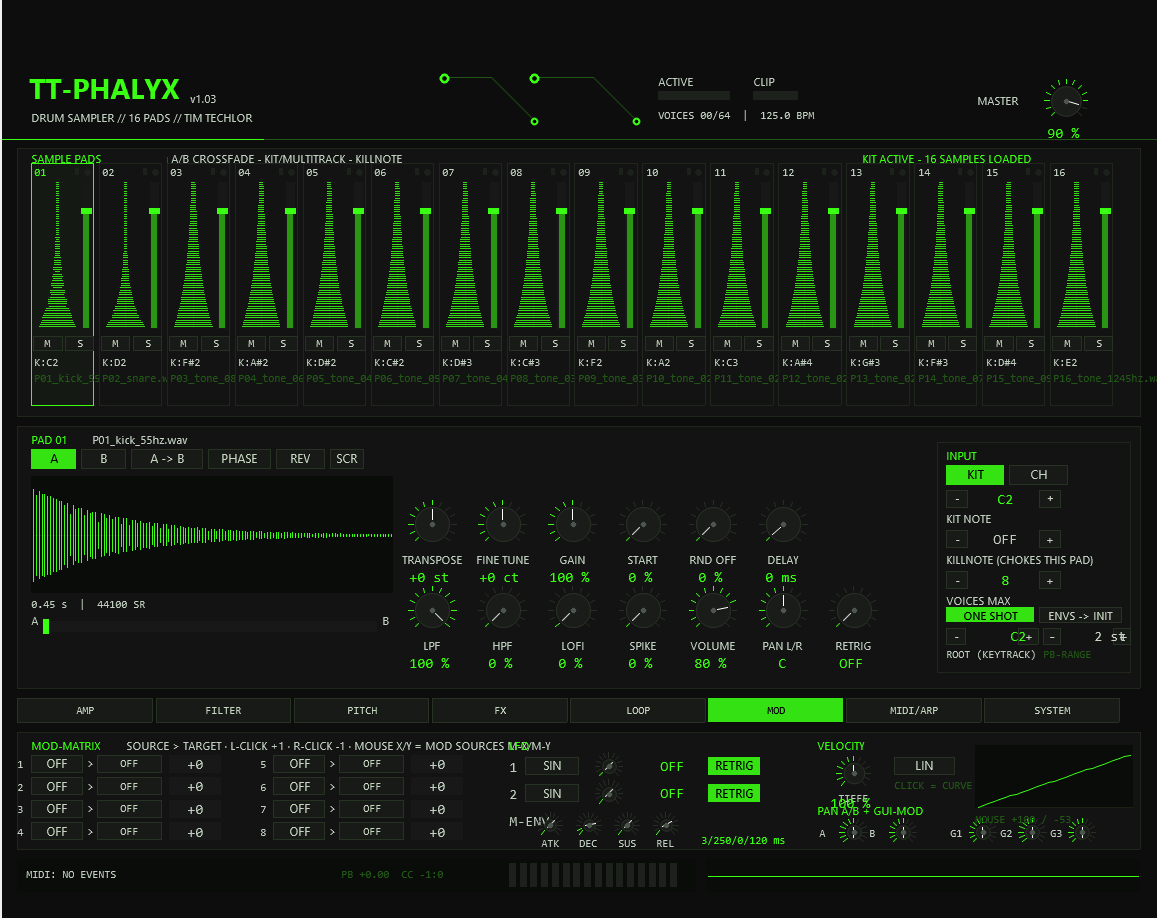
Modulation matrix — 8 rows
Each row routes one source to one destination with a bipolar amount (−100…+100). Click the source field, then the destination field, then drag the amount. Several rows can target the same destination and sum up.
Sources
| Name | Signal |
|---|---|
| VEL | Note-on velocity (0…127 normalised) |
| KEY | Keytrack — note pitch relative to ROOT |
| G1 / G2 / G3 | GUI modifier knobs (this tab) — automate or MIDI-learn them |
| M-X / M-Y | Mouse position over the plugin window |
| LFO1 / LFO2 | The pad's two LFOs |
| MENV | The pad's mod envelope (ADSR below the matrix) |
| RND | New random value per note-on |
Destinations
| Name | Target |
|---|---|
| VOL | Pad volume |
| PAN | Stereo position |
| PITCH | Playback rate (in semitones at ±100) |
| CUTOFF / RESO | Filter frequency / resonance |
| LFO1 RT / LFO2 RT | LFO 1 / LFO 2 rate |
| XFADE | Rides the A/B crossfade fader |
LFOs & mod envelope
13MIDI/ARP Tab
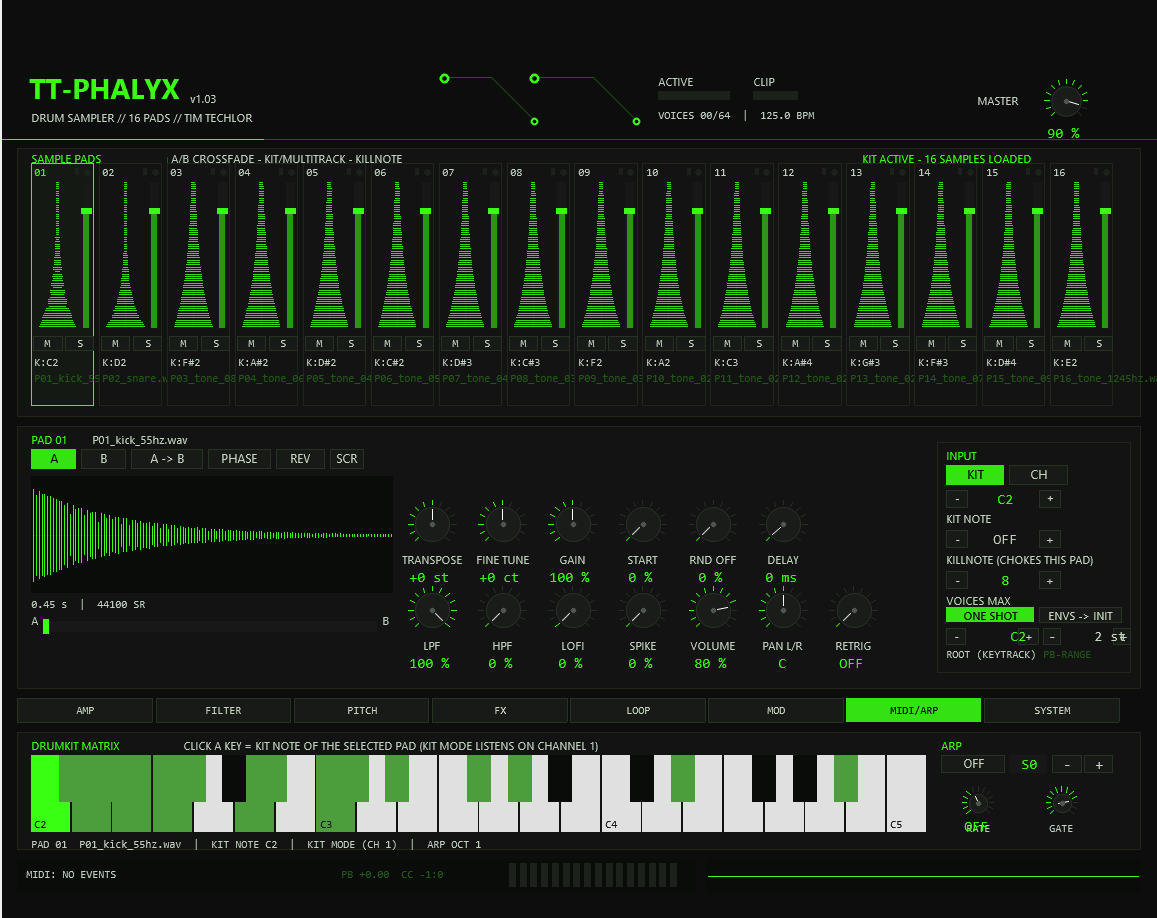
Drumkit matrix
A one-and-a-half-octave keyboard shows the current kit mapping. Click any key to assign it to the selected pad (drum mode only — multitrack pads use channels instead). The mapping is per pad and stored with the project.
Arpeggiator — one per pad
Hold a note and the pad's arp takes over, firing sample-accurately in the audio thread (no plugin-latency wobble):
The slim pads show a small arp marker while a pad's arpeggiator runs. A note-off stops that pad's arp; the current step still plays out.
14SYSTEM Tab
15Scratcher
- Arm the pad with SCR in the full panel.
- Hold a note on that pad.
- Grab the waveform in the full panel and drag — the playhead of both slots follows your hand, like a vinyl scratch, for as long as the note is held.
The same position is exposed as automation slider 53, so you can scratch from a MIDI controller, an LFO in REAPER's modulation system, or draw scratch moves in the arrange view. A playhead line on the waveform shows the live position.
16MIDI Reference
Drum kit mode (channel 1)
Pad input 0 = kit mode: the pad responds to its GM note on channel 1. Factory mapping:
Multitrack mode
Pad input 1–16 assigns the pad exclusively to that MIDI channel. The pad becomes tonal: incoming notes are tracked relative to ROOT and transposed with TRANSPOSE/FINE — play chromatic lines through one pad's sample. Different pads can share a channel (layering) or split the channels.
Other MIDI behaviour
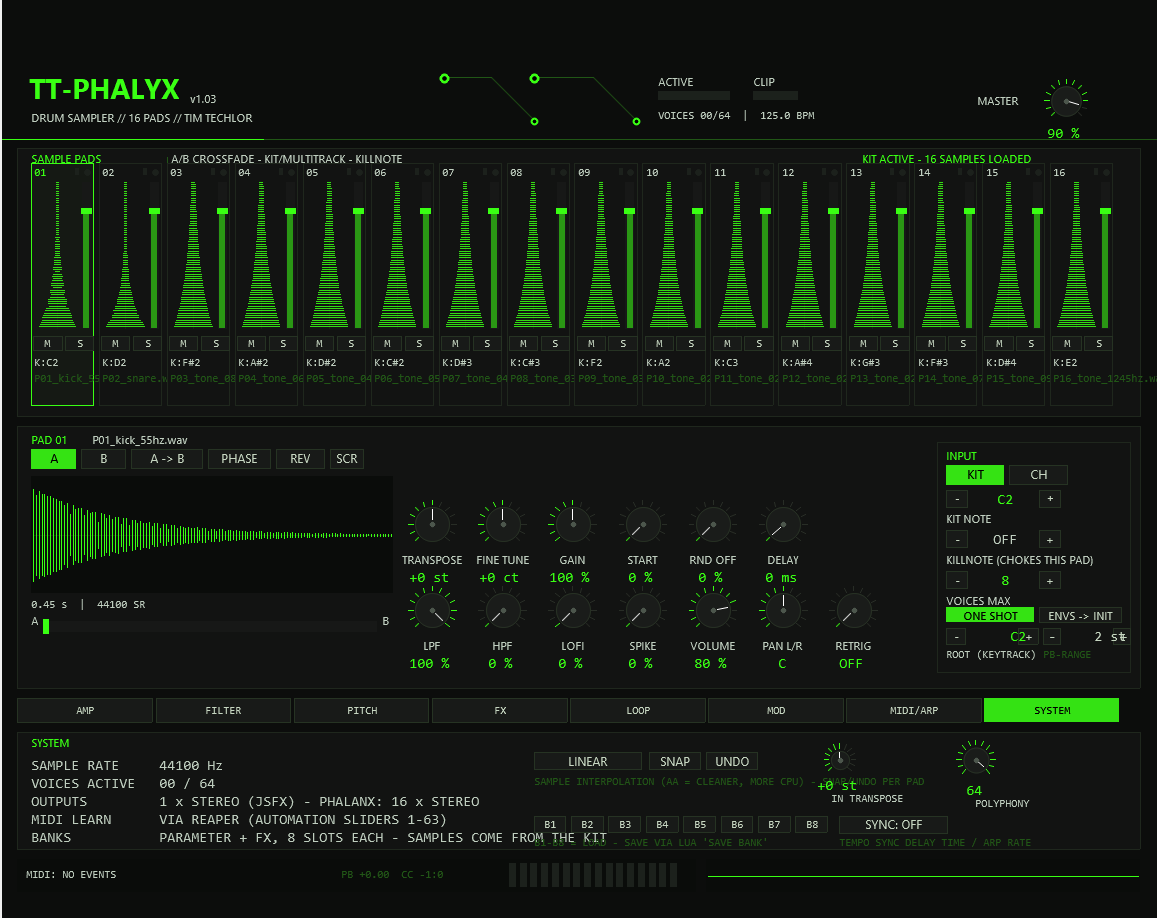
- Incoming transpose (SYSTEM, ±24 st) is applied first; in kit mode it remaps the entire kit.
- Pitch bend applies to all sounding voices of a pad within the pad's PB range (0–24 st, default 2), smoothed over ~11 ms.
- Killnote implements per-pad chokes; the classic use is closed hat (42) killing open hat (46): set the open-hat pad's killnote to 42.
- Monitor: the status line at the bottom logs note events, shows the last pitch-bend / CC values and a velocity bar for each of the 16 pads.
- TT-PHALYX consumes note events; CC and pitch bend are passed through the FX chain.
17Banks & Undo
A bank is the complete state of the plugin — all 16 pads with every parameter, the mod matrix, envelopes, the master EQ and FX chain, polyphony and system settings. Samples always come from the current kit, so a bank is a sound-setup snapshot, not an audio archive.
Save (Lua action)
- Set up your kit and parameters.
- Run “TT-PHALYX Save Bank”.
- Enter a slot number 1–8. The action saves
tt-phalyx-bankN.binnext to the plugin.
Load (SYSTEM tab)
- Click B1…B8.
- The bank replaces parameters and FX; the status line confirms “BANK LOADED” or “BANK EMPTY OR WRONG VERSION” (empty/incompatible).
Undo
- SNAP stores the selected pad's parameters; UNDO restores them. One level per pad.
- Switching pads takes an automatic snapshot — a quick UNDO always brings back what you just left.
18Automation & MIDI Learn
TT-PHALYX exposes its whole engine as hidden REAPER parameters. In the FX window's parameter list (or via Param → MIDI learn / envelopes in the arrange view) they behave like any plugin parameter:
| Sliders | Function |
|---|---|
| 1 | Master volume |
| 2 | Selected pad (1–16) |
| 3–14 | Selected pad: volume, pan, transpose A, fine A, transpose B, fine B, crossfade, mute, solo, input mode, kit note, killnote |
| 15–38 | Mod matrix rows 1–8: source / target / amount (3 per row) |
| 39–44 | LFO 1 shape / rate / phase-retrig, LFO 2 shape / rate / phase-retrig |
| 45–48 | Mod envelope attack / decay / sustain / release |
| 49–50 | Velocity depth / velocity curve |
| 51–52 | Pan sample A / pan sample B |
| 53 | Scratcher position |
| 54–55 | Interpolation (linear/AA), incoming transpose |
| 56–59 | Arp mode / rate / octaves / gate (selected pad) |
| 60–63 | Root note, pitch-bend range, arp shuffle, tempo-sync mode |
Sliders 3–52 mirror the selected pad — automate a specific pad by first selecting it (slider 2 or a UI click), or use REAPER's “take all snapshots” workflow. The FX-slot knobs of the FX tab are independent parameters, not sliders.
19Limitations vs. Phalanx
TT-PHALYX follows Phalanx where JSFX allows it. These points are deliberate differences:
| Phalanx | TT-PHALYX |
|---|---|
| 16 stereo outputs | 1 stereo output (JSFX limitation). Workaround: several instances on routed tracks. |
| 256 voices | 64 global voices, 1–16 per pad — far beyond drum needs. |
| AA Reverb & impulse convolution | Algorithmic ROOM/TRASH/GATE instead — no convolution in JSFX at real-time-friendly cost. |
| Vengeance plugin hosting | Not possible in JSFX. |
| Samples embedded in the project | Samples referenced from kit folders; projects store paths and parameters (keeps projects small and REAPER-native). |
| Banks saved from the UI | Load from the UI; saving via the bundled Lua action (JSFX file access is read-only). |
| Drag & drop sample loading | Kit-folder loading via the Lua action. |
20Troubleshooting
No sound?
- Kit not loaded — run the kit action and check the pad labels for file names.
- Kit mode listens on channel 1 only; set the track input or the pads to multitrack channels.
- Mute/solo state: a lone active SOLO silences every other pad.
- Check pad volume (default 80 %) and master volume (default 90 %), and the CLIP/MUTE LED column — a red CLIP indicates earlier overload.
FX window shows an error text instead of the UI
The JSFX failed to compile (e.g. after a manual edit). The first line names the
problem; fix or restore tt-phalyx.jsfx — REAPER recompiles on save.
Sync / banks oddities
- Delay ignores sync — set SYSTEM → SYNC to DELAY or DLY+ARP; the delay TIME row must then show note values, not ms.
- Arp plays ms again — same switch; ARP must be active in SYNC.
- “BANK EMPTY OR WRONG VERSION” — the bank file doesn't exist or was written by an incompatible version. Re-save it with the current Lua script.
- First ~0.5 s after loading ignore the FX preset file — the plugin polls external config files on a timer; renders starting at zero should place hits beyond the first half second.
Sound & CPU
- Clicks when transposing up — switch the pad to AA (Hermite) interpolation.
- Samples longer than 20 s are truncated per slot (loop material is unaffected in principle — but plan loops below 20 s).
- CPU: the arpeggiator scheduler sleeps when no arp is active; AA interpolation and the ROOM insert are the most expensive blocks per voice.
21Specifications
| Engine | |
|---|---|
| Pads | 16, each with sample slots A + B and crossfade |
| Voices | 64 global (4–64 configurable), 1–16 per pad, voice stealing oldest-first |
| Sample loading | WAV/AIFF via RIFF parser, resampled to project rate, mono-summed, 20 s cap per slot, 128-bucket peak cache for the display |
| Interpolation | Linear (default) or 4-point Hermite (“AA”) |
| Latency | None; arpeggiator runs sample-accurately in the audio thread |
| I/O | Stereo in / stereo out, instrument (notes consumed, CC + bend passed) |
| State | |
| Project storage | Full parameter blob (all 16 pads × 128 fields, system, FX) via JSFX serialize, format v5 |
| External files | tt-phalyx-kit.bin (sample paths), tt-phalyx-bank1…8.bin, optional tt-phalyx-fx.bin (FX preset, 45 floats) |
| Parameters | 64 automation sliders, 63 in use (v1.02) |
| Misc | |
| Samplerates | 44.1 – 96 kHz (delay buffer sized for 96 kHz = 1 s per channel) |
| Platform | REAPER 7.x JSFX (all platforms) |
| License | MIT — © TimTechlor |
22Changelog
1.03 — English UI
- All on-screen text, the built-in manual (@about) and the Lua helper scripts are English now. Helper scripts renamed: “TT-PHALYX Load Kit” / “TT-PHALYX Save Bank” (re-add them once in REAPER's action list).
1.02 — Feinschliff package
- NEW: Tempo sync (SYSTEM, slider 63) — delay time and/or arp rate follow the project tempo. Delay rasters 1/16…1/1, arp rasters 1/4…1/32, including triplets.
- NEW: Slim pads draw Sample B as a dark ghost contour behind Sample A.
- TONE: Chorus now runs two modulation voices per channel (quarter-phase offset) — fuller, less comb colouration. Flanger feedback got HF damping (~2.5 kHz).
1.01 — Improvement package
- NEW: Per-pad arpeggiator shuffle 0–50 % (off-beats swing late).
- NEW: Pitch bend with per-pad range 0–24 st, smoothed ~11 ms, works in both trigger modes.
- NEW: Root note control for multitrack keytrack.
- NEW: MIDI monitor in the status line (PB/CC readout + 16 velocity bars).
- NEW: Predelay 0–250 ms for ROOM / TRASH / GATE.
- NEW: Clip LED in the header, scratch playhead line, arp markers on slim pads.
- FIX: Debug counters no longer written into project state blobs.
1.00 — Release
- Built-in manual (@about), CPU polish (arp scheduler sleeps when idle), release build.
0.6.0 — MIDI/ARP/System
- Per-pad arpeggiator (UP/DOWN/UP-DN/RND/ROLL), scratcher, system page (AA interpolation, incoming transpose, polyphony), preset banks B1–B8, per-pad undo.
- ROOM output staging fixed (was near full scale).
0.5.0 — FX page
- Master chain: 4-band EQ (RBJ biquads, live response curve) + 4 insert slots with 12 effect types.
0.4.0 — Modulation
- 8-row modulation matrix, 2 LFOs, mod envelope, GUI modifiers, velocity panel, per-slot panorama.
0.3.x — Filter / Pitch / Loop · 0.2.0 — Pad sound · 0.1.x — Core
- Filter page (LP/HP/BP/Notch, 6/12/24 dB, drive), pitch envelope with portamento, loop editor (normal/ping-pong/crossfade, zero-cross snap), pad sound shaping (slot B, reverse, offsets, sample delay, phase), core sampler with voice pool, kit note map, multitrack mode, killnote and the TT design front end.