01The concept
The rumble is the rolling sub-bass carpet that carries a modern techno track — classically built by copying the kick, running the copy through a long dark reverb, gating it with an envelope that re-fires on every hit, low-passing it hard and ducking it against the dry kick. TT-RUMBLER packs that whole chain into a single plug-in with every stage on the front: a trigger detector that listens to the kick, three rumble engines (VERB / NOISE / PITCH), a tempo-synced AHDR envelope in the Kikzilla percent-of-length semantics, a resonant filter block with an envelope-driven high cut, and a mix stage with feed-forward auto gain and a clipper.
It is an effect, not an instrument: it processes the audio that reaches it — put a kick in front of it (TT-KICK is the obvious partner, but any kick source works) and it does the rest. The engines run on the mono mid signal and the rumble is duplicated to L/R — an authentic mono sub — while the dry kick passes through in stereo, scaled by the KICK fader. The third engine, PITCH, is the feature no dedicated rumble tool offers: it drops the kick itself by up to two octaves, so the rumble is literally built out of your own kick's body.
All 28 sound parameters live on one 900 × 700 panel — no tabs, no menus. The header carries the trigger LED, a 20-step UNDO, the preset bar (INIT + 24 factory designs and a 32-slot user bank), the OPTIONS button and the TIPS switch for the hover tooltips.
02Quick start
- Insert
TT-RUMBLERon the kick track right after the kick source in the FX chain (e.g. after TT-KICK) — it needs the kick's audio on its input. - Set THRESHOLD (default −3 dBFS — the kick peak must reach it, see section 04) so the TRIG LED blinks once per kick hit — the LEVEL bar shows the follower against the white threshold mark.
- Push the RUMBLE fader up (≈70 %), leave LENGTH on 1/4 and START at its default 50 % — the rumble swells after the kick punch instead of covering it.
- Pick an engine: VERB for the classic room rumble, NOISE for a textured bed, PITCH to drop the kick's own body into the sub.
- Leave AUTO GAIN on (it holds the rumble ≈6 dB under the kick) and park HIGH CUT in the 40–120 Hz sweet spot.
MIDI the audio trigger is off — feed notes or switch back to
AUDIO.03Signal flow
                     +---------------------------------------------------+
IN (kick audio from   | TRIGGER — peak follower 0.5 ms / 50 ms,           |
 the FX chain before, | threshold −60…0 dBFS, ~3 dB hysteresis,           |
 e.g. TT-KICK)        | 30 ms debounce — AUDIO / AUDIO+MIDI / MIDI        |
        |             +-----------------------+---------------------------+
        |                                     | re-fires the AHDR envelope
        |                                     | (sample-accurate)
        |                                     v
        +--> [DRY KICK ── KICK fader]    [ENGINE: VERB | NOISE | PITCH]
        |        (stereo, untouched)          |  (mono mid signal)
        |                                     v
        |                               AHDR gate (env value EC_VAL)
        |                                     v
        |                               LOW CUT (resonant HP 20–200 Hz)
        |                                     v
        |                               DRIVE (parallel band ~140 Hz)
        |                                     v
        |              +--> HIGH CUT (LP 30–2000 Hz, CUT TYPE)  <-- ENV DEPTH
        |              |      (envelope opens it up to +4 oct)  (0–4 oct)
        |              |                      |
        |              |                AUTO GAIN (feed-forward peak-hold,
        |              |                ~6 dB under kick, freezes on breaks)
        |              |                      v
        |              +-------------- RUMBLE fader (mono → L/R)
        |                                     |
        +--------------- SUM ---------------+
                               |
                         CLIPPER (soft clip at CEILING, CLIP LED)
                               |
                         OUT −12…+12 dB → ±2.0 safety clamp → OUT PINS
Every kick hit re-fires the envelope, the envelope gates the engine and — via ENV DEPTH — sweeps the high cut upward while the rumble swells. AUTO GAIN measures both paths between triggers (feed-forward, so it cannot pump with the beat) and sits before the RUMBLE fader, so the fader always stays a pure level control.
04Trigger
| Control | Range | What it does |
|---|---|---|
| THRESH | −60…0 dBFS (default −3) | Audio trigger level. The peak follower (0.5 ms attack / 50 ms release) must drop ~3 dB below the threshold to re-arm — the hysteresis keeps one hit from double-firing — and a 30 ms debounce enforces a minimum gap between triggers. |
| SRC | AUDIO · A+M · MIDI | Trigger source. AUDIO = the input follower only; MIDI = note-ons only; A+M = both. MIDI hits are sample-accurate (queued per block), and a MIDI hit briefly holds the audio follower off (≈250 ms) so the same event cannot fire twice. |
| LEVEL bar | −60…0 dBFS log | The follower level with a white mark at the threshold — above the mark the trigger can fire. The numeric LVL/THR readout sits under it. |
| TRIG LED | 100 ms latch | Lights on every fired trigger — a big one in the panel, a small one in the header. |
Default since 0.2.0: THRESH −3 dBFS. The follower must actually exceed the threshold, so the kick has to peak above roughly −2.4 dBFS at the input of TT-RUMBLER (measured with a synthetic kick and the exact follower: peaks of −3 dBFS and below do not fire). For quieter kicks lower THRESH (CTRL+click resets it to −3 dB).
TT-RUMBLER is an FX plug-in: all incoming MIDI (notes, CC, pitch bend, clock) passes straight through — notes only additionally fire the envelope when SRC allows them. A trigger restarts the envelope from the START phase and re-anchors the auto-gain measurement window.
05Engines
Three engines, one active at a time — the MODE buttons select the source, CHARACTER refines it, and only the knobs the selected engine actually reads are shown. Switching the engine flushes its buffers, so an old tail never repeats into the new engine.
| Engine | Characters | Knobs | Source |
|---|---|---|---|
| VERB | MODAL · WALL · BLOOM | DECAY · FOCUS · DENSE | Feedback-delay network excited by the kick |
| NOISE | CLASSIC · GRIT · RUBBLE | TONE | Colored noise bed |
| PITCH | TIGHT · DEEP · GRAIN | PITCH (0…−24 st) | The kick itself, pitched down |
VERB — a dark room on the kick
The mono mid feeds a 200 Hz low-pass exciter into four parallel feedback comb filters plus two allpasses. DECAY sets the comb feedback as a T60 time (0.2–8 s — the readout is the nominal value, see section 12), FOCUS parks the damping pivot between 40 and 400 Hz (lower = darker room), DENSE (0–100 %) controls the diffusion — low values thin the comb tails out.
- MODAL — the combs ring tonal (a T60 bonus on two of the four combs, ~32–48 ms delay set). The "singing room".
- WALL — short, dense, diffuse (~23–41 ms set). Tightest verb tail.
- BLOOM — long delays (~53–74 ms), T60 ×1.5 and a softened input, so the room swells late behind the kick.
NOISE — a textured bed
A deterministic generator (Park-Miller LCG) feeds the noise character; TONE (40–2000 Hz) shifts the colour.
- CLASSIC — a three-stage one-pole cascade: the dark, brown-ish colour that is the classic rumble bed.
- GRIT — clipped white noise; TONE drives the internal saturation. Raw edge.
- RUBBLE — bandpass growl (Q ≈ 1.4); TONE sets the band's middle.
PITCH — the kick's own body, dropped (the USP)
The input runs through a 32768-sample ring buffer read by two heads a half window apart, blended with a Hann half-period crossfade (the weights sum to exactly 1, so transitions are click-free; reads are linearly interpolated). PITCH sets 0…−24 semitones — −12 st doubles the kick into an octave-down sub shadow. The window phase-locks to every trigger: at fire time head A sits at full weight exactly W/2 behind the write head, so each kick lands identically in the shifted tail — deterministic punch instead of beat-to-beat level lottery. The envelope restart waits the same ~W/2, keeping gate and shifted flag in sync.
- TIGHT — window ×0.5, least lag.
- DEEP — window ×1, the sub default.
- GRAIN — window ×2, lo-fi drone character.
At 0 st the engine deliberately still runs through the buffer — the latency stays constant and switching pitches never clicks. The inherent lag (~W/2 samples) is a documented characteristic — see section 12.
06Envelope
The AHDR uses the Kikzilla basic semantics: LENGTH picks the
whole envelope's duration as a note value — 1/1 · 1/2 · 1/4 ·
1/4T · 1/8 · 1/8T · 1/16 — always tempo-synced to the host (the
panel prints the resulting time in ms under the stepper), and
START / ATTACK / HOLD / RELEASE are percentages of that
length, not absolute times:
| Section | % of LENGTH | Behaviour |
|---|---|---|
| START | 0–100 | A pure delay before the attack — the output stays at 0 while the kick punch plays through clear. The single most important rumble control. |
| ATTACK | 0–100 | Swell time — how fast the rumble rises to full level. |
| HOLD | 0–100 | Full-level time. |
| RELEASE | 0–100 | Fall time to zero. |
Default START = 50 % (INIT and all factory presets, CTRL+click reset). With the other sections unchanged the sum exceeds 100 %, so the sections are squeezed proportionally — the swell starts later and is correspondingly shorter; reduce ATTACK/HOLD/RELEASE if you want the old shape back.
If the four percentages sum to more than 100 % they are squeezed proportionally (each is scaled by total/sum); a sum below 100 % leaves silence at the end. The display draws the resulting curve with the S/A/H/R section markers — squeezed proportions included — and is read-only in v1 (edit with the knobs, the curve follows).
CURVE (−500…+500) bends the attack and release exponent: p = 23·c·0.002 — negative values give a sharp knee with a long tail, positive values a fast snap. A 1.5 ms smoothing pole on the gate output keeps re-triggers and tempo jumps click-free, and a parameter or BPM change mid-flight hands the running envelope to the right next section instead of jumping. Every trigger restarts the envelope from START — the pumping comes from the re-triggered gate, not from a compressor.
07Filter & drive
| Control | Range | What it does |
|---|---|---|
| LOW CUT | 20–200 Hz | Resonant high-pass on the engine output — cleans the kick's click and top end off the rumble. |
| LC RES | Q 0.5–8 | Resonance of the low cut — a tuned bump right at the cutoff that can sing. |
| HIGH CUT | 30–2000 Hz | Low-pass on the rumble — the main tonal control. The typical techno spot is 40–120 Hz. |
| HC RESO | Q 0.5–8 | Resonance of the high cut — adds a whistle edge to the sweep. |
| DRIVE | 0–100 % | Parallel saturation band around ~140 Hz — thickens the rumble while the top of the band passes clean. At 0 the stage is bypassed bit-exactly. |
| ENV DEPTH | 0–4 oct | The envelope opens the high cut as the rumble swells — the "rolling pressure" move (the filter opens from e.g. 45 to 90 Hz and closes again). Hard-limited inside at 30 Hz to 0.45·srate. |
| CUT TYPE | CLEAN · COMB · DIRTY | High-cut character: CLEAN is a linear state-variable filter, COMB adds a 35 % delay line at the cutoff (industrial edge), DIRTY is a stabilized tanh SVF (raw, grittier). |
08Mix & clipper
| Control | Range | What it does |
|---|---|---|
| KICK / RUMBLE switches | on / off | The KICK and RUMBLE labels under the faders are on/off switches (lit = audible). Off = mute of that output only, with a ~5–10 ms soft ramp (no click): with KICK off the dry kick is silent while trigger and engine keep running; with RUMBLE off the engine, AUTO GAIN and the trigger keep running, so switching it back on causes no settling. MIDI pass-through is untouched. A muted fader and its percentage are dimmed. The switches are a listening/working tool: they are not part of presets (loading a preset leaves them alone, UNDO ignores them), are stored in the project/FX-chain state, and both default to on. Older projects load with both on. |
| KICK / RUMBLE | 0–100 % | Vertical faders. KICK is the dry kick (stereo, untouched); RUMBLE is the engine level (mono, duplicated to L/R) sitting after AUTO GAIN in the chain. |
| AUTO GAIN | on/off (default on) | Feed-forward peak-hold: measures the kick's peak and the rumble's peak before its own VCA between triggers, then aims the rumble ≈6 dB under the kick — it only attenuates and glides over ~2 s, so it cannot pump with the beat. If no trigger fires for 3 s or the kick drops below −45 dBFS, the gain freezes — breakdown tails are never cut. The AG n% readout shows the current gain. |
| OUT | −12…+12 dB | Final level, bipolar — the middle is unity gain. |
| CLIPPER + CEILING | on/off · −12…0 dBFS | Soft clip on the sum at the ceiling; the CLIP LED latches 100 ms on hits. Behind OUT a last-resort ±2.0 safety clamp catches extreme settings. |
| OUT SCOPE | — | The summed output as heard — post-OUT, pre-clamp (right edge = now). |
09Presets
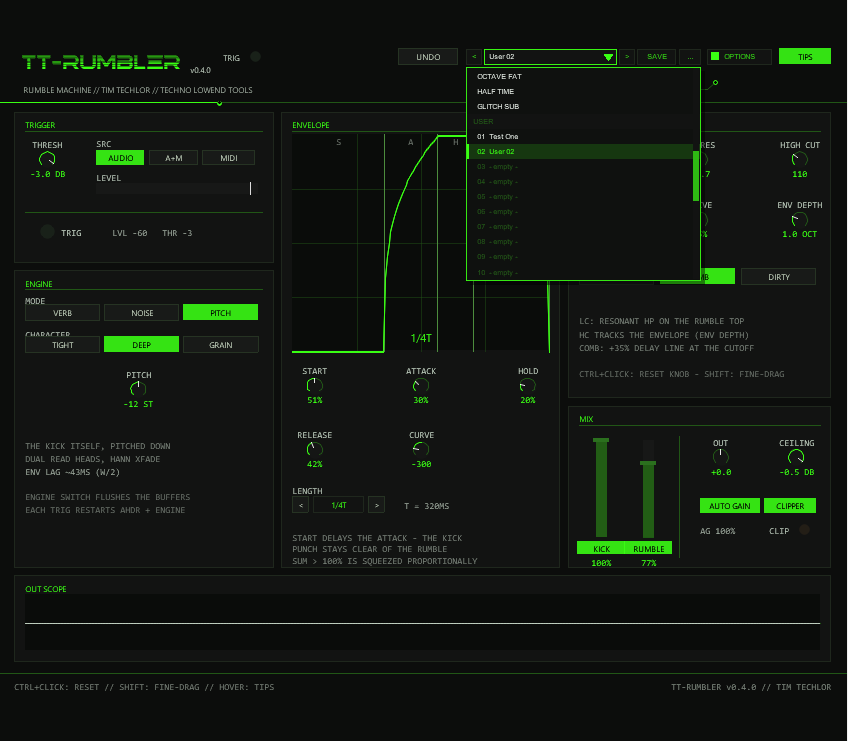
The preset bar in the header (left of OPTIONS) is the same in every
TimTechlor plugin: [<] [ name ▾ ] [>] [SAVE] [...].
The list holds INIT (the factory state) plus the 24 factory
designs (section FACTORY) and 32 user slots (section USER). Every
preset (factory or user) writes the 28 sound parameters and is undoable:
UNDO next to the bar steps back over a preset load like over any edit.
An asterisk * behind the name means the sound was edited since
the preset was loaded. Every factory preset was rendered through a Python
transcript of the engine and passed an offline level/pump/clip gate before
shipping.
- empty -).Loading, saving, managing
</>step through the factory presets and then the used user slots (with wrap-around) and load at once.- Click the name to open the dropdown (mouse wheel scrolls three rows per notch); a click on a row loads it. A click outside closes the list without triggering the control underneath.
- SAVE stores the current sound in the selected user slot; with a factory preset selected it takes the first free slot. A name box opens (default
User 01, up to 24 characters): type the name, Enter = OK. Backspace works; a space needs Shift+Space (REAPER keeps plain Space for the transport); Esc may close the whole FX window depending on your REAPER settings — use the CANCEL button instead. - ... opens a small menu for a selected user preset: RENAME, COPY (into the next free slot) and DELETE (asks for a second click).
- Not part of a preset: the KICK / RUMBLE mute switches, the colour scheme, the tooltip switch.
Where the user presets live
JSFX cannot write files, so the user bank is part of the plugin state
(@serialize): it is saved with the project, in FX chains and
track templates. To carry it to other projects or computers use REAPER's own
preset button in the FX window (+ → Save preset...): a native
REAPER preset file of this plugin contains the whole bank, and loading that
preset restores all 32 slots. Projects saved with an older version open with an
empty bank and an unchanged sound. Each used slot adds well under 1 kB to the project.
| # | Name | Engine · Character | Character of the design |
|---|---|---|---|
| 0 | INIT | VERB · MODAL | Neutral defaults — VERB T60 3 s, 1/4 envelope, HC ~80 Hz. |
| 1 | WAREHOUSE | VERB · MODAL | The video recipe: T60 3 s, 1/2 length, ATTACK 40 % (START 50 % like every preset since 0.2.0). |
| 2 | DEEP DARK | VERB · WALL | Long dark wall: T60 6 s, FOCUS 70 Hz, HC down to 60 Hz. |
| 3 | BLOOM RISE | VERB · BLOOM | Slow riser: T60 8 s (×1.5 character), 2-oct env depth. |
| 4 | TONAL DEEP | VERB · MODAL | "Tonal reverb" demo: short T60 ~1 s at FOCUS 55 Hz through a DIRTY cut. |
| 5 | MODAL AIR | VERB · MODAL | Airier modal room: T60 4.5 s, FOCUS 120 Hz, HC up at 120 Hz. |
| 6 | BLOOM WIDE | VERB · BLOOM | Full diffusion (DENSE 100), T60 5 s, 1/2 length. |
| 7 | WALL SHORT | VERB · WALL | Tight wall at 1/8 length, T60 1.5 s — close, clipped rumble. |
| 8 | CLUB READY | VERB · MODAL | Balanced club rumble: T60 2.5 s, HC ~90 Hz, 30 % drive. |
| 9 | BOOM E1 | NOISE · CLASSIC | The "E1 boom" chest-pressure recipe: HC 45 Hz, LC 86 Hz with a small LC bump. |
| 10 | SCHRANZ | NOISE · GRIT | "Inject Schranz": bright grit (TONE ~500 Hz), DIRTY cut at 70 Hz, clipper at −1 dB. |
| 11 | ROLL 16 | NOISE · RUBBLE | Rolling 1/8T flags — the comb-roll idea, TONE ~180 Hz. |
| 12 | DARK CARPET | NOISE · CLASSIC | Whole-bar carpet: dark noise (TONE 55 Hz) over a 1/1 envelope. |
| 13 | WHITE WASH | NOISE · GRIT | Brighter wash: TONE ~300 Hz through a CLEAN 110 Hz cut. |
| 14 | BROWN PULSE | NOISE · CLASSIC | Hard-pumping triplet pulse: TONE 65 Hz, 1/4T, sharp knee. |
| 15 | RUBBLE LOW | NOISE · RUBBLE | Dark comb growl: TONE 70 Hz, LC wide open at 25 Hz. |
| 16 | COMB ROLL | NOISE · RUBBLE | Industrial 1/16 roll through the COMB high cut. |
| 17 | DIRTY LOW | NOISE · CLASSIC | Raw low rumble: TONE 90 Hz, DIRTY cut, 40 % drive. |
| 18 | OCTAVE | PITCH · TIGHT | The kick one octave down — the shortest window, tightest sub drop. |
| 19 | DEEP SEA | PITCH · GRAIN | Two octaves down through the grain window, dark filter chain, rumble at 100 %. |
| 20 | SUB DROP | PITCH · DEEP | −12 st long flag over a 1/2 envelope — the classic sub drop. |
| 21 | GRAIN TAIL | PITCH · GRAIN | −18 st triplet tail (1/4T) with a drive edge. |
| 22 | OCTAVE FAT | PITCH · DEEP | −12 st fattened by drive and the COMB cut at 110 Hz. |
| 23 | HALF TIME | PITCH · TIGHT | −24 st half-time drop over 1/2, rumble at 100 %. |
| 24 | GLITCH SUB | PITCH · GRAIN | −7 st chopped sub over 1/16 with COMB and full env depth. |
10Editing, undo & tips
- Drag a knob vertically — 120 px is a full travel; a click without movement changes nothing. Holding SHIFT gives a 4× finer ratio (480 px travel).
- Faders: a click on the track sets the value directly; dragging moves it; SHIFT switches to an anchored fine drag mid-move.
- CTRL+click resets every knob and fader to its default — one shared default table feeds both the reset and the INIT preset, so they can never diverge.
- Hover any control for a tooltip in a floating panel. The TIPS button in the header switches them off (the state is saved with the project); tooltips hide while you drag.
- UNDO walks back through the last 20 edit states — every ended drag or button edit pushes one snapshot, preset changes included. Pure interface state (tooltips, page, colour scheme) survives a restore untouched, and there is deliberately no redo.
- The LENGTH stepper is click-only — the
<and>buttons step with wrap-around. The preset bar in the header is described in section 09. - Parameter changes are click-free: targets glide over ~20 ms slews, and switching the engine flushes its buffers instead of fading.
11Options / Color
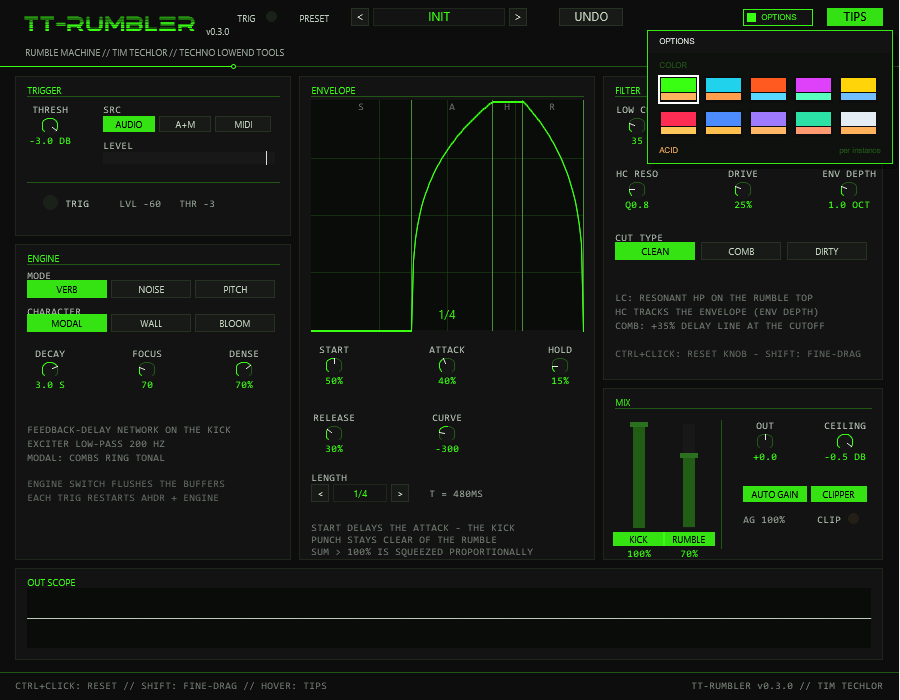
OPTIONS in the header (right of UNDO), then a swatch. A click outside the box closes it.The OPTIONS button opens a small box with the COLOR choice: ten schemes —
ACID, CYAN, ORANGE, MAGENTA, YELLOW, RED, BLUE, VIOLET, MINT and ICE. A scheme changes the accent colour (knob rings, envelope curve,
active buttons, LEDs, panel lines), the second colour (the CLIP LED) and, for RED to ICE, the slightly tinted background and panel greys of the whole front at once.
The choice applies per plug-in instance and is saved with the project and with FX-chain copies (it rides in a spare word of the state blob;
projects saved with an older version open in ACID). It is not part of the presets and not touched by UNDO — loading a preset never
changes your colour. The factory colour is ACID (the classic acid green, identical to versions before 0.3.0). The scheme has no effect on the audio.
12Tips & tricks
- START ≈50 % (the default since 0.2.0), ATTACK 30–50 %: the rumble swells like a vacuum after the kick punch instead of eating it — the signature techno move, straight from the Kikzilla demos.
- HIGH CUT sweet spot 40–120 Hz: real-world rumble settings sit around 45–80 Hz; a touch of HC RESO (~15 %) adds an edge the sweep can whistle on.
- ENV DEPTH 15–25 % (≈0.6–1 oct) opens the filter with the swell and closes it again — the "rolling pressure" feel where the bass physically rolls toward the listener.
- Triplet LENGTHs (1/4T, 1/8T) lay rolling flags against a straight kick grid — try ROLL 16 or BROWN PULSE.
- Brown noise is the rumble colour: NOISE on CLASSIC with TONE down at 40–80 Hz is the classic bed; RUBBLE adds a tonal growl.
- LC RES doubles as a tuned sub bump — a little resonance at the low cut punches the rumble's bottom octave.
- COMB at a higher HIGH CUT = industrial; DIRTY with moderate DRIVE (10–40 %) = raw. Keep DRIVE modest — the mud zone lives at 150–300 Hz.
- PITCH: TIGHT for timing-critical drops, GRAIN for drones; around −7 st the two heads chop the sub into a glitch texture (GLITCH SUB).
13Limitations & notes
- PITCH latency is characteristic: the shifted flag trails the kick by ~W/2 samples — ≈21 ms on TIGHT, ≈43 ms on DEEP and ≈85 ms on GRAIN at 48 kHz. The envelope restart waits the same amount, so the gate and the shifted tail stay aligned; the dry kick is not delayed. There is no PDC in v1.0 — the plug-in reports no latency to the host. For rumble work this lag is musically unproblematic (a re-review is scheduled for v1.1).
- The DECAY readout is the nominal T60: the comb-loop damping is not compensated in the formula, so the effective tail runs shorter at low FOCUS settings (measured ≈2.8–5.1 s at FOCUS 70 Hz with DECAY 8 s) and close to nominal at high FOCUS.
- Engines are mono by design: they run on the mid signal and the rumble is duplicated to L/R — an authentic mono sub. The dry kick stays stereo.
- The envelope display is read-only in v1 — edit with the knobs; the curve and section markers follow.
- OUT SCOPE shows the sum — a dimmed rumble-only overlay is a v1.1 item.
- Undo has no redo; the 20-deep ring covers sound edits only. State serializes as a 66-word blob ('RMBL' v2) into the project and into native REAPER presets; the colour scheme (0.3.0) is stored in one of its spare words. Since 0.4.0 the user preset bank follows that blob in the same state.