
01The concept
A static EQ notch removes a frequency always — also when nothing is ringing there. A multiband compressor squashes whole bands. TT-SPECTRAL asks a sharper question on every analysis hop: is this bin louder than its own neighbourhood justifies? Only then, and only there, does it cut.
cut[bin] = min( MAX CUT, DEPTH % × max(0, level[bin] − baseline[bin] + focus[bin] − threshold) )The engine resolves the spectrum into 2049 populated bins (≈ 11.7 Hz apart at 48 kHz — honest numbers in section 06), so a ringing resonance is carved while the programme material between the bins keeps its level. Measured: pure pink noise passes at full suppression depth with 0.000 dB level loss, and the bands ±60 Hz around a suppressed tone move by 0.00 dB.
02Quick start
- Insert
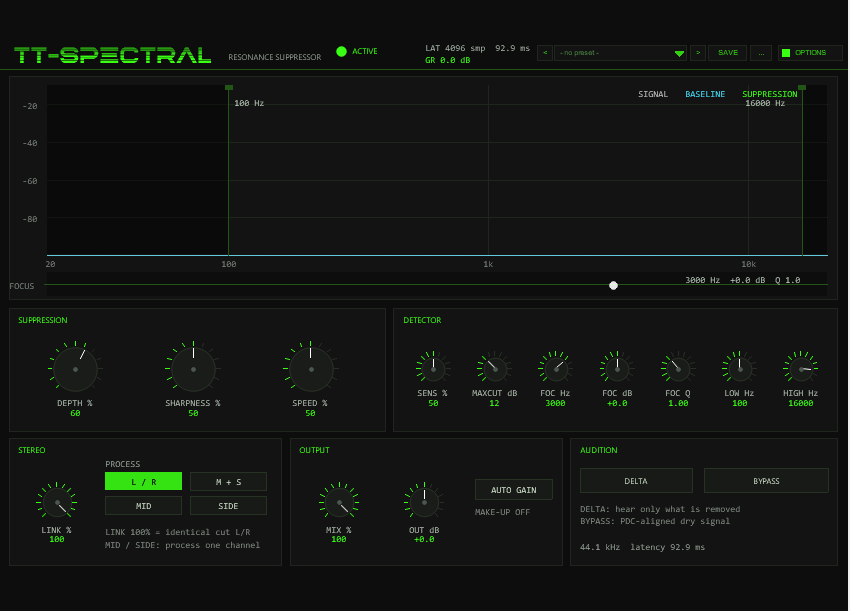
TT-SPECTRALon a harsh track (cymbals, a sibilant vocal, a resonant snare, an aggressive bus). - Optional shortcut: pick a starting point in the preset bar in the header (for example Vocal Harshness or Surgical Ring) — see Presets.
- Set DEPTH to ~80 and SHARPNESS to ~70. The display shows the live spectrum (grey), the robust baseline (cyan) and the suppression teeth — resonances appear as spikes through the baseline.
- Adjust SENSITIVITY: higher = lower threshold = more bins count as resonant.
- Press DELTA to hear exactly what is being removed. If you hear music instead of just the ringing, back off SENSITIVITY or raise SHARPNESS.
- Limit the working range with LOW CUT / HIGH CUT — e.g. only hunt 200 Hz–8 kHz — and lift a stubborn spot with the FOCUS bell.
03In practice
Three field-tested recipes. The pattern never changes: let the display show where the energy sits, tune the detector until only the resonant bins grow teeth, then prove it with DELTA — the golden rule is that the delta must sound like isolated ringing or noise-like fizz, never like music. If you recognise the song in the delta, the detector is eating programme material.
Finding and taming a harsh resonance
Goal. Kill the ring on a harsh source — a whistling synth, a snarling bass, a spitty vocal — without dulling the tone around it.
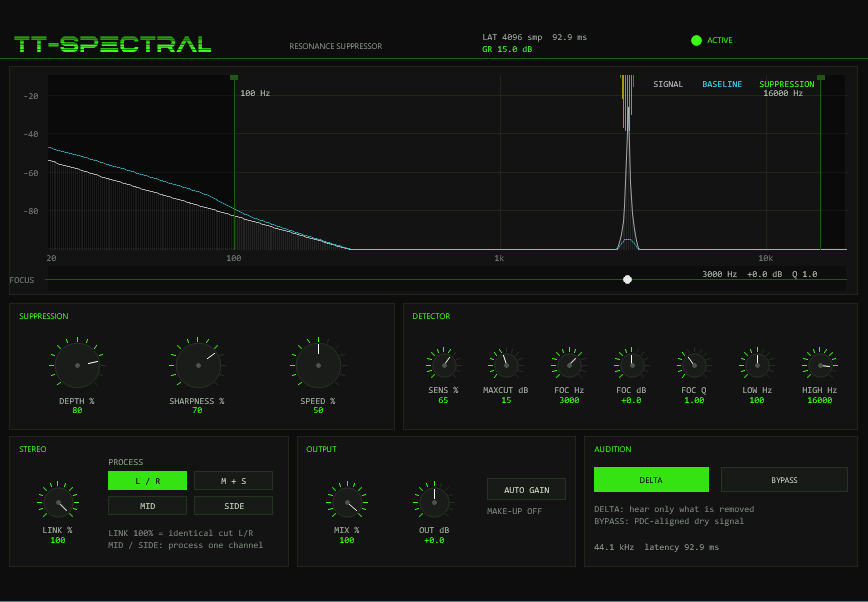
- Loop the worst phrase and watch the spectrum. Resonances are the stationary narrow spikes that keep standing while the rest of the spectrum moves (on a spectrogram they would be persistent horizontal lines). In the shot below, the 3 kHz ring pokes straight through the cyan baseline and carries an amber suppression tooth.
- Start at DEPTH 80, SHARPNESS 70, SENSITIVITY 65. A real ring teeths immediately. If nothing shows, raise SENSITIVITY until the spike appears; if broadband material starts toothing too, back it off — SENSITIVITY moves the threshold from 15 dB down to 1 dB of overhang.
- Keep MAX CUT at 12–15 dB while hunting: the per-bin ceiling stops an over-eager setting from gutting the signal.
- Flip DELTA on (the figure shows this state). You should hear thin, toneless ringing. If you hear music, raise SHARPNESS — a narrower baseline stops wide harmonic structure counting as resonance — or reduce SENSITIVITY.
- Set SPEED last: it scales the per-bin attack/release time constants logarithmically (50→0.5 ms attack, 300→15 ms release). Slow settings suit long sustained rings; faster ballistics track short, spiky ringing. Then switch DELTA off.
Pitfalls. Chasing a resonance that is not narrow (raise SHARPNESS, it will leave the teeth anyway if it is real); running DELTA too long and EQ-ing by what remains instead of what is removed; letting MAX CUT exceed ~15 dB on the first pass — rather solve a stubborn ring with the FOCUS bell (section 08).
Gentle bus cleanup
Goal. Take the edge off an entire bus — set-and-forget, transparent, no pumping.
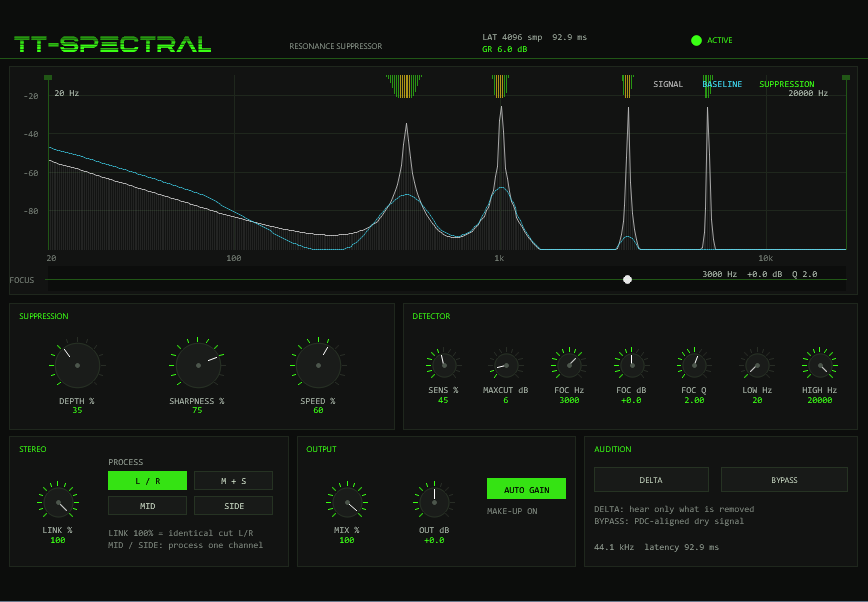
- Dial in moderation everywhere: DEPTH 30–40, SHARPNESS ~75, SENSITIVITY ~45, SPEED ~60. Only needle-sharp peaks count, the ballistics are a touch lazy, and removal stays shallow.
- Cap MAX CUT at 6 dB — nothing can ever be cut harder, so the bus cannot be hollowed out by a loud section.
- Switch AUTO GAIN on. It compares long-term dry/wet power (~400 ms averaging) and re-adds up to +12 dB through a 150 ms smoother — it compensates the energy the resonances carried away. It is deliberately not a loudness normaliser: quiet programme stays quiet.
- If it still feels like it is doing something, blend with MIX ~70–80 %. MIX scales only the removed energy, so the blend can never comb-filter against the dry path.
Watch. The header GR should idle at a few dB
(6 dB in the figure), not double digits. Dullness, level swimming or a
‘breathing’ top end mean DEPTH, SENSITIVITY or MAX CUT are
too hot — check with DELTA; on a bus the delta should be nearly
inaudible.
Targeted work: mask, FOCUS and stereo modes
Goal. Process exactly one region or one channel — nothing else.
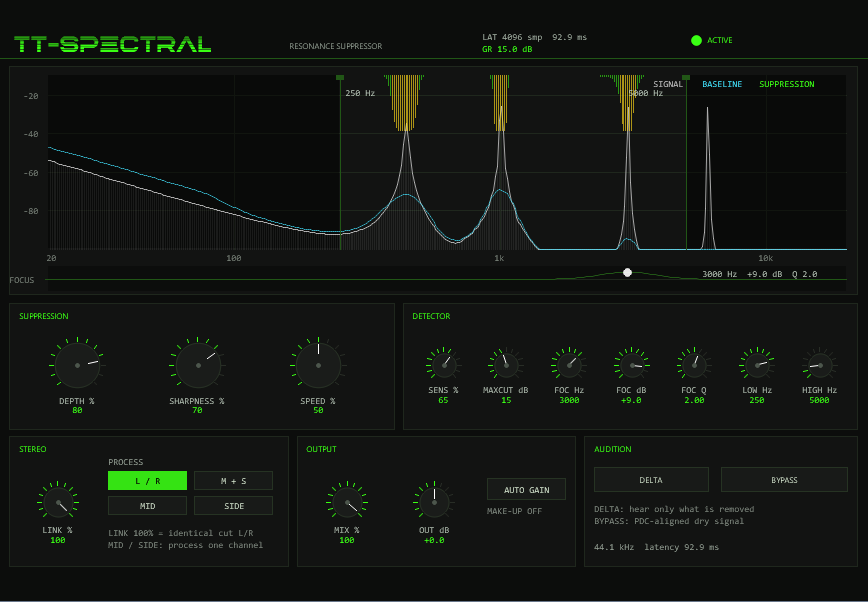
- Restrict the band first: drag the LOW CUT / HIGH CUT mask edges in the display (or use the LOW/HIGH knobs). Outside the band the detector threshold is effectively infinite — the cut there is measurably 0.0000 dB. The figure hunts only 250 Hz–5 kHz; the regions outside are darkened and stay untouched even though a ring at ~6 kHz is plainly visible.
- Point the FOCUS bell at the stubborn frequency: FREQ on the ring, GAIN +6…+12 dB, and Q narrow (2–4) so only that neighbourhood becomes extra sensitive. The strip under the display draws the exact threshold offset — the bump at 3 kHz in the figure is +9 dB at Q 2.0.
- Pick the channel mode deliberately: L/R for normal stereo, MID when the problem sits in the centre (vocal harshness), SIDE for wide harshness (cymbals, reverb tails) while the centre passes untouched, M+S to process both components independently.
- Keep STEREO LINK at 100 % unless the image suffers — at full link both channels share one detection and the cuts are bit-identical, so a centred source cannot be pulled sideways. Lower it only if a hard-panned source sounds dragged toward the centre.
Pitfalls. Ringing in MID mode when the ring lives in the sides (check where it sits before committing); a mask edge forgotten from a previous session — right-click the markers to reset to 100 Hz / 16 kHz; FOCUS GAIN left positive while hunting elsewhere (it raises sensitivity only near FREQ, but still counts).
04Display & handling
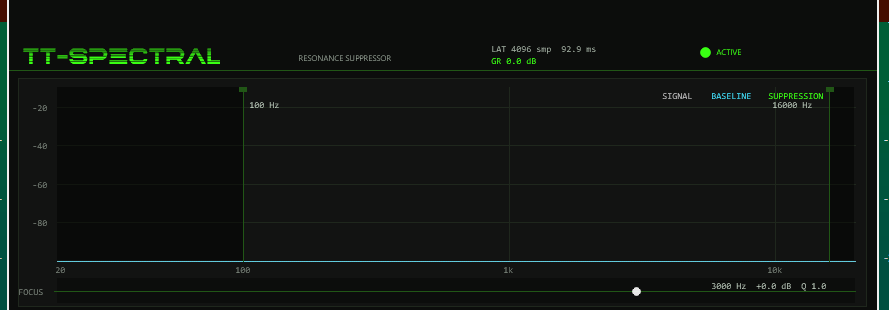
All REAPER sliders are hidden by design — the 900×570 front panel is the interface. The resonance display plots 20 Hz–20 kHz on a logarithmic axis against −100…−10 dBFS and draws three curves:
| Curve | Colour | Meaning |
|---|---|---|
| SIGNAL | grey fill + line | Live level per column (maximum of both channels); rises instantly, decays smoothed |
| BASELINE | cyan line | The robust local baseline the detector compares against — resonances show as spikes through it |
| SUPPRESSION | acid / amber / red teeth from the top | Current per-bin cut growing downward: ≤6 dB acid green, 6–15 dB amber, >15 dB red; a 24 dB cut spans half the plot height |
- Regions outside LOW CUT / HIGH CUT are darkened. The two edge handles drag the mask edges directly; right-click resets them (100 Hz / 16 kHz).
- The FOCUS strip below the display draws the exact threshold offset of the bell: drag its handle horizontally for FREQ and vertically for GAIN, use the mouse wheel for Q; right-click resets to 3 kHz / 0 dB / Q 1.
- Knobs: drag vertically (hold Shift for fine steps) or use the mouse wheel; right-click or double-click resets a knob to its default.
- Header readouts: ACTIVE/BYPASSED LED,
LAT= latency in samples and ms,GR= current maximum cut of both channels; the footer repeats sample rate and latency.
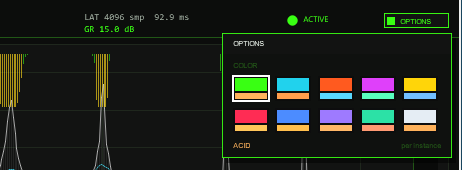
OPTIONS at the right end of the header (right of the preset bar), then a swatch. A click outside the box closes it.Options / Color. The OPTIONS button at the right end of the header opens the box; COLOR offers ten schemes:
ACID, CYAN, ORANGE, MAGENTA, YELLOW, RED, BLUE, VIOLET, MINT and ICE. A scheme changes the accent colour (knob rings, active buttons, LEDs, mask handles,
the light suppression teeth), the second colour and, for RED to ICE, the slightly tinted panel background of the whole front at once. Colours that carry a meaning stay fixed:
the cyan BASELINE curve and the amber and red suppression teeth (6–15 dB and above 15 dB). The choice applies per plug-in instance, is saved with the project
and with FX-chain copies, and is not touched by parameter changes or randomising. The factory colour is ACID. The colour is stored in the hidden parameter 32
(UI Color, 0–9).
05Presets
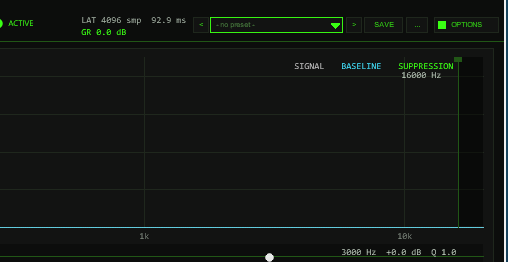
OPTIONS: < name > SAVE .... The name opens the list with the FACTORY and USER sections.The bar loads and saves the whole sound setting of the instance in one step: DEPTH, SHARPNESS, SPEED, SENS, MAXCUT, LOW and HIGH cut,
the three FOCUS values, LINK, the PROCESS mode (L/R, M+S, MID, SIDE), OUT and AUTO GAIN (14 values). Not part of a preset: MIX, DELTA and BYPASS
(they describe how you use the plug-in on a track, not the sound of the setting), the colour scheme (OPTIONS) and the hidden test parameters. Loading a preset therefore never switches
your audition or bypass state and never changes the wet/dry balance.
| Control | Function |
|---|---|
< / > | Previous / next preset: first the six factory presets, then the used user slots; wraps around and loads immediately. |
| Name field | Opens the list: FACTORY (6 presets) and USER (32 slots, empty ones show - empty -). Mouse wheel scrolls, click loads. A * behind the name means a value differs from the loaded preset. |
SAVE | Saves the current setting into the selected user slot; with a factory preset (or none) selected, into the first free slot. A name box opens (up to 24 characters, default User 01): type, Enter or OK saves, CANCEL or a click outside cancels. |
... | RENAME, COPY (into the next free slot), DELETE (a second click confirms) for the selected user preset, and INIT (all 14 values back to the factory defaults: DEPTH 60, SHARPNESS 50, SPEED 50, SENS 50, MAXCUT 12 dB, LOW 100 Hz, HIGH 16 kHz, FOCUS 3 kHz / 0 dB / Q 1, LINK 100 %, L/R, OUT 0 dB, AUTO GAIN off). |
Factory presets
Starting points, not final settings. Each preset was measured on the test signal (pink noise at −18 dBFS plus steady tones at 1, 3 and 6 kHz, 9 to 15 dB above the noise floor; MIX 100 %, offline render, level change against the same signal with DEPTH 0):
| Preset | Idea | Tones 1 / 3 / 6 kHz | Broadband |
|---|---|---|---|
| Gentle Master | Light polish for a full mix: low depth and sensitivity, 6 dB ceiling, mask 60 Hz–18 kHz. | −2.2 / −3.3 / −3.3 dB | 0.00 dB |
| Vocal Harshness | Tames ringing and edge in a voice: mask from 150 Hz to 12 kHz, FOCUS bell at 3.5 kHz, +4 dB so that region counts as resonant earlier. | −5.7 / −9.8 / −8.7 dB | −0.09 dB |
| Surgical Ring | Narrow, deep cuts for stubborn resonances: high SHARPNESS and SENS, 18 dB ceiling. | −8.3 / −10.8 / −11.0 dB | −0.04 dB |
| Drum Bus Ring | Fast ballistics (SPEED 75) for drum-room ring; FOCUS bell at 800 Hz, +3 dB, Q 0.8. | −6.4 / −6.6 / −6.5 dB | −0.02 dB |
| Mid Only Clean | PROCESS = MID: only the centre is cleaned, the side signal stays untouched. | −7.0 / −8.4 / −8.9 dB (mid); side tone 5 kHz: 0.00 dB | −0.03 dB |
| Wide Mix Bus | PROCESS = M+S, LINK 60 %, AUTO GAIN on: gentle stereo-aware bus cleanup with make-up. | −3.7 / −5.1 / −5.2 dB (relative to the broadband level) | 0.00 dB (AUTO GAIN) |
A factory preset changes exactly the 14 values above; MIX, DELTA, BYPASS and the colour stay as they are. The numbers depend on the material — on real
music the amount of cut is set by how far the resonances stand above their own neighbourhood.
Where the user bank lives. Plug-ins cannot write files, so the 32 user slots are part of the plug-in state: they are saved with the project, with FX-chain and track-template copies,
and in every REAPER preset of this plug-in (the + button in the FX window toolbar). To take your bank to another project or computer, save a REAPER preset once
(+ → Save preset) and load it there: the whole bank comes with it. Projects saved with earlier versions load unchanged with an empty bank.
Typing names. REAPER keeps Space for the transport, so type Shift+Space for a blank. Depending on your REAPER settings Esc closes the whole FX window; use CANCEL instead. (The + menu of the FX window also has Send all keyboard input to plug-in.)
06How detection works
On every 1024-sample hop the engine converts each bin's power into a dB level against a sine calibration, smooths it over three bins (0.25/0.5/0.25 — this tames the ±5.6 dB Rayleigh scatter of noise, and costs a real resonance only ~0.7 dB), optionally blends in the stereo link, and builds a robust local baseline: a three-pass winsorised moving average — each bin's own peak is clipped to +3 dB, then +1.5 dB above the running average before averaging, so a resonance cannot inflate its own baseline by more than a fraction of a dB. The window half-width scales with frequency (roughly an octave) and follows SHARPNESS — higher = narrower neighbourhood = only needle-thin spikes count.
| Control | Range / default | Function |
|---|---|---|
SENSITIVITY | 0–100 %, def. 50 | Detection threshold above the baseline: 15 dB at 0 %, 8 dB at 50 %, 1 dB at 100 % — how far a bin must exceed its baseline to count as resonant |
SHARPNESS | 0–100 %, def. 50 | Baseline window width — higher means only very narrow resonances are caught |
DEPTH | 0–100 %, def. 60 | Fraction of the detected overhang removed (80 % removes 0.8 dB per dB overhang) |
MAX CUT | 3–30 dB, def. 12 | Hard ceiling per bin — keeps the process transparent |
SPEED | 0–100 %, def. 50 | Scales the per-bin one-pole ballistics logarithmically: attack 50→0.5 ms, release 300→15 ms (measured: 50.0/300.0 ms at 0 %; 8 dB of cut within 7.8 ms on 50 ms bursts at 100 %) |
Before the ballistics run, the target notch is dilated ±2 bins — an STFT frame cannot carve a notch narrower than a few bins — and smoothed with a 1-2-1 kernel against gurgle; then the frequency mask is applied, so outside the band the target is exactly 0 dB. Tiny states under 0.005 dB snap to zero instead of lingering. Detection is level-relative, not absolute — the same setting works on quiet and loud passages alike.

07Spectral engine
The shared TimTechlor STFT core windows 4096 samples (√Hann), zero-pads to 8192 and runs a real transform on a 1024-sample hop (4× overlap, 21.3 ms at 48 kHz / 23.2 ms at 44.1 kHz). The 8192-point transform yields 4097 addressable pair slots — but only the even-indexed slots ever carry energy (verified empirically: odd pairs are zero at every test frequency), leaving 2049 populated bins spaced srate/4096 ≈ 11.72 Hz apart at 48 kHz. The detector grid covers the 2048 bins j = 0…2047; DC and Nyquist are zeroed before resynthesis and can never be cut.
The removed energy — not the residual — is reconstructed through
its own overlap-add path, so the output is dry − removal.
That is why DELTA audition and MIX come free, why MIX can never
comb-filter, and why BYPASS is bit-exact.
08Controls
| Control | Values / default | Function |
|---|---|---|
DEPTH | 0–100 %, def. 60 | Removal depth of the detected overhang |
SHARPNESS | 0–100 %, def. 50 | Baseline neighbourhood width |
SPEED | 0–100 %, def. 50 | Attack/release scaling of the per-bin state (section 05) |
SENSITIVITY | 0–100 %, def. 50 | Detection threshold, 15→1 dB of overhang |
MAX CUT | 3–30 dB, def. 12 | Per-bin cut ceiling |
LOW CUT / HIGH CUT | 20–500 Hz / 4–20 kHz, def. 100 / 16 k | Hard processing mask (draggable in the display); HIGH CUT is held ≥ 1.5× LOW CUT internally |
FOCUS FREQ / GAIN / Q | 100–16 kHz / ±12 dB / 0.3–8, def. 3 k / 0 / 1 | Bell that shifts the threshold locally (section 08) |
STEREO LINK | 0–100 %, def. 100 | Shared detection between channels (section 09) |
PROCESS | L/R · MID · SIDE · M+S, def. L/R | Channel mode |
MIX / OUT | 0–100 % / ±12 dB, def. 100 / 0 | Parallel blend of the removal and post trim |
AUTO GAIN | OFF/ON, def. OFF | Make-up proportional to the removed energy (section 10) |
DELTA / BYPASS | OFF/ON | Audition the removed part / latency-aligned bypass |
All parameters are automatable — the sliders stay hidden by design
(- prefix); the front panel is the interface. A diagnostic
readout block lives on hidden sliders 18–31 for tests and automation
queries (section 11). Slider 32 (UI Color) stores the colour scheme of the
OPTIONS box (section 04).
09Mask & focus bell
The frequency mask is surgical: below LOW CUT and above HIGH CUT the detector threshold is effectively infinite — bins there cannot be cut at all (measured: a 60 Hz tone inside a masked-out region receives 0.0000 dB of reduction, and the removed spectrum carries < −60 dB outside the band). The two lowest and two highest transform bins are excluded regardless, so DC and the top edge stay safe with any setting.
The FOCUS bell adds a Gaussian dB offset to the detection threshold around FREQ, with an octave width σ = 0.7/Q — positive GAIN makes bins near FREQ count as resonant much earlier, negative GAIN protects them:
| FOCUS GAIN | Effect | Use |
|---|---|---|
| +6…+12 dB | Bins near FREQ count as resonant much earlier — measured +12 dB lifts a marginal 5.9 dB cut to 15.5 dB | A known ring frequency (snare shell, room mode, vocal harshness) |
| 0 dB | Neutral | — |
| −6…−12 dB | Bins near FREQ are protected — measured −12 dB keeps the cut at 0.00 dB | Protect the body of the signal while the rest is cleaned |
The strip under the display draws exactly this offset — what you see in the FOCUS curve is the dB value added to each bin's threshold.
10Stereo link & M/S
With both channels processed, STEREO LINK blends each channel's detector level toward the combined level in the dB domain: at 100 % both sides see the same spectrum, so the cuts are bit-identical (measured maximum deviation 0.000000 dB); at 0 % each channel cuts only what it actually has. In MID- or SIDE-only modes LINK is idle.
| PROCESS | Behaviour |
|---|---|
L/R | Normal stereo operation — separate detection per channel, blended by LINK |
MID | Only the mid signal is analysed and cleaned — the side passes untouched (measured −0.00 dB) |
SIDE | Only the side signal — tame wide harshness (cymbals, reverb) while keeping the centre intact |
M+S | Mid and side are both processed independently (LINK blends their detection) |
M/S processing happens per bin in the frequency domain (mid = (L+R)/2, side = (L−R)/2) — measured isolation: 11–13 dB of cut in the processed channel, −0.00 dB in the other.
11Audition, mix & output
DELTAplays exactly the removed spectrum at the MIX amount — the ringing you are eliminating. Because the output isdry − removal, wet + delta reconstructs the input bit-exactly (measured residue below −300 dBFS); at DEPTH 0 the delta floor also sits below −300 dBFS.MIXscales only the removed energy — 50 % halves the cut depth, 0 % is clean dry. A true parallel blend with no comb filtering (measured: 2.42 dB of cut at MIX 50 %).AUTO GAINcompares the long-term dry/wet power (~400 ms averaging) and applies up to +12 dB of make-up through a 150 ms smoothing — compensation for the removed energy, not a loudness normaliser.OUTtrims the result ±12 dB after everything.BYPASSfades over ~20 ms to the latency-aligned dry signal — bit-exact (measured difference exactly 0), sample-aligned A/B via REAPER's delay compensation. While fully bypassed the spectral analysis is skipped entirely, so CPU use drops to passthrough.

12Latency, PDC & diagnostics
| Source | Amount |
|---|---|
| STFT window (fixed) | 4096 samples — reported exactly to REAPER's plug-in delay compensation (85.3 ms at 48 kHz, 92.9 ms at 44.1 kHz) |
The header shows the live latency in samples and ms plus the current
maximum gain reduction (GR) of both channels.
Hidden diagnostic readouts
Hidden sliders 18–31 and 33–36 (the Q … family) are
test/automation readouts. Normal use never needs them, but they are
readable via REAPER's parameter list and drive the header meters:
| Readout | Meaning |
|---|---|
Q IDX / Q VAL | Query interface: IDX selects an address — first the per-hop log ring at the tracked bin (state, target, overhang, level; 2048 hops each), then the per-bin arrays (cut state, level, baseline per channel) — VAL returns the value |
Q TRKBIN | Bin observed by the per-hop log ring (1–2046, def. 256 ≈ 3 kHz at 48 k) |
Q PDC | Reported delay = 4096 samples |
Q HOPS | Processed analysis-hop counter |
Q SRATE | Current host sample rate |
Q GMAX0 / Q GMAX1 | Current maximum cut per channel in dB — the header GR meter |
Q LINKERR | Max |cut L − cut R| across bins (exactly 0 dB at LINK 100 %) |
Q THR | Current detection threshold in dB (derived from SENSITIVITY) |
Q MASKERR | Reserved — currently always 0 |
Q PEAKBIN | Index of the bin with the largest cut on channel 0 |
Q PB CMD / Q PB IDX / Q PB A / Q PB B | Preset-bank test interface (sliders 33–36): command, slot or factory index, and two readouts. Only used by the test suite; leave at 0 |
Q TAUA / Q TAUR | Current attack/release time constants in ms (derived from SPEED) |
13Troubleshooting
- Everything sounds dull — SENSITIVITY too high or SHARPNESS too low; check with DELTA whether programme material is being removed, or drop MIX to ~70 % for a gentler blend.
- The ring is still there — MAX CUT may cap the cut; raise it, or place the FOCUS bell on the ring frequency with +6…+12 dB.
- Pumping on busy material — lower SPEED for slower ballistics, or reduce DEPTH; the overhang is capped per bin, so the artefact is usually ballistics, not depth.
- Image feels pulled to centre on a panned source — lower STEREO LINK below 100 % so each side only cuts what it has.
- Nothing happens at the low end — the default LOW CUT is 100 Hz; lower it toward 20 Hz for sub-range work (the two lowest bins, DC to ~23 Hz, stay excluded regardless).
- Cuts start late on very short rings — raise SPEED; attack phases shorter than ~2 hops (~40–46 ms) are quantised to the hop grid by design.