
01The concept
A fair A/B test needs equal loudness — otherwise the louder version always wins. TT-TRUEAB clamps any FX chain between two instances:
[ TT-TRUEAB PRE ] → [ any FX chain ] → [ TT-TRUEAB (POST) ]- PRE measures the K-weighted input loudness and streams the
unprocessed audio into a shared ring buffer in the gmem namespace
ttab. - POST measures the loudness after the chain, reads PRE's level and audio back from shared memory and pulls the chain output to the input loudness — a fair bypass comparison with no level cheat.
Classic gain-match tools only exchange a level value. TT-TRUEAB transports the full dry audio — 218 samples per channel, about 5.5 s at 48 kHz. That is what makes a latency-aligned reference and a real difference signal possible; a level-only tool has no dry audio to compare against.
Loudness is measured with a K-weighting (BS.1770-like: high shelf +4 dB at ~1.5 kHz plus a ~38 Hz low-frequency high-pass) over a 400 ms window on both sides. Since both sides use the same window, this is a relative measurement; no ITU gating is needed.
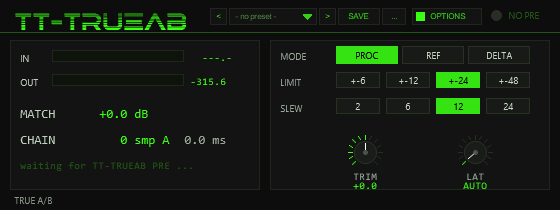
02Quick start
- Insert
TT-TRUEAB PREbefore the chain you want to judge. Its two switchesACTIVEandDRY RINGboth default to ON. - Insert
TT-TRUEAB(POST) after the chain. The PRE LINK LED in the header lights up as soon as POST sees the PRE header; without it the header readsNO PRE. - Play material. The match gain slews toward the correction at up to
12 dB/s; roughly half a second after linking, POST starts measuring
the chain latency (watch the
LAT SCANline). - Switch between PROC, REF and DELTA on POST.
03In practice
Three concrete setups that cover what TT-TRUEAB is for: judging a chain at equal loudness, hearing only what the chain changed, and reading out the chain's latency for parallel work.
A/B a processing chain at equal loudness
Goal: decide whether a chain (EQ + compressor + saturator, say) actually improves the material — with the loudness bias removed.
- Insert
TT-TRUEAB PREin the slot before the chain on the source track andTT-TRUEAB(POST) in the slot after it. FX slot order is the routing — no cabling needed. - Play a representative loop — not the quietest part of the track.
- Wait for the PRE LINK LED and the status line reading
ok, then letMATCHconverge (about a second at the default SLEW of 12 dB/s). - Toggle PROC ↔ REF. PROC is the chain corrected to input loudness; REF is the original, read from PRE's ring at the measured chain latency. Whatever still sounds better at equal loudness is a real improvement — not a level cheat.
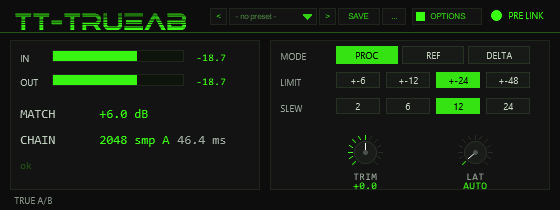
A).Settings: the default MATCH LIMIT of ±24 dB and
SLEW of 12 dB/s are safe starting points. On gentle chains
narrow the limit to ±6 or ±12 to bound the correction; use
TRIM for residual bias you want to keep or remove.
- Don't judge during the first seconds — while MATCH is still
slewing or the status line reads
LAT SCAN, REF is not yet aligned. - Don't A/B via the plugins' bypass buttons — bypassing a plug-in drops its level and its latency. REF is the honest bypass: the original signal, loudness-matched and time-aligned.
- If CHAIN never settles or sounds smeared in REF, the correlation could
not lock on the material — enter the delay on the
LATknob by hand.
Delta audition — hear only what the chain changed
Goal: isolate the footprint of the chain: distortion residue, EQ tilt, compression pumping, added noise.
- Same rig as above. Make sure PRE's
DRY RINGswitch is on (it is by default) — DELTA needs the dry audio. - Wait until the latency measurement has run once (CHAIN shows a value
flagged
Aand the status line is back onok). - Switch MODE to DELTA: you hear
PROC − REF— gain and delay removed, only the chain's fingerprint left.
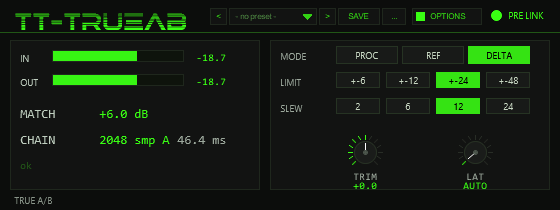
Reading the result: near-silence means the chain is transparent — a pure gain+delay test chain nulls to about −75 dB here. Constant hiss is added noise, a growl is nonlinear distortion, and a crackle on transients usually means the latency lock is wrong.
- If DELTA never gets quiet on a chain that should be transparent, watch
the
LAT SCANline — on very flat material (a sustained sine, near-silence) the correlation may not lock; setLATmanually to the plug-in's reported delay. - With the ring switched off at PRE, DELTA has no reference and outputs
the matched PROC signal — if DELTA sounds identical to PROC, check
PRE's
DRY RING.
Measure a chain's latency for parallel alignment
Goal: learn the real delay a plug-in or chain introduces — to align a parallel bus against it, or to verify a plug-in's PDC claim.
- Bracket only the suspect plug-in(s) between PRE and POST on a scratch track.
- Feed it material with movement — noise or transient-rich audio works best for the correlation.
- Read
CHAIN: samples plus milliseconds, flaggedAfor auto-measured. That is the delay to dial into the compensator of the parallel path. - To freeze the value, turn the
LATknob to the measured number — the readout then shows the same figure without theA.
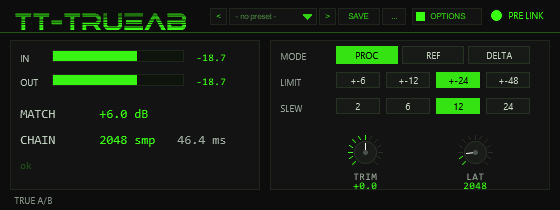
A flag and the periodic re-scan stops.- The auto-scan covers 0–16384 samples (about 0.34 s at
48 kHz); a chain with a longer delay needs a manual
LATentry. - In AUTO the sweep repeats roughly every half second, so the value
follows live chain changes — freeze it with
LATonce you have the number you need.
04Audition modes
| Mode | What you hear |
|---|---|
PROC | The processed signal, corrected automatically (plus TRIM) to the input loudness. |
REF | The dry signal, read straight from the PRE ring buffer at the measured chain latency — same loudness, sample-aligned to the chain output. |
DELTA | The true difference PROC − REF: exactly what the chain changed — saturation, EQ shifts, compression — with gain and delay removed. |
Switching morphs between the modes with ~5 ms triangular crossfade weights, so there are no clicks. Without a PRE link POST forces PROC; the mode buttons only take effect while linked.
If PRE's dry ring is switched off, POST still level-matches on the level value alone: PROC works as usual, REF stays silent and DELTA simply passes the matched PROC signal (difference against silence).
05The display
The POST front panel is divided into a meter panel (left) and a control panel (right). The readouts are also mirrored as read-only automation parameters (section 10).
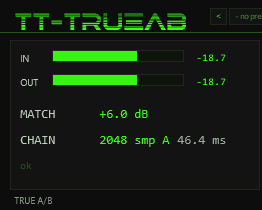
- PRE LINK
- Header LED. Lit while POST receives a live PRE header;
the text next to it reads
PRE LINKorNO PRE. - IN
- Bar meter and numeric readout of the K-weighted input level
reported by PRE (
---.-while unlinked). - OUT
- Bar meter and readout of the output level after the match gain — i.e. the level you actually hear in PROC.
- MATCH
- The currently applied correction in dB, slewing toward its target at the SLEW rate.
- CHAIN
- Measured chain latency in samples plus milliseconds.
A trailing
Amarks the automatic result; a manually entered LAT shows the same value without theA. - status line
LAT SCAN n/16384while an auto-correlation sweep runs ·waiting for TT-TRUEAB PRE ...while unlinked ·okotherwise.
06Latency engine
Any latency inside the chain (plug-in delay compensation, look-ahead) would smear REF and DELTA, so POST measures the chain latency itself — by correlating its own input against the dry audio in the PRE ring:
- Coarse scan: up to 128 taps of the current block are cross-correlated against the ring, 512 candidates per audio block in steps of 4 samples. One sweep covers 0–16384 samples in about eight blocks — spread out so it causes no CPU spike.
- Fine search: a sample-accurate refinement of ±15 samples around the coarse result, using up to 256 taps.
- Scheduling: the first sweep starts about 0.5 s after the link comes up and only once PRE has written at least 20,000 samples. In AUTO mode the sweep repeats roughly every half second, so the readout tracks chain changes live.
Turn the LAT knob to enter the latency by hand (0–16384 samples);
0 means automatic and the knob shows AUTO. A manual
value freezes the display and stops the periodic re-scan — useful when the
material is too flat or quiet for the correlation to lock.
07Controls
POST is operated entirely from the drawn panel. Buttons switch directly; the two knobs respond to vertical drags (hold Shift for fine adjustment), the mouse wheel, and right-click or double-click resets a knob to its default.
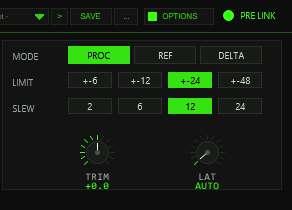
| Control | Values (default) | Function |
|---|---|---|
MODE | PROC · REF · DELTA (PROC) | Selects the audition mode (section 04). Ignored while unlinked. |
MATCH LIMIT | ±6 · ±12 · ±24 · ±48 dB (±24) | Maximum correction of the automatic match. TRIM is added on top and may exceed the limit. |
SLEW | 2 · 6 · 12 · 24 dB/s (12) | How fast the match gain follows loudness changes. |
TRIM | ±12 dB, knob (0) | Manual fine correction added on top of the limited match target. |
LAT | 0–16384 smp, knob (0 = AUTO) | Manual latency override; also freezes the periodic re-scan. |
PRE controls
PRE has no panel of its own — its two switches live in REAPER's slider list:
| Switch | Default | Function |
|---|---|---|
ACTIVE | ON | Together with DRY RING, gates writing into the dry ring. |
DRY RING | RING ON | Enables streaming the unprocessed audio. With either switch off, PRE still sends its level and the pair works as a meter-only gain match (no REF audio, DELTA = PROC), which also saves CPU. |
08Preset bar & user bank
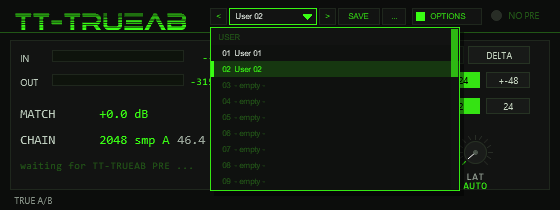
OPTIONS: < name > SAVE .... The name opens the list of the 32 user slots; the preset in use is marked.TT-TRUEAB is a measuring tool, so presets are a small convenience: they store the measurement settings — MATCH LIMIT, SLEW, LAT (manual latency or AUTO), TRIM and METER (parameters 2–6; METER is stored although it is not wired to the display yet) —
so that you can jump between, say, a fast-slewing setup for mixing and a slow, tightly limited one for mastering, or keep the pinned latency of a particular plug-in chain. Not part of a preset: MODE (PROC/REF/DELTA is the A/B switch itself; loading a preset must never flip you into DELTA), the colour scheme and the readouts.
The bar is narrower than in the larger plug-ins (196 instead of 250 units) to fit the 560×210 window. There are no factory presets. The PRE instance has no panel and no presets.
| Control | Function |
|---|---|
< / > | Previous / next used user slot; wraps around and loads immediately. |
| Name field | Opens the list of the 32 user slots (empty ones show - empty -). Mouse wheel scrolls, click loads. A * behind the name means the settings differ from the loaded preset. |
SAVE | Saves the current settings into the selected user slot, or the first free one. A name box opens (up to 24 characters, default User 07): type, Enter or OK saves, CANCEL or a click outside cancels. |
... | RENAME, COPY (into the next free slot; the selection stays on the original), DELETE (a second click on the same entry confirms) for the selected slot, and INIT (defaults: LIMIT ±24, SLEW 12, LAT AUTO, TRIM 0, METER SLOW). |
Where the user bank lives. Plug-ins cannot write files, so the 32 user slots are part of the plug-in state: they are saved with the project, with FX-chain and track-template copies,
and in every REAPER preset of this plug-in (the + button in the FX window toolbar). To take your bank to another project or computer, save a REAPER preset once
(+ → Save preset) and load it there: the whole bank comes with it. Projects saved with earlier versions load unchanged with an empty bank.
Typing names. REAPER keeps Space for the transport, so type Shift+Space for a blank. Depending on your REAPER settings Esc closes the whole FX window; use CANCEL instead. (The + menu of the FX window also has Send all keyboard input to plug-in.)
09Watchdog & safety
- On every audio block POST verifies that the PRE magic word is present,
that PRE's block counter is still advancing and that PRE's sample clock
is running. If any check goes stale the link drops — within a fraction
of a second the header shows
NO PRE. - Without a live link POST does passthrough: the mode is forced to PROC and the match gain slews back to unity, so the signal passes unchanged with no glitches from a frozen gain.
- Ring positions are only read while the ring flag is set and the unwrapped read position is ≥ 0 — a fresh instance never replays stale gmem garbage.
- If the ring is switched off at PRE while the level still arrives, POST keeps matching on the meter value alone: the pair degrades gracefully to a GainMatch-style tool instead of failing.
10Automation parameters
All user-facing values are visible in REAPER's parameter list and can be automated, learned or read by scripts:
| Instance | Visible parameters |
|---|---|
| POST | MODE, MATCH LIMIT,
SLEW dB/s, LAT smp (0=auto),
TRIM dB, METER and the readouts
IN LUFS (ro), OUT LUFS (ro),
MATCH dB (ro), CHAIN LAT (ro),
PRE LINK (ro) |
| PRE | ACTIVE, DRY RING,
IN LUFS (ro) |
Two internal diagnostics are hidden from the list: -SNT on POST
(a compiler liveness sentinel) and -WP on PRE (the ring write
position). The METER parameter (SLOW/FAST) is reserved in v1.0.0 —
it appears in the parameter list but is not wired to the display yet. Since v1.1.0 POST also has the hidden parameter UI Color (colour scheme 0–9, see Options / Color); since v1.2.0 four more hidden parameters (PB CMD, PB ARG, PB A, PB B, indices 13–16) form the test interface of the preset bank.
11Options / Color
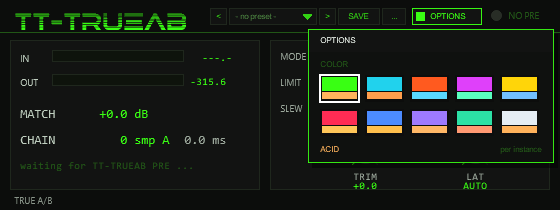
Click OPTIONS in the header of TT-TRUEAB POST to open the box. Under COLOR pick one of ten schemes: ACID, CYAN, ORANGE, MAGENTA, YELLOW, RED, BLUE, VIOLET, MINT or ICE.
A click on a swatch changes the whole front at once (accent, dimmed accent, panel and ground tint, knob discs, meter bars); a click outside the box closes it. The choice applies per plug-in instance
and is saved with the project and with FX chains (hidden parameter UI Color, index 12). The factory colour of TT-TRUEAB is ACID. Colour has no effect on the audio; PRE has no panel and no colour option.
12Troubleshooting
NO PRE/waiting for TT-TRUEAB PRE ...— no PRE instance is running, or it is bypassed/offline so its block counter stalls. Note: switching PRE'sACTIVEoff does not break the link — it only stops the dry ring.- REF is silent although the link is up — PRE's
DRY RING(orACTIVE) is off, so the pair runs in meter-only mode. - DELTA sounds identical to PROC — same cause: with no ring data the difference against silence is just the matched signal.
- REF/DELTA odd right after inserting — the ring needs about half a second to fill and the first auto-scan waits for 20,000 PRE samples.
- DELTA never gets quiet on a chain that should be transparent — watch the
LAT SCANline; if the correlation cannot lock (very flat or quiet material), setLATmanually to the plug-in's reported delay. CHAINvalue keeps changing — the auto sweep re-runs roughly twice per second. Freeze it by settingLATby hand.- Levels chase each other on very dynamic material — raise
SLEWfor a faster follow, or narrowMATCH LIMITto bound the correction.