Glowing acid-green slime pouring onto a black vinyl record

Season 2026 // Free acid toolkit for REAPER

The 303 invented acid.
This season it's free.

A free acid toolkit for REAPER, released drop by drop: a new tool every Thursday, 18:00 CET. It starts with the TT-303. What comes next stays classified until the day before. Plus Acid Under Control, 24 pages on getting a 303 to sit with the kick.

  • 15drops
  • 11out now
  • 24page PDF
  • 0 €no account, no paywall
01 // TOOLKIT

THE TOOLKIT

The season drops one tool a week. Here is what is out now, each one free with a full manual, limits and known issues included. Tools marked ReaPack install in one click. Click a drop number to jump to its tool; the highlighted card is the actual drop. The next name is below, the rest stays classified.

Preview of the next drop, interface deliberately blurred

DROP 06 // NEXT

CLASSIFIED

“Two things want the same frequency. Only one gets it.”

THU 19 NOV · 18:00 Berlin time

Get notified

05 / 15 drops released // a new drop every Thursday, 18:00 Berlin time

  1. 01OUT
  2. 02OUT
  3. 03OUT
  4. 04OUT
  5. 05LATEST
  6. 07???
  7. 08???
  8. 09???
  9. 10???
  10. 11???
  11. 12???
  12. 13???
  13. 14???
  14. 15???

ACID CORE

The 303 at the heart of the season, and the tools that drop around it.

03 TOOLS
01 // SYNTHv2.1.4

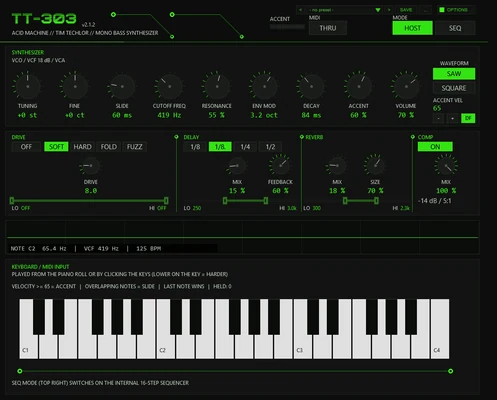
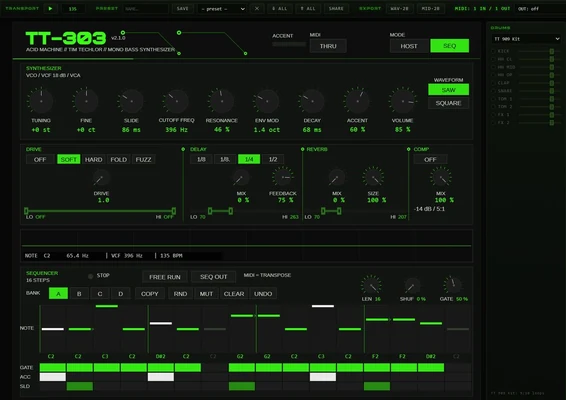
TT-303 Acid Machine

Acid bass synth in the style of the TB-303

An 18 dB ladder at 2× oversampling and a slide that glides in log frequency, so a fifth takes as long as an octave. The accent charges up: three accents in a row hit harder than one after a rest. Four drive models dirty the mids and leave the fundamental clean. The manual says openly where it differs from a real 303.

TryLoad SQUELCH, ride CUTOFF, set ACC on a few steps and SLD on two or three.

  • 18 dB ladder
  • accent build-up
  • 4 drive models
  • 16 steps × 4 banks
02 // WEB APPv2.1.0

TT-303 in the browser

The same acid voice in a browser tab

Step sequencer, a small drum machine and Web MIDI in and out. Everything runs locally, nothing is uploaded. Export two bars of the 303 as WAV or the pattern as MIDI and drag them into your DAW.

TryChrome, Edge or Firefox. Click the start overlay once, or it stays silent.

  • no install
  • Web MIDI in + out
  • WAV + MIDI export
  • nothing uploaded
03 // MIDIv1.2.0

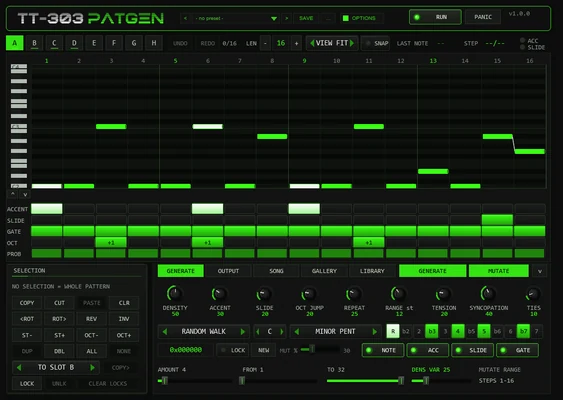
TT-303PATGEN

Pattern generator that thinks in acid

Five algorithms write accents, slides, ties, octave pops and the odd tense flat second. Every pattern comes from a 24-bit seed: same seed, same settings, same pattern, so a lucky accident can be found again. MUTATE rewrites only the steps you choose.

TryPut it above the TT-303 and leave the 303 in HOST mode.

  • 5 algorithms
  • 24-bit seed
  • 8 slots + song chain
  • 32 style patterns

DRUMS

Kicks, snares, claps and hats synthesized from scratch. No sample pack needed.

01 TOOLS
04 // DRUMSv1.1.0

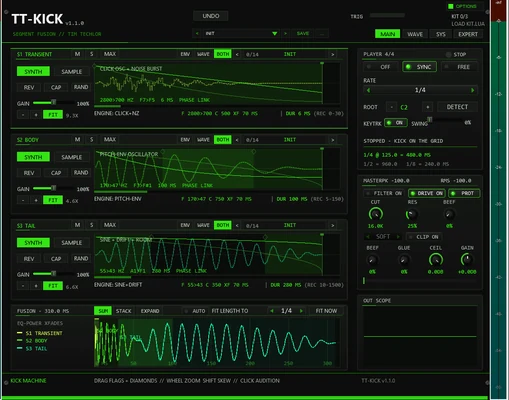
TT-KICK Kick Machine

A kick built from three segments

Transient, body and tail are joined end to end with equal-power crossfades instead of stacked as layers, and the synth keeps the phase across every joint. Each segment can be a synth or a sample. A badge turns orange when a segment runs longer than it should.

TryAll factory kicks are synthesized, so they work before you load a single sample.

  • 3 segments
  • synth or sample
  • 44 factory kicks
  • 20-step undo

LOW END AND BASS

Basses, rumble and the duck that makes room for both.

02 TOOLS
05 // EFFECTv1.1.0

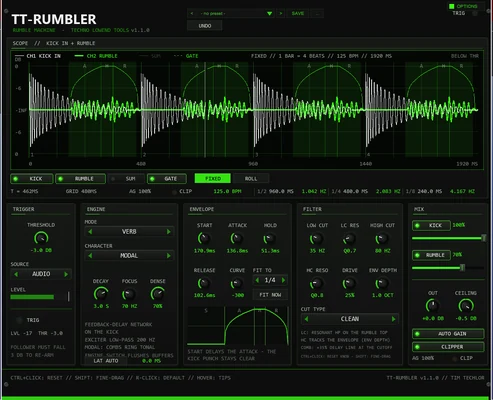
TT-RUMBLER Rumble Machine

Techno rumble built from your kick

It listens to the kick and builds the pumping sub layer from it: through a reverb, through noise, or the kick itself pitched down by up to 24 semitones. A tempo-synced envelope swells after the punch, and auto gain holds the rumble about 6 dB under the kick.

TryRight after the kick, LENGTH 1/4, high cut somewhere between 40 and 120 Hz.

  • VERB / NOISE / PITCH
  • synced envelope
  • auto gain
  • 22 presets
ACTUAL DROP // 05
06 // EFFECTv1.0.1

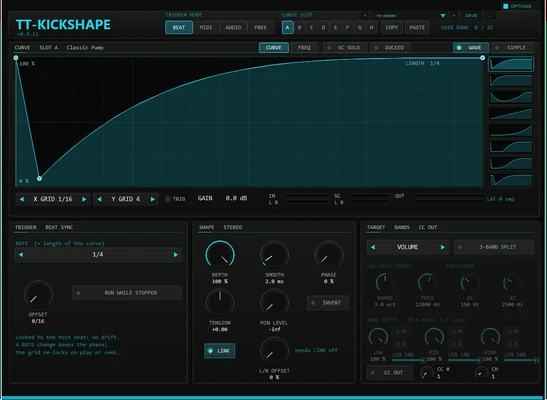
TT-KICKSHAPE

Draw the sidechain duck

Pumping without a compressor: draw the volume curve and trigger it from the beat, a MIDI note, an audio transient or a free clock. A 3-band split can duck only the lows, and the curve can go out as MIDI CC to move other plug-ins.

TryLows only: split on, LOW 100 %, MID 30 %, HIGH 0 %, crossover around 200 to 300 Hz.

  • 32-point curves
  • 4 trigger modes
  • 3-band split
  • CC out

GENERATIVE MIDI

Arps, chance and tunings that push a line somewhere new.

02 TOOLS
07 // MIDIv1.1.1

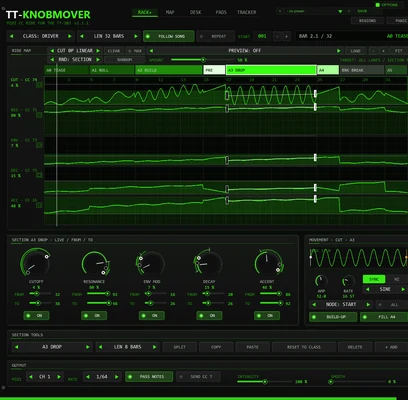
TT-KNOBMOVER

Moves the knobs of your TT-303 for you

Describe the track as sections (tease, roll, build, pre-drop, drop, fill, break, reset). For every section and every knob it draws a line from a start to an end value, adds a swing on the cutoff and a gentle wobble on the rest, and sends the result as MIDI CC. Grab any knob and take over live.

TryPick the preset Driver Single Drop 48, play from the start and grab CUTOFF during the drop.

  • section arrangement
  • MIDI CC out
  • 64 factory presets
  • live takeover
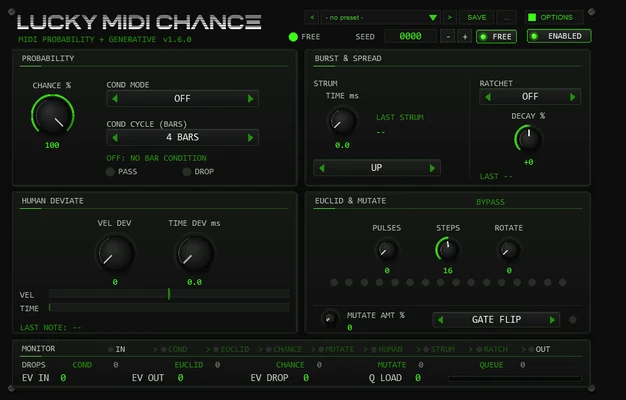
08 // MIDIv1.6.0

TT-LuckyMidiChance

Controlled chance for MIDI

A probability gate, bar conditions like 1:4 or FILL, a Euclidean gate, strum and ratchets, plus a humanize that only ever plays late, so it adds no latency. Lock the seed and the same notes get the same decisions every time.

TryCHANCE around 70, VEL DEV around 12. Past about 20 it starts to sound sloppy.

  • probability gate
  • bar conditions
  • ratchets
  • seed lock

HELPERS

Small scripts for the clicks around the music.

03 TOOLS
09 // THEMEv1.0.1

CLEAN & FLAT ACID

A flat graphite REAPER theme with one acid-green accent

The arrange view and the mixer redrawn on top of Default 7.0: flat track panels and mixer strips, one acid-green accent, amber mute, and meters that stay green, yellow, orange and red. Three layouts and a Theme Adjuster for colours, fonts, UI scale and contrast.

TryInstall it from ReaPack or TT-REAPERMANAGER, then pick it under Options > Themes.

  • 3 layouts
  • Theme Adjuster
  • bake your own copy
ReaPack
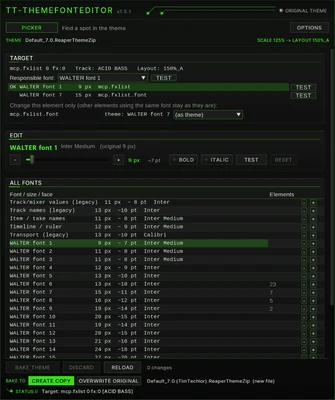
10 // SCRIPTv1.5.1

TT-THEMEFONTEDITOR

Find and change REAPER theme fonts

Point at any text in REAPER, lock it with Shift or a click, and see which theme font draws it. Change size, bold or italic with a live preview, then bake the theme: as a new copy (default) or back into the original, with the old version kept as .bak.

TryNeeds ReaImGui and js_ReaScriptAPI, both from ReaPack.

  • pick + lock
  • live preview
  • copy or overwrite
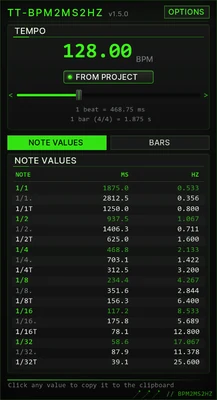
11 // TOOLv1.5.1

TT-BPM2MS2HZ

Note values in milliseconds and hertz

Every note value from 1/1 to 1/32, plain, dotted and triplet, in ms and Hz, plus whole bars in seconds. The REAPER window follows the project tempo and copies a value on click; the web app takes typed BPM or tap tempo.

TryDotted eighth at 128 BPM: 351.6 ms, the classic ping-pong spacing.

  • dotted + triplets
  • tap tempo
  • web + REAPER
02 // FREE PDF

ACID UNDER CONTROL

The mixing guide that goes with the toolkit. Written for the moment when the line finally squelches, and the mix falls apart.

A mixing strategy for 303 sounds in modern techno

Production guide // by Tim Techlor

Why a 303 fights the kick, eats the low end and turns harsh at high resonance, and what to do about it at the source, in the EQ, in the sidechain and on the bus. Eleven chapters, one signal-chain blueprint, one checklist.

  • 24 pages
  • 11 chapters
  • signal-chain blueprint
  • 10-point checklist

Four things from the guide

  • One frequency, one owner. High-pass the 303 at 30 to 40 Hz. The sub belongs to the kick.
  • Duck it, don't pump it. Sidechain from the kick at 4:1, release 80 to 150 ms, 3 to 6 dB of gain reduction. More than that and you hear the pumping.
  • Dirt goes on a copy. Distort a duplicate, high-pass it at 200 to 300 Hz and tuck it 8 to 12 dB under the original.
  • Watch the third accent. Accents build up, so the loudest moment of a pattern is rarely the first accent. It's the third or fourth.

Chapters

  1. 01Why the 303 is so hard to mix
  2. 02Fix it at the source: sound design before mixing
  3. 03Frequency work: slotting the 303 into the low end
  4. 04Kick and 303: sidechain and groove
  5. 05Dynamics: smoothing without killing the accents
  6. 06Character: saturation and parallel distortion
  7. 07Space and stereo width: delay, reverb, mono safety
  8. 08Automation and context checks
  9. 09The signal chain as a blueprint
  10. 10Typical mistakes and quick fixes
  11. 11Pre-bounce checklist
Send me the PDF

03 // NEWSLETTER

JOIN THE SEASON

One form, two things: the guide right away, and the ACID SEASON newsletter only if you confirm it.

Get the guide. Stay in the loop.

Enter your email and the download link for Acid Under Control lands in your inbox. The same email lets you confirm the ACID SEASON newsletter.

  • New plug-ins and updates of the toolkit first, with release notes
  • Acid production and mixing notes from the studio
  • New drops in the shop
  • Double opt-in: no newsletter without your confirmation
  • Unsubscribe with one click in every email
  • Runs on our own server in the EU, no tracking of individuals
04 // INSTALL

INSTALL IN A MINUTE

  1. Install ReaPack in REAPER: one file into the UserPlugins folder, restart REAPER.
  2. Extensions → ReaPack → Import repositories, paste this URL:
    https://raw.githubusercontent.com/timtechlor/reapack-TimTechlor/main/index.xml
  3. Extensions → ReaPack → Browse packages, search for “TimTechlor”, tick what you want, click Apply.
  4. The Theme Font Editor also needs ReaImGui and js_ReaScriptAPI; both are in the ReaTeam Extensions repository that ReaPack ships with.

ReaPack tools install today. Every Thursday a new tool joins the same repository; ReaPack picks it up on its next sync. Manuals are in the manual library.

05 // SUPPORT

KEEP IT FREE

No paywall, no pro version, no account. Nothing changes if you don't pay.

Buy Tim a coffee

If a tool saved you an evening or ended up on a release, a tip helps pay for the server and the time that goes into the next plug-in. Any amount is fine.

This is a tip, not a donation to a charity, so there is no donation receipt. The links lead to the payment providers; nothing is sent to them until you click.

Free ways to help

06 // SHOP

WEAR THE SEASON

Hoodies for tall people and shirts pressed by hand. Also a way to give something back.

01 // ZIP HOODIE

Extra slim, extra long

Designed for tall people after too many hoodies with short sleeves or a tent-wide body. Produced at fair wages in Europe.

See the hoodies in the shop
02 // T-SHIRT

Pressed by hand, one by one

Every shirt goes through Tim's own plotter and HTV heat press. Slogans like Techno has cured me because therapy was too expensive.

See the shirts in the shop

shop.timtechlor.de — hoodies, shirts and whatever drops next. The shop runs on SumUp; no data goes there until you click the link.

Open the shop